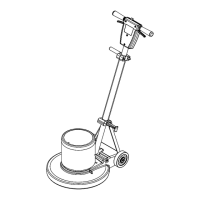
The Storm Floor Polisher is a commercial-grade floor cleaning machine designed for a variety of floor maintenance tasks, including scrubbing, polishing, buffing, and stripping. It is suitable for use in hotels, schools, hospitals, factories, shops, and offices.
Function Description:
The Storm Floor Polisher operates by rotating a brush or pad driver against the floor surface. Different types of brushes and pads can be attached to perform specific tasks. The machine features an adjustable handle for operator comfort and control, and a safety lock to prevent unintended operation. It is equipped with a motor that drives the brush/pad, and an electrical system that includes a power cord, switches, and a circuit breaker for protection against overloads.
Important Technical Specifications:
- Construction: Heavy-duty die-cast aluminum deck with a heavy-duty rubber bumper. The handle is made of tubular steel, adjustable, and features a die-cast aluminum handle housing.
- Motor:
- SP13, SP15, SP17, SP20 models: 1.0 hp, 115 volts, 60 Hz.
- SP17X, SP20X, SPDS20 models: 1.5 hp, 115 volts, 60 Hz.
- Brush/Pad Speed:
- SP13, SP15, SP17, SP20, SP17X, SP20X models: 175 rpm.
- SPDS20 model: 175/300 rpm (dual speed).
- Electrical System:
- Cable: 50' (15 m), 14/3, built-in cord wrap.
- Switches: Dual levers with safety lock.
- Wheels: Two 5" (12.7 cm) diameter, 1.25" (3 cm) wide, non-marking tread.
- Handle: 1.5" (4 cm) tubular steel, adjustable with an easy-to-use thumb-activated safety lock.
- Dimensions (L x W x H):
- 13" (33 cm) model: 21.0" (53 cm) x 14" (36 cm) x 47" (119 cm).
- 15" (38 cm) model: 22.0" (56 cm) x 16" (41 cm) x 47" (119 cm).
- 17" (43 cm) model: 23.0" (58 cm) x 18" (46 cm) x 47" (119 cm).
- 20" (51 cm) model: 24.5" (62 cm) x 21" (53 cm) x 47" (119 cm).
Usage Features:
- Handle Installation: The machine is shipped with the handle unassembled. Installation involves attaching the handle assembly to the base using a hardware kit, ensuring correct orientation of the cord assembly and cord hook. Spacers are crucial for correct handle operation. The handle links are attached, and the bolt and nut are tightened, then backed off slightly to allow movement. The motor cord is then plugged into the handle cord receptacle.
- Controls:
- Safety Lock: Prevents accidental activation.
- Switch Levers: Turn the machine on/off.
- Adjustment Handle: Allows the operator to set the handle to a comfortable operating position. The handle lock nut can be adjusted for optimum locking force. The handle adjust bar is factory preset for efficiency; if disturbed, it can be re-positioned by removing and rotating the handle and bolt 180 degrees.
- Operation:
- Safety First: Always hold the machine firmly with both hands due to high starting torque. Ensure the pad driver or brush is correctly installed and in good condition.
- Starting: Plug the machine into a properly grounded outlet. Lower and lock the handle into a comfortable position. Push the safety lock forward to unlock the switch levers, then squeeze one or both levers to turn the machine on. The safety lock re-engages only when both levers are released.
- Stopping: Release both switch levers.
- Circuit Breaker: The machine has a circuit breaker on the rear of the motor to protect against overloads. If it trips, push the reset button. Correct the cause of overloading before restarting.
- Pad Driver Installation: Lay the machine back to expose the underside. Place the pad driver on the motor lug and rotate clockwise to engage. To remove, turn counter-clockwise. Ensure the pad is centered on the pad driver for proper engagement.
Maintenance Features:
- Daily Maintenance:
- Inspect the power cord for wear; replace immediately if frayed or cracked to prevent electrical shock.
- Place the machine in the storage position with the pad off the floor.
- Check pad condition; change if soiled or torn.
- Monthly Maintenance:
- Check pad wear to prevent chemical buildup.
- Check the pad driver system for damage.
- Check handles, switches, and knobs for damage.
- Check all bearings for noise.
- Check skirt/bumpers for damage and replace as necessary.
- Check the overall performance of the machine.
- Scrub Brushes:
- Perform Alert Feature: Original brushes have pre-trimmed bright yellow tufts. When the brush bristles wear down to the length of the yellow tufts, the brush should be replaced.
- Types of Brushes/Pads:
- Aggressive Grit: Nylon fiber impregnated with silicone carbide grit for grinding stains, soil, and surface material.
- Mild Grit: Less aggressive silicone carbide grit for medium soil conditions, offering faster ground speed than nylon bristles on light applications.
- Nylon: General-purpose scrub brush with stiff bristles, good for concrete, wood, and tile floors.
- Nylon Polish: Softest brush for gentle cleaning of finished tile or terrazzo floors without removing finish.
- Nylon Bristles: Versatile for coated or uncoated surfaces.
- White Pads (Polishing): For dry polishing to achieve high-gloss, or surface washing on highly polished/burnished floors.
- Red Pads (Buffing): For light-duty scrubbing; with mild detergent, they clean surfaces without removing finish.
- Blue Pads (Scrubbing): For heavy-duty scrubbing and light stripping; removes less finish than brown pads but effectively removes black marks, stains, and dirt.
- Brown Pads (Stripping): For easy and complete removal of old floor waxes/finishes, ground-in dirt, black heel marks, and spills. Used with proper stripper, they leave the floor clean for finishing.
* Brush Inspection: Check scrub brushes daily for wire, string, wear, and damage. Replace if bristles are missing or if the yellow "Perform Alert" tufts indicate minimum brush length.
- WARNING: Indicates hazards that could result in severe personal injury or death.
- CAUTION: Indicates hazards that could result in minor personal injury or product or property damage.
- FOR SAFETY: Identifies actions that must be followed for safe operation.
- General Safety: Use indoors only. Do not use outdoors or expose to rain. Use only as described in the manual with manufacturer-recommended components. Do not operate if damaged, dropped, or left outdoors. Keep openings clear of debris. Do not operate near flammable vapors or materials.
- Personnel: Maintenance and repairs must be done by qualified personnel. Only instructed and authorized persons should operate the machine. Pay attention to others, especially children, during operation.
- Unattended Operation: Unplug the machine when leaving it unattended.
- Electrical Safety: Do not handle the plug or machine with wet hands. Unplug by grasping the plug, not the cord. Do not use with a damaged cord or plug. Keep the cord away from heated surfaces and avoid pulling/running the machine over it.
- Grounding Instructions: The appliance must be grounded to reduce the risk of electric shock. It is equipped with an equipment-grounding conductor and plug for a nominal 120-volt circuit (Fig. A). A temporary adaptor (Fig. C) may be used with a 2-pole receptacle (Fig. B) if a grounded outlet is unavailable, but only until a proper grounded outlet can be installed. The adaptor's green ear must be connected to a permanent ground. Improper connection of the grounding conductor can result in electric shock. Consult a qualified electrician if in doubt about grounding. Adaptors are not allowed in Canada.
- Servicing: Avoid moving parts. Do not wear loose clothing. Use Windsor approved replacement parts.

 Need help?

 To Next Page
 General