
 Need help?
Do you have a question about the Winegard RZ-6035 and is the answer not in the manual?
Select Menu, then Channel Search to perform a channel scan on your TV.
Move antenna and rescan to find the most channels within range. Scan monthly for updates.
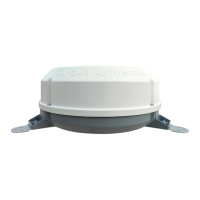
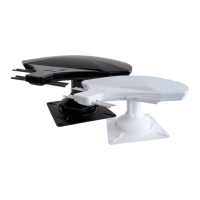
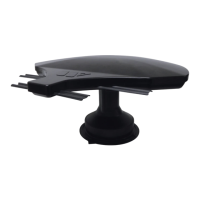
The Winegard Rayzar z1 is an amplified local HD and digital broadcast TV antenna designed to receive VHF and UHF digital and HD TV channels. This device is intended for use in various settings, including recreational vehicles (RVs) and homes, providing access to free over-the-air television programming. The antenna comes in two models: RZ-6000 (white) and RZ-6035 (black), offering aesthetic choices to suit different environments.
The primary function of the Winegard Rayzar z1 antenna is to capture broadcast television signals, both high-definition (HD) and standard definition (SD), from local stations. It is specifically designed to work with digital signals, ensuring compatibility with modern televisions. The "amplified" aspect means it includes a built-in signal booster, which helps to strengthen weak signals, thereby improving reception quality and increasing the number of channels available, especially in areas with moderate to weak signal strength. The antenna supports both VHF (Very High Frequency) and UHF (Ultra High Frequency) bands, which are the two main frequency ranges used for terrestrial television broadcasting. By covering both bands, the Rayzar z1 ensures comprehensive access to the full spectrum of available over-the-air channels.
The antenna connects to a television via a coaxial cable, and its power supply unit (PSU) is crucial for its amplification capabilities. The PSU needs to be in the "ON" position, indicated by a green light, for the antenna to function correctly and provide amplified signals. Without the power supply, the antenna would operate as a passive antenna, likely resulting in reduced performance.
The Winegard Rayzar z1 is designed for user-friendly operation, focusing on ease of installation and signal optimization.
Initial Setup and Channel Scan: After ensuring the antenna power supply is on, users need to perform a channel scan on their television. This involves accessing the TV's menu, typically navigating to "Settings," then "Channel Setup," and selecting "Antenna" or "Air" mode (not "Cable"). The TV will then search for available channels and store them in its memory. This process is fundamental for the TV to recognize and display the channels the antenna is receiving.
Signal Optimization through Rotation: A key feature for optimizing reception is the antenna's rotatable handle. If few or no channels are found during the initial scan, or if the picture quality is poor, users can push up on the handle and rotate it 90 degrees counter-clockwise. After rotation, a second channel scan should be performed. This process can be repeated as needed until a satisfactory number of channels are found. This rotational capability allows users to point the antenna in different directions to capture signals from various broadcast towers, which is essential because TV signals are directional.
Fine-Tuning for Best Reception: Beyond the 90-degree rotations, the antenna allows for finer adjustments. To further improve the number of received channels or picture quality, users can slowly rotate the handle between and around the previously identified scan points. Each slight adjustment can be followed by an additional channel scan to determine if reception has improved. This iterative process of rotating and scanning helps users pinpoint the optimal orientation for maximum channel reception and clarity.
Travel Position (for RVs): For users in recreational vehicles, the antenna includes a "travel position" feature. When finished using the antenna, it should be placed in this position by rotating the handle clockwise until it hits a hard stop. This secures the antenna, preventing damage during transit. The arrow on the ceiling plate serves as a visual guide for this rotation. After placing it in travel position, the antenna power supply should be turned off.
Remote Control Integration (TV Remote): The channel scanning process is initiated using the television's remote control, making it a familiar and integrated experience for most users. The manual emphasizes that running a channel scan is distinct from simply pressing the Channel UP/DOWN buttons on the remote, as a scan actively searches for and stores new broadcast frequencies.
External Resources for Channel Location: The manual recommends checking external resources like antennaweb.org. By inputting their current zip code, users can identify the specific channels available in their area and their approximate broadcast directions. This information can be invaluable for initially orienting the antenna and understanding which directions are most likely to yield channels.
While the manual primarily focuses on operational aspects, some implicit maintenance considerations can be inferred:
Power Supply Management: The instruction to turn off the antenna power supply when not in use (e.g., when in travel position) suggests a practice that can contribute to the longevity of the power supply unit and potentially conserve energy.
Regular Channel Scans: The recommendation to "Scan monthly for programming updates" serves as a maintenance-like feature. Broadcast channels can change frequencies, new channels may become available, or existing ones might cease broadcasting. Regular scans ensure that the TV's channel list remains current and optimized, providing access to the latest available programming. This proactive approach helps users maintain optimal performance over time.
Physical Inspection (Implicit): Although not explicitly stated as a maintenance task, the design of the antenna, particularly its rotatable handle and ceiling plate, implies that occasional visual inspection for any physical damage or obstruction would be prudent, especially for RV users where the antenna is exposed to various environmental conditions during travel. Ensuring the handle rotates smoothly and the antenna is securely mounted would fall under general care.
In summary, the Winegard Rayzar z1 is a versatile and user-friendly amplified antenna designed to enhance the over-the-air TV viewing experience. Its key features revolve around effective signal reception, intuitive channel scanning, and flexible orientation adjustments, making it a practical solution for accessing free digital and HD television.
 General
| Frequency Range | 47-862 MHz |
|---|---|
| Gain | 3.5 dB |
| Dimensions | 14.5 x 9.5 x 2.5 inches |
| Connector Type | F-Type |
| Weight | 1.8 lbs |
| Impedance | 75 ohms |
| VSWR | <2.0:1 |
| Mounting Type | Mast or Wall |








 To Next Page