PRODUCT INSTALLATION
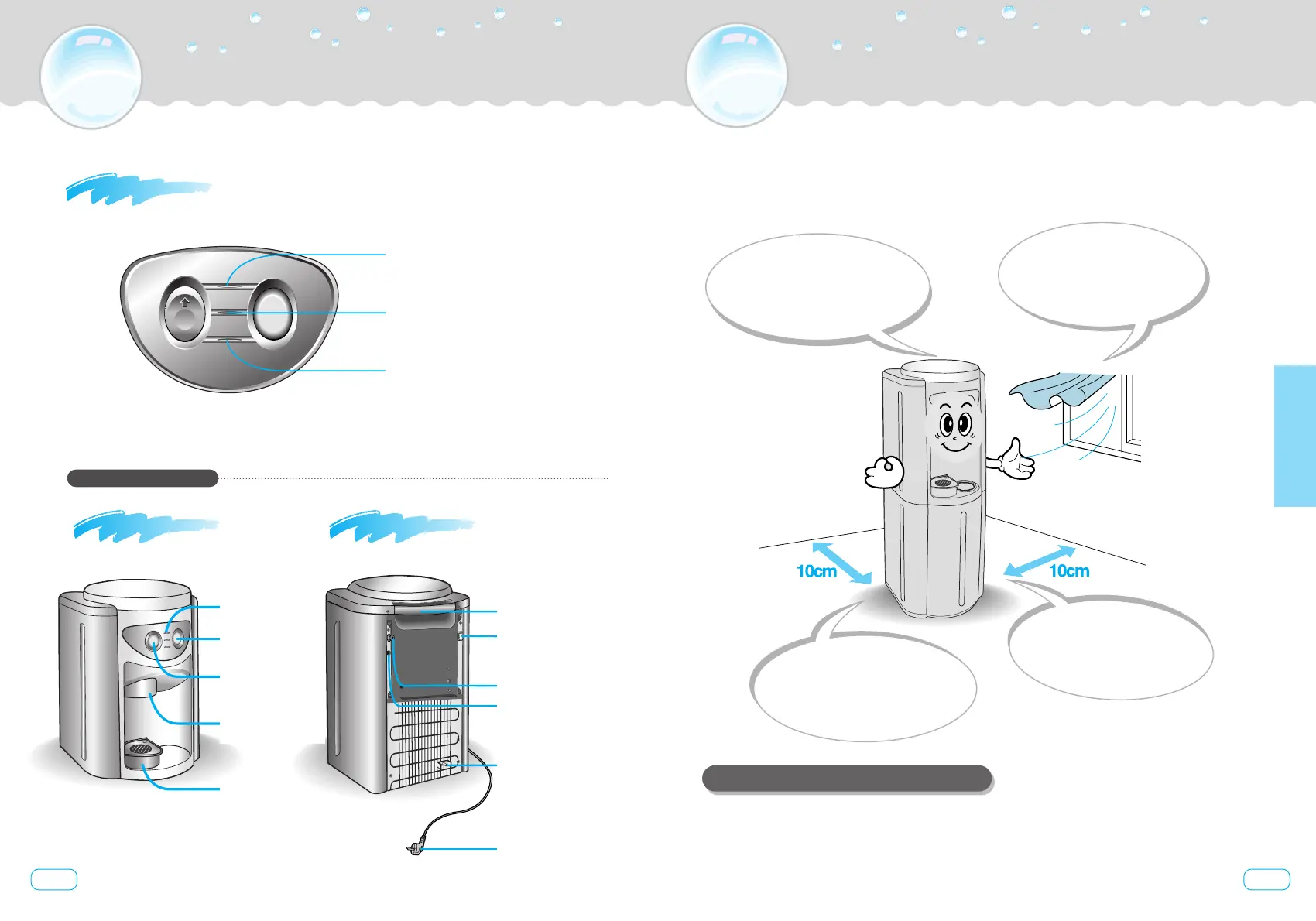
SPACE SELECTION
9
10
Do not install product
under direct exposure
to sunlight.
Select a space with low humidity
and good ventilation.
Do not install outside.
To ensure better temperature control
and avoid risks of electric shocks
Product must be
installed about 10cm
away from the wall
Product must be installed
on hard and flat floor.
To avoid unexpected
vibrations and noise
For better performances and a longer life of your product,
select an adequate space to install it.
PRODUCT AND PARTS VIEWS
Display panel
Models : W-5TC, W-5TD
Hot Water Indicator (red)
Power Indicator (orange)
Cold Water Indicator (green)
Display panel
Cold water
Button
Hot water
Safety button
Water outlet
Drip tray
Front side Rear side
Hot water switch
(select ‘off’for cold water only.
select
‘on’for cold and hot water.)
Sink faucet water
outlet hole(option)
Water Supply Inlet
Hot water
drain cap
Handle
Power plug
1. After installing your product in the right space, connect Water Supply.
2. Make sure that Hot Switch is Off
3. Plug product in.
PRODUCT INSTALLATION : SET-UP
Installation



 To Next Page