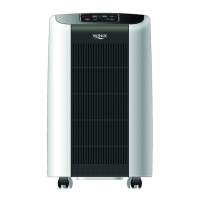
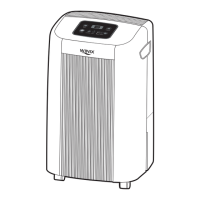
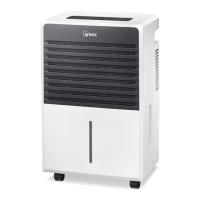
The Winix WDH 871 Dehumidifier is a household appliance designed to remove excess moisture from the air, helping to prevent moisture damage and create a more comfortable indoor environment. It is suitable for use in various areas such as basements, kitchens, laundry rooms, bathrooms, spa/exercise areas, and spaces where books or valuables are stored. It can also be used during construction or remodeling to reduce drying time for drywall and paint.
Function Description:
The dehumidifier operates by drawing in moist air, passing it over a cooling coil where moisture condenses, and then releasing drier air back into the room. The collected water is stored in a removable bucket or can be continuously drained using a hose. The device features a built-in defrost control to prevent frost buildup on the evaporator coils, automatically turning off the compressor while the fan continues to run during defrosting. It also includes an automatic shutoff feature that activates when the bucket is full or not properly positioned, or when the desired humidity setting has been reached.
Important Technical Specifications:
- Model: WDH 871
- Power Supply: AC 115V/60(Hz)
- Moisture Capacity: 70 Pints (24-Hour Period)
- Control Type: Electronic
- Refrigerant: R-410A / 11.29 oz. (320g)
- Humidity Setting Range: 35%-70% (5% Increments)
- Timed Shut-off: Setting Range: 1Hr-12Hr (1 Hour Increments)
- Fan Motor Speed: 2 Stages (High/Low)
- Dimensions: 15.75 x 26.30 x 13.31 inches (400 x 668 x 338 mm)
- Net Weight: 41.9 lbs (19 Kg)
- Operating Temperature: 36°F-99°F
- Drain Pump: 12V DC
- Pump Drain Hose: 25 inches x 18 feet (6.35 x 5,486 mm)
Usage Features:
The dehumidifier offers multiple operating modes and water disposal options:
- Control Panel: Features buttons for Power ON/OFF, Comfort Mode, Humidity Setting, Timer, Fan Speed, and Pump ON. Indicators include Timer, Humidity Display, Bucket Full, and Fan Speed (High/Low).
- Power ON/OFF: Simple button press to turn the unit on or off.
- Operating Modes:
- Comfort Mode: Automatically adjusts humidity to an optimum 50% level. Fan speed adjusts automatically based on room humidity.
- Humidity Mode: Allows manual adjustment of desired humidity levels in 5% increments from 35% to 70%.
- Continuous Mode: Runs the unit continuously until manually turned off or another setting is selected. "Lo" is displayed in this mode.
- Fan Speed Selection: Users can choose between High or Low fan speeds. In Comfort Mode, fan speed adjusts automatically.
- Timer Function: Allows setting the unit to run for a desired period (1 to 12 hours) before automatically shutting off.
- Water Removal Indicators:
- Pump ON: Indicates when the pump is active for automatic water removal using the included 18 ft. hose. The pump operates for 30 seconds when the bucket is full and turns off until the bucket fills again.
- Bucket Full Indicator: Lights up when the collection bucket is full, and the unit automatically stops operating.
- Water Disposing Options:
- Manual Emptying: The bucket can be easily pulled out, carried by its handle, emptied, and replaced. The unit will not operate if the bucket is not properly placed or if the "Bucket Full" light is on.
- Gravity Drain Hose (Garden Hose Not Provided): Allows continuous drainage using a standard garden hose. The DRAIN CONNECTOR is screwed onto the hose and attached to the dehumidifier. The hose must be positioned lower than the DRAIN CONNECTOR to ensure proper gravity flow.
- Pump Drain (18 ft. Pump Drain Hose Provided): Enables automatic water removal to a floor drain, water container, or outside through a basement window. The pump can lift water up to 15 feet above the unit. This option requires the pump button to be activated.
- Safety Precautions: Emphasizes proper grounding, avoiding damaged power cords, not sharing outlets, unplugging during strange sounds/odors/smoke, avoiding wet hands, ventilating the area, not cleaning with water, and not blocking inlet/outlet. It also warns against removing the bucket while the pump is operating, which can cause an "E3" error.
Maintenance Features:
Regular maintenance is crucial for optimal performance and longevity of the dehumidifier.
- Cleaning the Exterior: The exterior should be cleaned with a soft brush or dry towel. Avoid spraying water directly on the unit.
- Cleaning the Bucket: The collection bucket should be cleaned weekly with mild detergent to prevent mold and bacteria buildup. After cleaning, ensure the bucket cover and bucket are properly reinstalled, and the float switch is unobstructed.
- Cleaning Front Grills and Air Filter:
- Remove the front grill by pulling it out from the bottom and then lifting it up.
- Pull the bottom of the filter out and lift it out. The filter is flexible and will not be damaged by removal.
- Wash the filter with mild detergent and rinse thoroughly, then air dry away from direct sunlight.
- Reinstall the filter and grill in reverse order.
- The front grill can also be cleaned with a vacuum cleaner using a soft brush attachment to remove dust.
- Troubleshooting: The manual provides a comprehensive troubleshooting guide for common issues such as the unit not working, inefficient dehumidification, loud noises, and drainage problems, along with corresponding solutions and check points.
- Error Codes: Specifically, the E3 error code indicates issues with the pump drain system or bucket installation. Corrective actions include unplugging the unit, checking and reinstalling the bucket, ensuring the pump drain hose is not crimped, blocked, or improperly installed, and verifying that the pump drain hose is not submerged or positioned too high. After addressing the issue, the unit must be unplugged and restarted.
Winix offers a limited warranty covering defects in material and workmanship. The appliance is covered for one year from the purchase date for free repair. The sealed refrigerant system is covered for five years. Warranty coverage is limited to 90 days if the product is used for non-private family purposes. The warranty does not cover expendable items, damage from improper installation/operation/maintenance, abuse, misuse, use for unintended purposes, damage from unrecommended detergents/cleaners, or unauthorized modifications. The customer's sole remedy is product repair. Implied warranties are limited to one year or the shortest period allowed by law. Winix is not liable for incidental or consequential damages.


 To Next Page

 General