SECTION 4 –
APPLIANCES AND SYSTEMS
4-4
Further Information
Refer to the appliance manufacturer’s
operation manual provided in your InfoCase for
complete features and operating instructions, as
well as safety precautions and maintenance
information.
MICROWAVE OVEN
-If Equipped
Refer to the manufacturer’s user guide located
inside the appliance for complete operating
instructions.
ONEPLACE
®
SYSTEMS
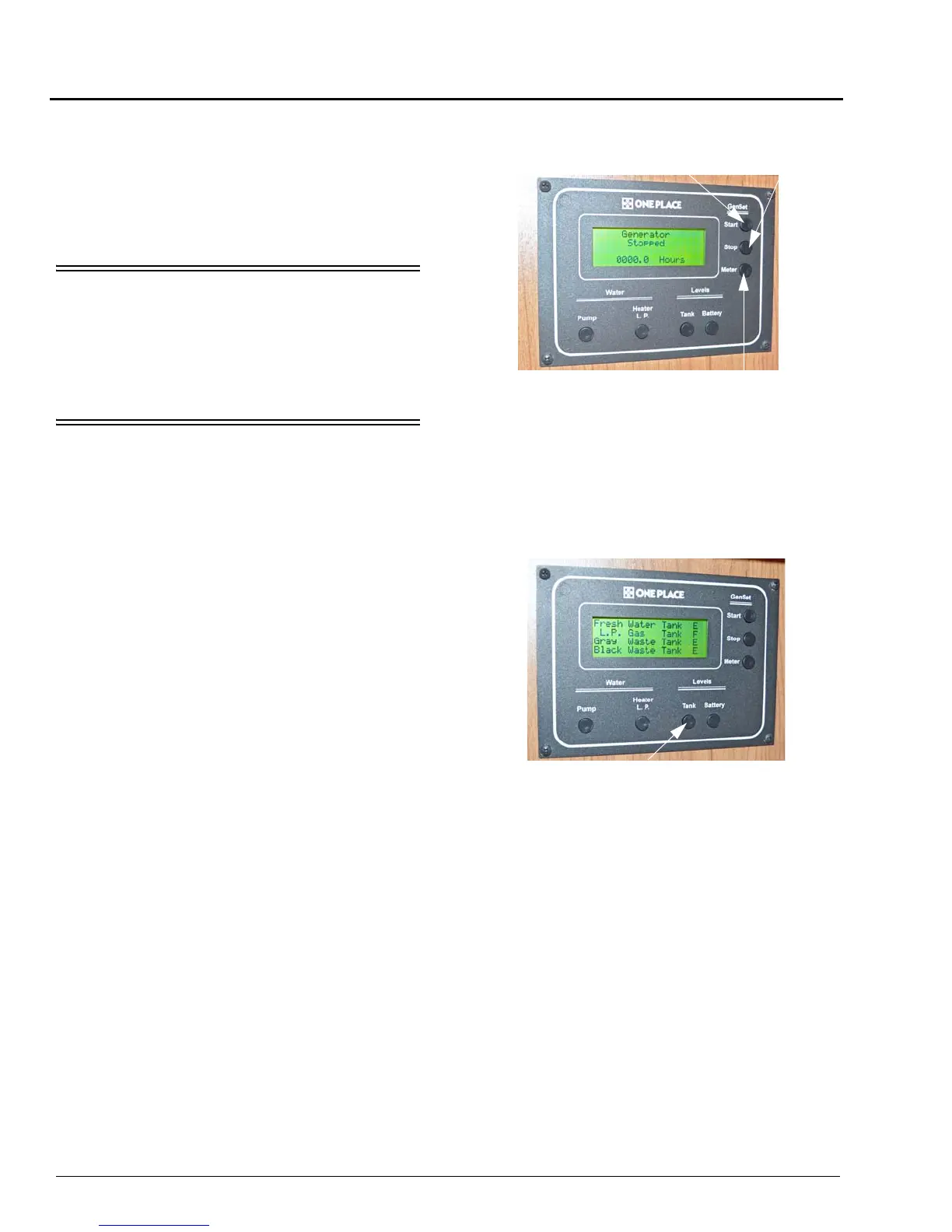
MONITOR PANEL
The OnePlace Systems Monitor Panel
provides a convenient, central location for
checking the condition of all utility systems in
your coach.
At the touch of a button, the monitor panel
will display the fresh water and holding tank
levels, propane gas tank level, plus the chassis
battery and house battery condition. You can start
the generator and check the generator hourmeter
or turn on the water pump and water heater.
Generator Start/Stop Switches and
Hourmeter
See Section 6 - Electrical for generator start-
up/shut-down and generator hourmeter
instructions.
Water And Holding Tank Levels
Press the Tank Levels switch to show
approximate levels on the LCD screen.
The approximate fluid levels are measured by
electronic sensors on the sides of the tanks. Tank
levels are displayed as 1/3, 2/3, and Full (F).
There is generally more fluid in a tank than
indicated on the monitor panel.
Gen Hourmeter
Typical - Your coach may or may not be
equipped with all of the features shown.
Gen Start
Gen Stop





 To Next Page