
 Need help?
Do you have a question about the Wise Controls WiseBox and is the answer not in the manual?
Radio Receiver with 4 x 10A relay contacts for various switching applications.
Connect mains supply and up to four circuits using designated terminals.
Program a single circuit to a switch button by pressing the M1 button and the switch button.
Program circuits for On/Off control using two buttons on a switch/remote.
Program a 7-button switch for group 'All On' and 'All Off' functions.
Assign master On and Off functions to buttons on a 2-button switch/remote.
Change channel mode between On/Off and Push to Make via dip switch.
Procedures for deleting single memorised switches or all programmed switches.
Delete a specific switch's control over a channel by pressing MT and the switch button.
Clear all programmed switches by pressing MT button multiple times and holding.
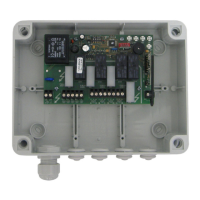
The WiseBox 4 x 10Amp is a radio receiver equipped with four 10A relay contacts, designed to switch contacts via radio signals from a wireless switch or remote. It is suitable for controlling various applications, including all types of light sources, electric gates, water features, and garage doors.
To install the WiseBox, connect a 240V mains supply to terminals 1 (Neutral), 2 (Live), and 3 (Earth). Up to four circuits can be connected using terminals 4-7 (Earth) and 8-15 (Live and Neutral).
This method programs a circuit such that one button turns it ON and another turns it OFF.
The 'MT' button automatically programs the WiseBox's 'all on' and 'all off' functions. This feature requires a 7-button switch or remote, utilizing two of the three buttons at the bottom of the switch.
This function requires a minimum of a 2-button switch/remote.
For further technical information, refer to the WisePIR instruction sheet.
The switching mode allows you to toggle between a "push to make" circuit and an "on/off" circuit.
 General
| Brand | Wise Controls |
|---|---|
| Model | WiseBox |
| Category | Controller |
| Language | English |

 To Next Page