22
Ⅴ. Control Panel and Introduction
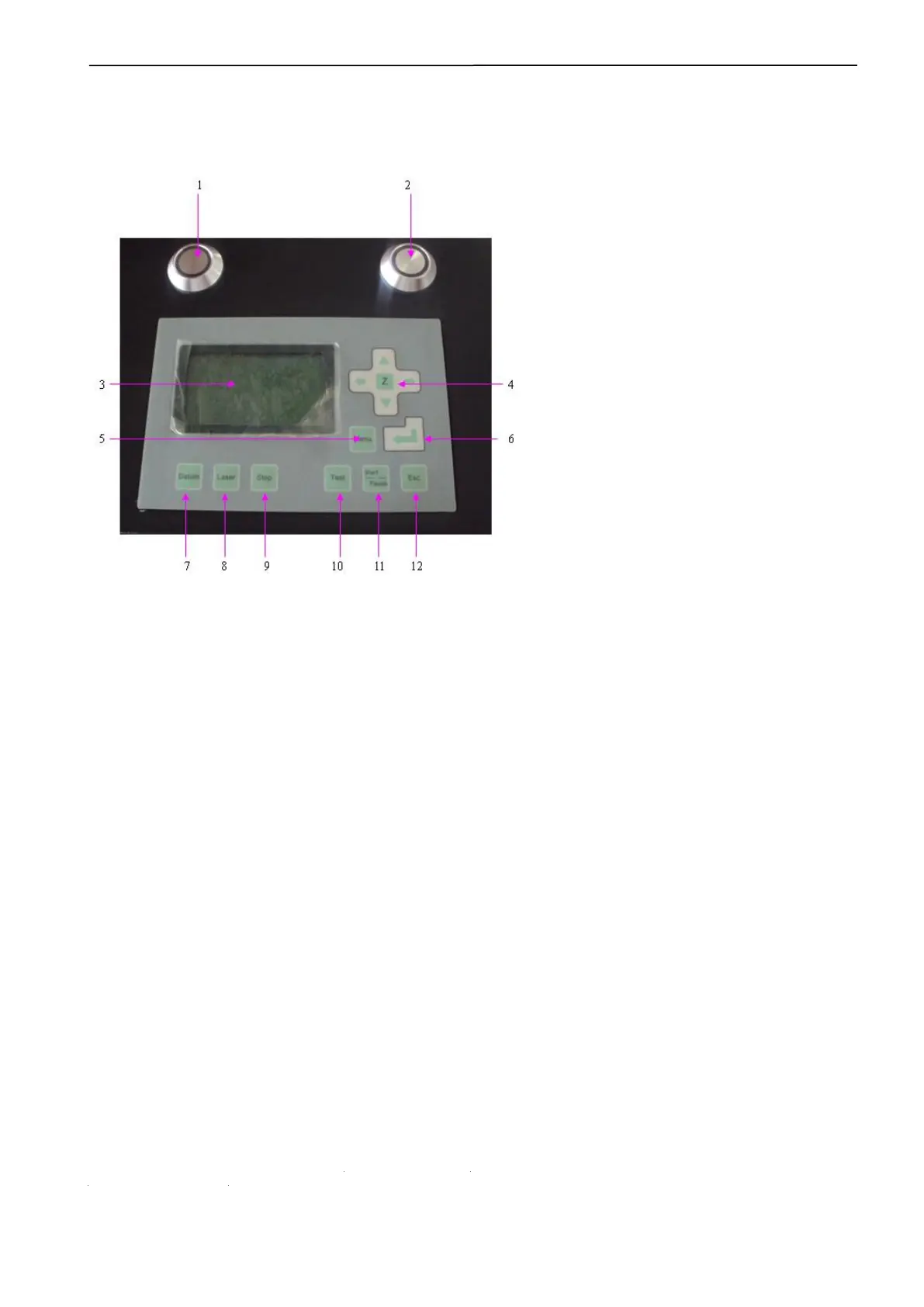
5.1 Sketch map of the control panel
1. Laser machine switch
2. Water chiller switch;
3. LCD screen
4. Function key for Z axis, press this key, could move the Z axis by up, down, left and right. This function needs the
support of hardware;
5. Menu: Enter accessory interface.
6. Enter. Confirm after setting parameter
7. Datum: the laser head will return to the original place in low speed; mainly for reducing the cumulative error.
Ensure install the origin switch and input the switching signal into the control box;
8. Laser: the laser tube will ray after pressed this button; it is used for testing the light strong or weak;
9. Stop: press it when working, the machine will stop working and return to origin;
10. Test: walk the frame; the laser head doesn’t ray, just run quickly around the frame of the graph; mainly for
position;
11. Pause: will stop the laser head temporary while working; will go on work after press “Start”;
12. Esc: Escape or cancel the function setting;
Button function declaration:
turn left turn right go straight backward



 To Next Page