Need help?
Do you have a question about the Wisenet HRX-835 and is the answer not in the manual?
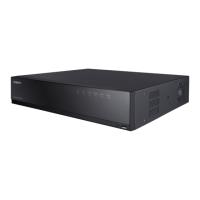
This document provides a comprehensive guide to the Wisenet Digital Video Recorder (DVR) models HRX-1632, HRX-835, HRX-435, and HRX-434. It covers the device's features, package contents, HDD installation, initial setup, screen configuration, search and playback functions, video export, product information access, and network connectivity, including P2P and DDNS services.
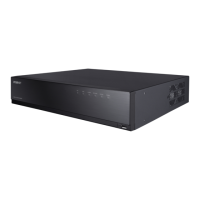
The Wisenet Digital Video Recorder is designed to record video and audio from network cameras to a hard disk, facilitating playback and remote monitoring over a network. It offers a robust surveillance solution with advanced features for both local and remote access. The DVR supports various camera resolutions, including up to 4M for HRX-1632 analog cameras, and outputs 4K high-definition images via HDMI for HRX-835, HRX-435, and HRX-434 models. Dual monitor output is supported by HRX-1632 and HRX-835.
The device supports ONVIF Profile S standard and RTP/RTSP protocols, ensuring compatibility with a wide range of network cameras. It also provides real-time display of HDD operation status through HDD SMART and supports HDD overwrite functionality. For data management, the DVR allows exporting recorded data using USB memory and external hard disks. It offers simultaneous playback of 6, 10, or 16 channels, with multi-channel timeline viewing during video playback.
Various search modes are available, including Time, Event, Smart, Text, Export, and ARB (Automatic Recording Backup), allowing users to efficiently locate specific recordings. The ARB feature also supports configuration for saving periods by channel. Multiple recording modes are provided, such as Normal, Event, and Scheduled Recording, to suit different surveillance needs. The DVR includes alarm input/output functionalities for enhanced security.
Remote monitoring is facilitated through a Windows Network Viewer, enabling live monitoring of network cameras. The installation wizard simplifies the initial setup for both the recorder and web viewer. Furthermore, the DVR supports smartphone remote monitoring via P2P and provides smartphone event alarms, sending real-time event messages to users.
The DVR features a new UI 2.0, designed for intuitive navigation and ease of use. Key usage features include an instant viewer for quick access to live feeds, a bookmark function for marking important events, and a thumbnail function (not supported in the web viewer) for visual browsing of recordings. Users can view camera event lists in real time and set up convenient event rules.
The device offers various sequence functions, including layout and page management, to customize the display of camera feeds. Extended search periods and convenient log search capabilities enhance the efficiency of finding specific events or system activities. It supports thermal imaging cameras and PTZ-linked cameras, allowing for advanced surveillance applications.
The installation wizard guides users through the initial setup process, including language selection, network settings, recorder ID/password setup, and camera ID/password setup. For network settings, users can choose between DHCP server or manual configuration of IP address, subnet mask, gateway, and DNS. The wizard also allows for online firmware upgrades.
Camera registration involves selecting cameras from a searched list and assigning them to channels. The channel setting feature allows users to view camera videos in split mode with thumbnail information and drag-and-drop functionality to change video positions.
The explore screen configuration provides a detailed overview of the recorder's interface, including menu options, list/event views, camera and event lists, layout lists, PTZ control, function buttons, video window, system status display, and event display. Users can customize layouts for live viewing, time search, and playback, defining channel order and combinations.
The search and play functions enable users to select layouts, dates, and channels for searching. The time bar allows for previewing recordings, and controls are available for adjusting playback speed, moving to previous or next frames, and filtering events by type. The system also displays a timeline for each channel and supports a 4-channel timeline view.
Exporting recorded video is straightforward, allowing users to select layouts, channels, time ranges, and formats. A capacity check feature ensures that the selected data can be exported.
The DVR includes several features that contribute to its maintenance and longevity. The HDD SMART functionality provides insights into the hard disk's operational status, allowing users to anticipate potential issues and perform timely replacements. The HDD overwrite feature ensures continuous recording by automatically overwriting the oldest data when the disk is full.
For network connectivity, the manual provides detailed instructions on connecting the DVR to a router and configuring network settings, including IP address and gateway. It emphasizes the importance of matching gateway settings between the local PC and the recorder for proper network communication.
The document also outlines system requirements for running the web viewer, including recommended browsers and supported operating systems, which helps users ensure their viewing environment is optimized for performance. It also details port forwarding setup on the router for external access, specifying the necessary ports (RTSP, HTTP, HTTPS, camera proxy) to be configured.
The Wisenet DDNS (Dynamic Domain Name Server) service is a crucial maintenance feature for remote access in dynamic IP environments. It allows users to access the recorder using a consistent DDNS address even if the router's WAN IP changes. The setup process involves registering an account on the DDNS website, adding the recorder's product ID, and configuring the DDNS settings on the DVR.
The P2P (Peer-to-Peer) service simplifies remote monitoring via smartphones by allowing direct connection to the recorder without complex network configurations. Users can test the P2P connection, scan QR codes to add devices to the Wisenet mobile application, and enter the recorder's ID/password for immediate access. The P2P service period is typically 3 years, with options for extension.
The document also provides information on accessing product information, manuals, firmware, FAQs, and HDD compatibility lists through the Hanwha Security website or mobile web, which are valuable resources for troubleshooting and maintenance.
Finally, the manual includes environmental compliance information, such as the Eco mark and RoHS directive, and guidelines for the correct disposal of the product and its batteries, promoting responsible environmental practices.
 General
| Video Input Channels | 8 channels |
|---|---|
| Video Output | HDMI, VGA |
| Compression Format | H.265, H.264 |
| Operating System | Embedded Linux |
| Network Interface | 1x RJ-45 (10/100/1000 Mbps) |
| Power Supply | 12V DC |
| Audio Output | 1 RCA |
| Operating Temperature | +0°C ~ +40°C (+32°F ~ +104°F) |
| Recording Resolution | Up to 5MP (2560x1920) |
| Audio Input | 8 RCA |

 To Next Page