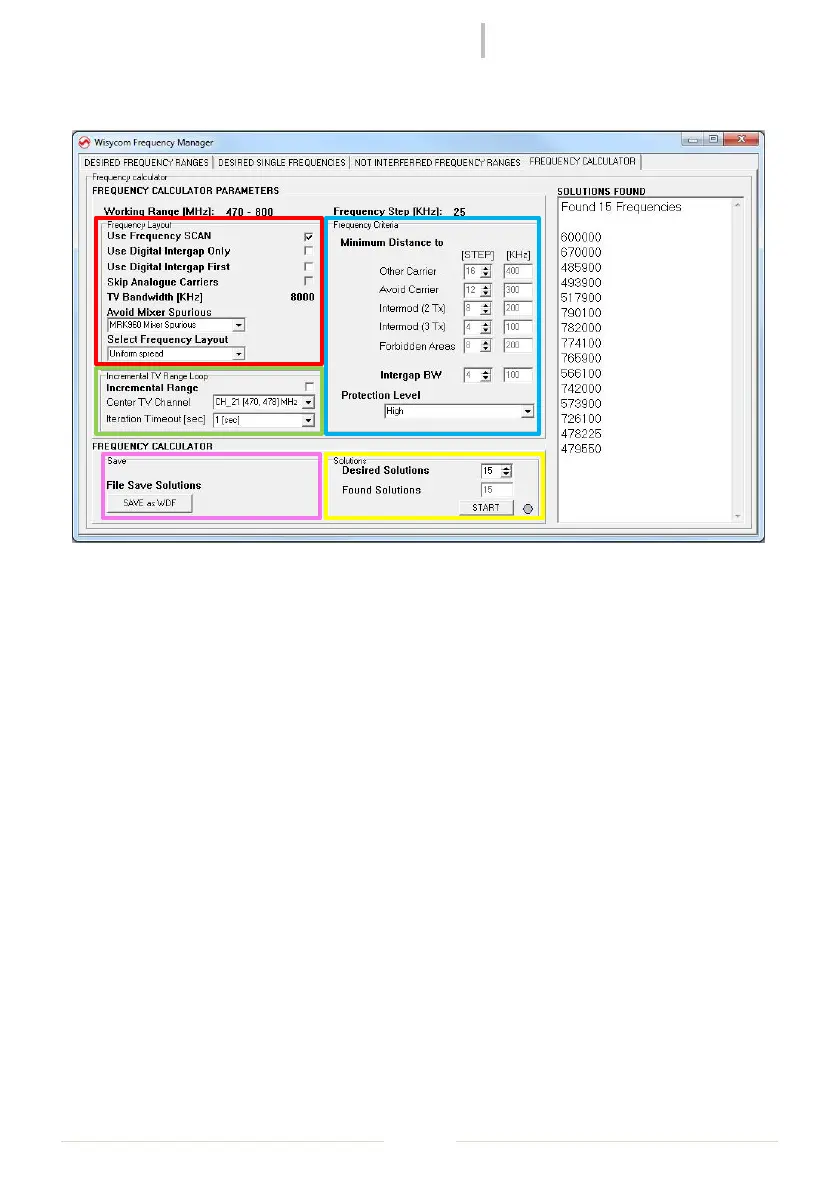
Select “FREQUENCY CALCULATOR” panel to set up the calculation of the frequencies and start
it.
❶ - Use Frequency SCAN: check it to use the frequency scan show in “NOT INTERFERRED
FREQUENCY RANGES” panel (this parameter can be set only after loading a scan or at the
end of a new one)
- Use Digital Intergap Only: check it if you want that the calculator must calculate the
solutions only in the intergap between two DVB-T channels
- Use Digital Intergap First: check it if you want that the calculator must calculate first the
solutions in the intergap between two DVB-T channels and then, when there are no
other solution in the intergap, in the remain allowed range.
- Skip Analogue Carriers
- Avoid Mixer Spurious: this list box permit to avoid mixer spurious when a receiver is used
near a transmitter. It’s possible to choose:
- “No Mixer Spurious” to not use this function;
- “MCR42 Mixer Spurious” to avoid mixer spurious using an MCR42;
- “MRK960 Mixer Spurious” to avoid mixer spurious using an MRK960.
- Select Frequency Layout: this list box permit to choose the layout of the solutions
between four choices: preferring the lower or higher frequencies, with an uniform
spread or preferring the frequencies with lower RF power.
❷ Check Internal Range if you want that the calculator must calculate first the solutions in a
specific Center TV Channel settable in the relative list box. With Iteration Timeout [sec] it’s
possible to set the time to wait for the calculation of solutions in the Center TV Channel
selected.



 To Next Page
 Loading...