6
EN
FR
DE
SV
NL
FI
DA
IT
ES
CS
PL
PT
RO
HU
SK
ET
EL
IS
LV
LT
SL
TR
BG
HR
Standard mode
Other measurement modes
2- Push the button. The screen will display “START.” Push the button once again to start the
measurement. The blood pressure measurement starts.
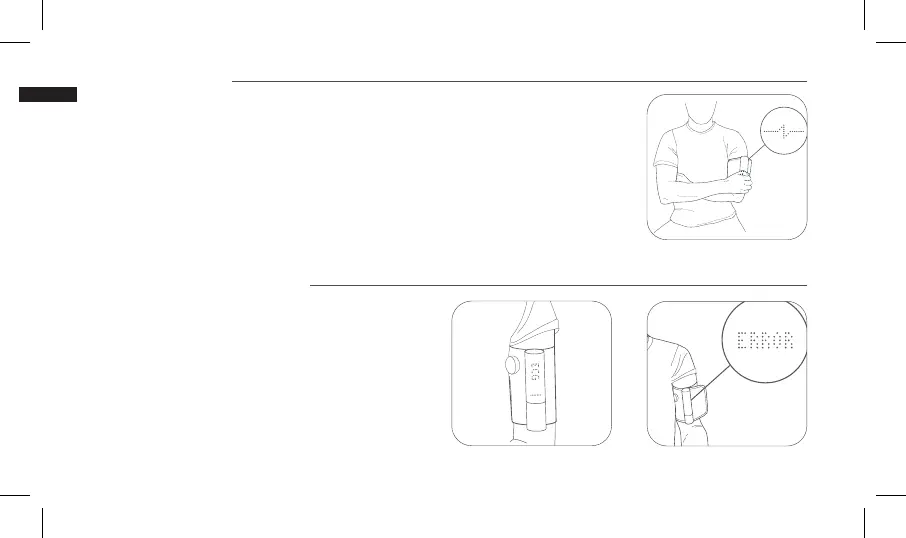
3- When the screen displays the illustrated pictogram, it means that the blood pressure meas-
urement is finished and that you will now proceed to the ECG and stethoscope signal recording.
Adjust your arm position to place the stethoscope against your chest, and place your hand on
the metal tube to ensure an accurate measurement.
You can remove your hand from the table and follow the position described on page 5.
1- When you push the button to start Withings BPM Core,
you can also select “Start x3” or “ECG” by swiping the
touch-sensitive area on the screen. “Start x3” launches
three blood pressure measurements in a row followed by an
ECG and stethoscope measurement. “ECG” will only record
the ECG and stethoscope signals. Make sure to use the
correct arm position for each measurement type.
2- If an error message appears on screen, please refer to
the explanation displayed in the app and troubleshooting
procedures described beginning on page 9.
6.
7. 8.


 To Next Page