16
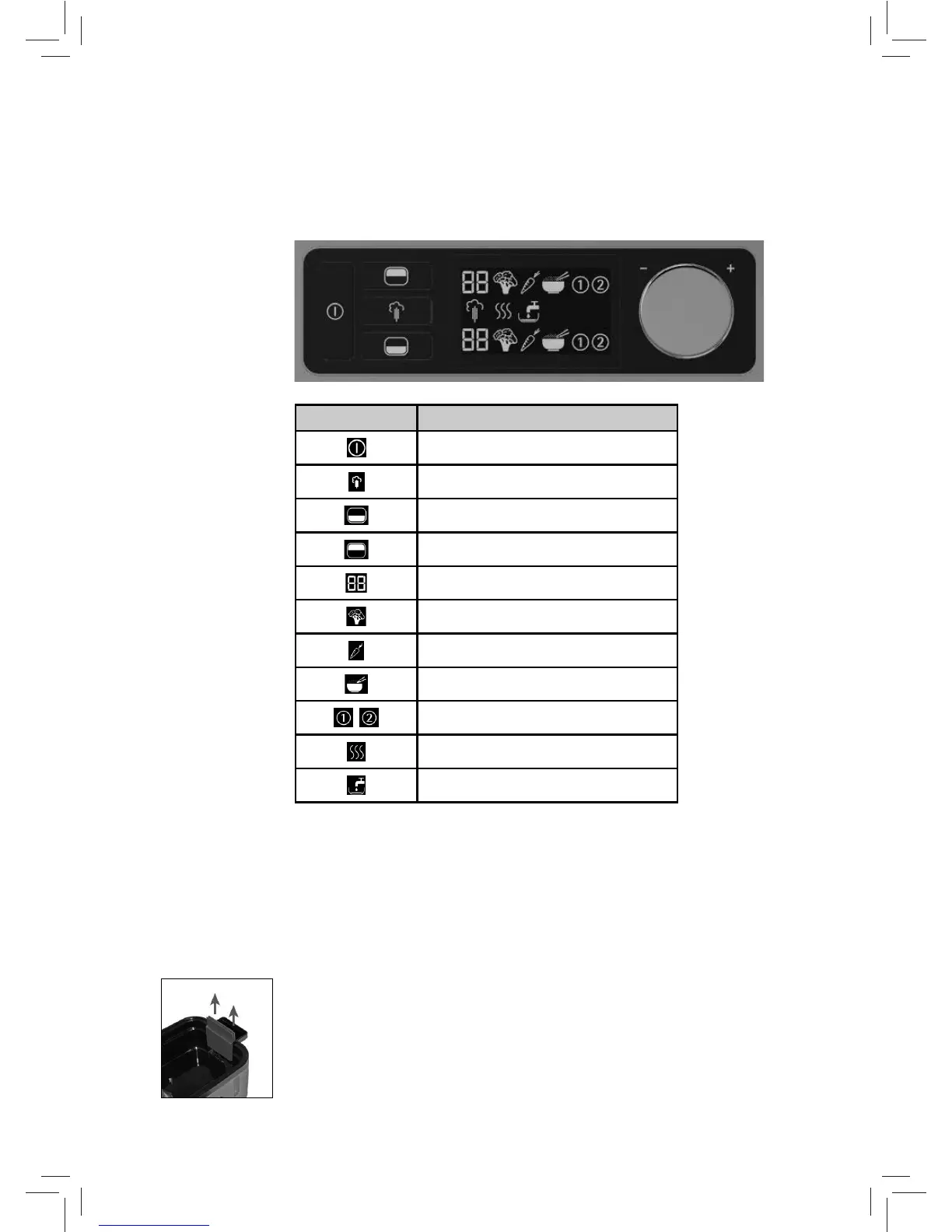
Control panel
Symbol/button Function
On/off button
Start button
Select lower cooking area
Select upper cooking area
Remaining time
Leafy and fruit vegetables program
Root vegetables
Rice/pasta program
,
Individually adjustable program
Keep warm function
Insufcient water
Note: The symbols in the body text are shown in inverted colour due to typogra-
phical reasons.
Before using for the rst time
Cleaning
Clean the device before use as described in the chapter on “Cleaning and Care”.
Starting up the appliance
1. Fill the water tank with cold tap water. Fill the tank at least half full with
water, but no higher than the max marker.
We recommend always lling to the maxmarker.
The markers are located on the back panel of the water tank.
Note: You must insert the steam locks into the handles on the base of the
appliance to prevent the handles from becoming too hot.
Remove this from the water tank at the end, so that the remaining water can
be emptied using the handles.


 To Next Page