EasyManua.ls Logo

Wnkim S700 - User Manual

Wnkim S700
8 pages
Print Icon
To Next Page IconTo Next Page
Loading...
support@wnkimlife.com
Question and Answer IconNeed help?

Do you have a question about the Wnkim S700 and is the answer not in the manual?

Summary

Important Safety Instructions

Power Security

Safety precautions for power supply, charger, and battery handling.

Battery Safety

Precautions for lithium battery handling, including avoiding heat, short circuits, and proper disposal.

Services

Guidelines for product inspection, use of parts, and modifications for user safety.

Reminder

Important reminders about the vacuum's limitations, such as not using it for wet surfaces or fine dust.

Product Instructions - Operation

Use as Stick Vacuum Cleaner

Instructions on assembling the dust cup, metal tube, and motorized brush for stick vacuum mode.

Use as Handy Vacuum

Guide on how to attach accessories to the main body for use as a handy vacuum.

Product Instructions - Charging

Charging Mode 1

Method for charging the host battery pack directly via the charging socket.

Charging Mode 2

Procedure for charging a single battery pack by removing it from the unit.

Product Storage

Wall Mount Installation

Steps for securely attaching the wall mount to a wall using nails.

Vacuum Cleaner Storage

How to lock the floor brush and secure the vacuum cleaner to the wall mount.

Accessory Storage

Guidance on storing cleaning accessories on the wall mount.

Demolition Instructions

How to Empty the Dust Cup

Step-by-step guide on how to empty the dust cup and clean the filter.

Clean Strainer and High Efficiency Filter

Critical information regarding cleaning the strainer and high-efficiency filter.

Removal Method of Roller Brush

Instructions on how to remove, clean, and reinstall the roller brush.

Troubleshooting

Not Cleaning Well

Troubleshooting tips for when the vacuum cleaner is not cleaning effectively.

Stop or Doesnt Work

Steps to resolve issues where the vacuum cleaner stops working or fails to turn on.

Battery Not Charging

Guidance on troubleshooting when the battery is not charging properly.

Power Brush Doesnt Work

Steps to fix problems with the power brush not operating.

Warranty Information

12-Month Warranty & Lifetime Customer Support

Information on the 12-month warranty period and lifetime customer support availability.

How to Initiate a Warranty Claim

Steps to follow for initiating a warranty claim if the appliance malfunctions.

Wnkim Customer Care

Contact details and process for seeking assistance with Wnkim appliances.

Overview

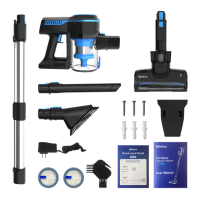
The Wnkim S700 is a Cordless Vacuum Cleaner designed for household use, offering versatile cleaning options as both a stick vacuum and a handy vacuum. It is powered by a lithium battery and features a motor with a power of 200W.

Function Description:

The Wnkim S700 serves as a dry vacuum cleaner, suitable for absorbing dust and dry debris from various surfaces. It is explicitly stated not to be used for absorbing water, wet surfaces, or fine powders like decoration dust, as this could damage the motor. The vacuum cleaner offers three power modes (Low/Medium/High), which can be toggled using the "SPEED" button. It features an On/Off Switch Button for easy operation.

Important Technical Specifications:

  • Battery: 22.2V/2200mAh lithium battery.
  • Charging Period: Approximately 4.5 hours.
  • Weight: 2.5kg.
  • Input: 26.5V/500mA.
  • Motor Power: 200W.
  • Airflow: 18dm³/s.
  • Package Dimensions (in): 17.32 x 13.38 x 7.09.

Usage Features:

The Wnkim S700 can be assembled and used in two primary configurations:

  1. As a stick vacuum cleaner:

    • Assembly: The dust cup is assembled in an anticlockwise direction. The metal tube is inserted into the main body until a click is heard, and then the motorized brush is attached to the head of the metal tube.
    • Operation: The vacuum cleaner is turned on by pressing the On/Off Switch Button. The "SPEED" button allows switching between Low, Medium, and High power modes. Pressing the On/Off Switch Button again while the machine is working will stop it.
    • Components: This configuration utilizes the telescopic metal tube, motorized brush, and dust cup.
  2. As a handy vacuum:

    • Assembly: Accessories (such as the long suction flat or suction flat) are inserted directly into the main body until a click is heard.
    • Operation: Similar to the stick vacuum, it is turned on and off using the On/Off Switch Button, and power modes are adjusted with the "SPEED" button.
    • Components: This configuration is ideal for targeted cleaning and uses specific accessories like the long suction flat or suction flat.

Charging Modes:

The device offers two charging methods:

  1. Direct Charging: The charging socket of the host battery pack can be directly inserted into the power adapter.
  2. Separate Battery Charging: The battery pack can be removed by sliding down the release button. The detached battery pack then has its own charging socket for connection to the power adapter.

Product Storage:

For convenient storage, the Wnkim S700 comes with a wall mount.

  • The wall mount should be fixed to the wall using nails.
  • The floor brush is locked, and the machine is fixed to the wall mount.
  • Cleaning accessories can also be attached to the wall mount for organized storage.

Maintenance Features:

Regular maintenance is crucial for the longevity and performance of the vacuum cleaner.

  1. Emptying the Dust Cup:

    • Press the dust cup lock.
    • Move the dust cup in the indicated direction to detach it from the main body.
    • Take out the filter and filter cover.
  2. Cleaning the Filter and Filter Cover:

    • Wash the filter and filter cover with cool water.
    • It is essential to ensure that the filter and filter cover are completely dry before reassembling.
    • The manual recommends washing the filter at least once a month.
  3. Reassembly:

    • Put the filter case back into the dust cup.
    • Attach the dust cup by twisting it in a counterclockwise direction.
  4. Cleaning Strainer and High Efficiency Filter:

    • Hold the main motor, press the button to open the dustbin cover.
    • Rotate the strainer and filter one by one to take them out.
    • If they are too dirty, wash them with cool water.
    • Ensure the strainer and filter are completely dry before refitting.
  5. Removal and Cleaning of Roller Brush:

    • Disconnect the power supply.
    • Slide the brush lock to the right to unlock it.
    • Take out the roller brush and clean any hair or foreign matter.
    • Wash the roller brush with water.
    • Dry the roller brush for 24 hours.
    • Install the roller brush back into the floor brush and slide the lock to the left until it is locked.

Safety Instructions:

  • Always use the original battery and charger provided.
  • If the charger cable is damaged, contact after-sales service for replacement.
  • Ensure the charger is removed from the charging plug when handling the battery or cleaning the machine.
  • The product uses a lithium battery; do not burn it or expose it to high temperatures to prevent explosion.
  • Avoid short circuits of battery terminals.
  • Keep the battery away from metal objects when not in use.
  • Handle the battery according to local laws and regulations.
  • Do not use any damaged or defective parts.
  • Do not modify the product to prevent personal injury.
  • Use only replacement parts or spare parts provided or recommended by the manufacturer.

Troubleshooting:

The manual provides solutions for common issues:

  • Not cleaning well: Check and empty the dust bin, ensure correct assembly, and clean the filter.
  • Stop or doesn't work: Charge the battery and clean the filter.
  • Battery not charging: Check connections with the power cord and wall socket.
  • Power brush doesn't work: Ensure the dust cup is assembled and locked, the power brush and metal tube are connected tightly, and check if the brush is blocked.

For unresolved issues, customers are advised to contact support@wnkimlife.com.

Warranty:

The Wnkim S700 comes with a 12-month warranty and lifetime customer support. The warranty applies to eligible purchases made directly from Wnkim authorized distributors and is non-transferable. To initiate a warranty claim, customers should contact customer support via email. For any questions, customers are encouraged to contact Wnkim Customer Support with their order number and purchase details.

Wnkim S700 Specifications

General IconGeneral
BrandWnkim
ModelS700
CategoryVacuum Cleaner
LanguageEnglish