8 | Wolf Customer Care 800.222.7820
Prior to Use
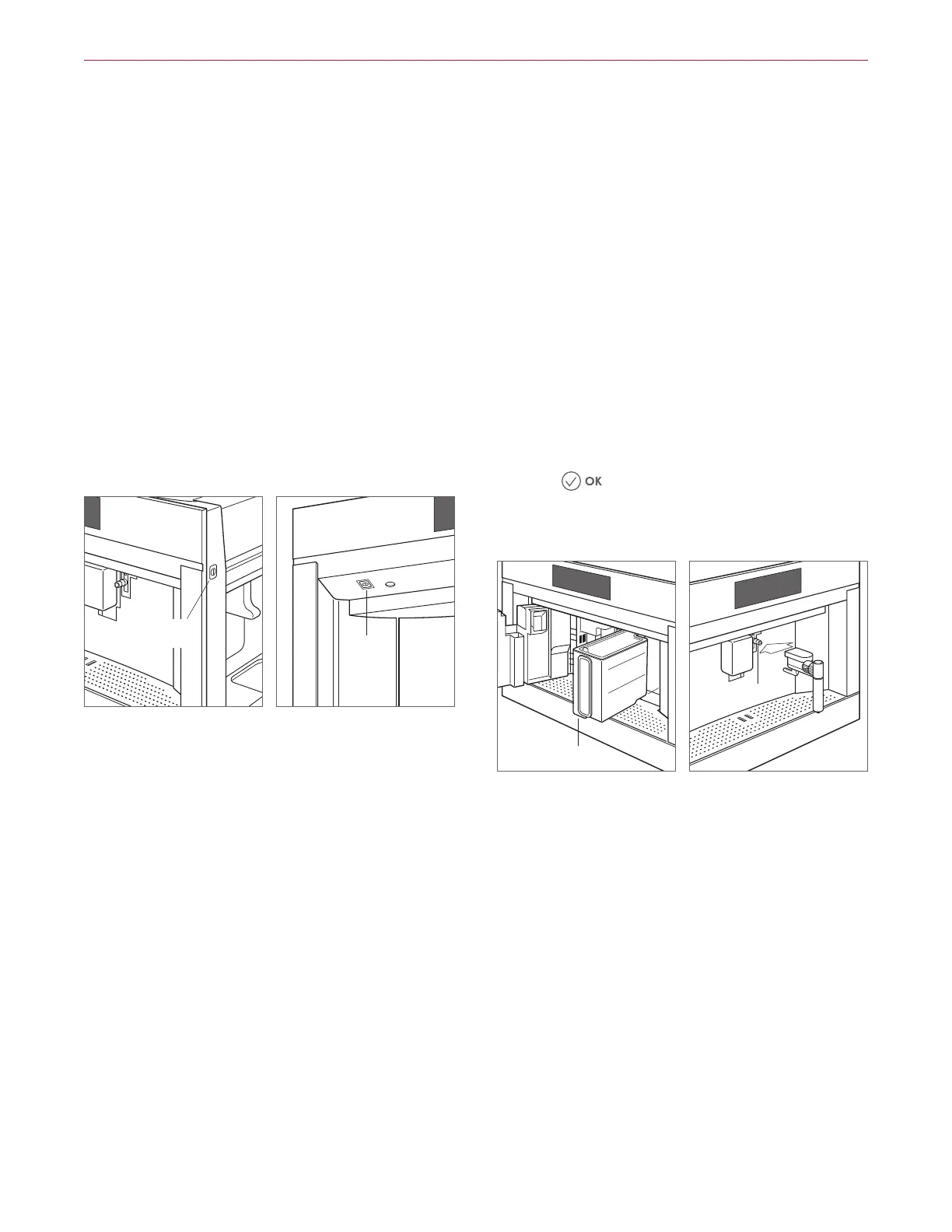
1 Slide the unit forward, press the main power button,
then slide the unit back. Refer to the illustration below.
2 Touch the stand-by power button. Refer to the
illustration below.
3 Use the test strip provided to determine water hardness.
Refer to User Options on page 14 to adjust the hardness
setting.
4 Clean the unit thoroughly with hot water and a mild
detergent.
5 Rinse and dry with a soft cloth.
Quick Start Guide
MAIN POWER
BUTTON
STANDBY
POWER
BUTTON
Main power button
Standby power button
1 Open the service door, then remove the water tank.
Refer to the illustration below. NOTE: If installed, the
water spout must be removed to open the service door.
2 Fill the water tank with water.
3 Insert the water spout into the receptacle. Two beeps
indicate the water spout is installed correctly. Refer to
the illustration below.
4 Place the rinse container below the water spout.
5 Select the desired language. To select, scroll through
the languages until the desired language appears, then
touch the corresponding icon.
6 Touch . Hot water is dispensed from the water
spout.
WATER TANK
RECEPTACLE
Water tank
Water spout
6
7
8
9
10
11



 To Next Page