WOLSTEAD PRO SWIFT DIGITAL AIR FRYER 8L OWNER’S MANUAL WOLSTEAD PRO SWIFT DIGITAL AIR FRYER 8L OWNER’S MANUAL
TOUCH SCREEN CONTROLS
Once the air fryer is in standby mode, the
touchscreen control can be used to control
the operation of the air fryer.
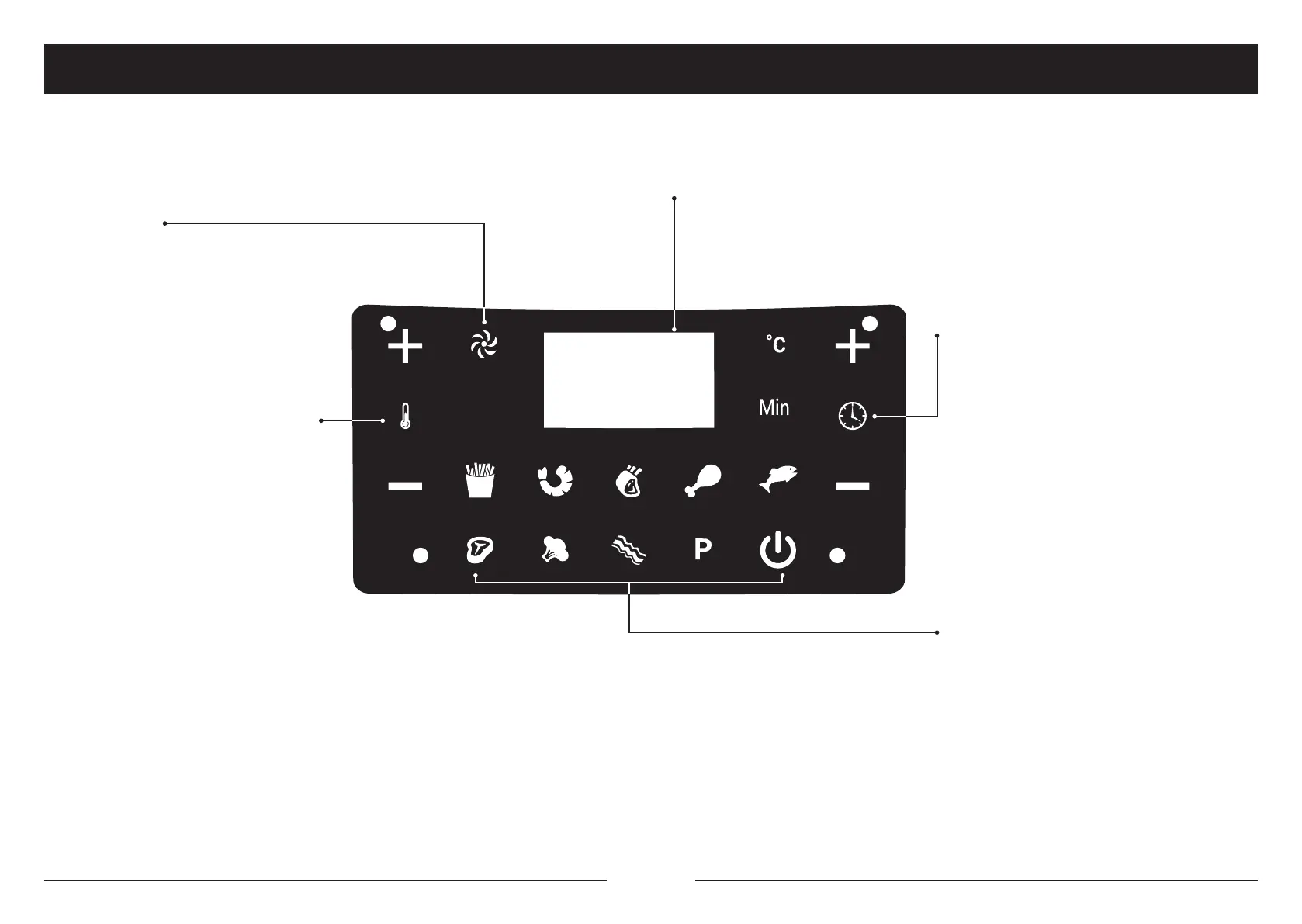
Cooking Timer Control Buttons
The cooking timer control buttons can
be found on the right hand side of the
touchscreen. Use the (+) and (-) buttons
above and underneath the clock symbol
to increase or decrease the cooking time,
one minute at a time. Hold down the (+) or
(-) buttons to rapidly change the cooking
Cooking Temperature Control Buttons
The cooking temperature control buttons
can be found on the left hand side of the
touchscreen. Use the (+) and (-) buttons
above and underneath the thermometer
symbol to increase or decrease the
temperature by 5°C. Hold down the
(+) or (-) buttons to rapidly change the
temperature. The temperature ranges
from 80°C to 200°C.
Preset Cooking Options
The Wolstead Pro Swift Digital Air Fryer
comes with 9 preset cooking options to
select from: Chips, Seafood, Roast, Chicken,
Fish, Steak, Cheese and Bacon.
The P icon refers to the preheat setting.
Refer to the Preset Cooking Options
section for more details on the preset
cooking menu.
Digital Display
The digital display above the touchscreen shows the cooking temperature and
remaining cooking time while the appliance is in use. The remaining cooking time
and temperature will alternate on the digital display while the appliance is in use.
White Fan Icon
The white fan icon ashes while the air
fryer is turned on and for up to 20 seconds
after it is turned off.


 To Next Page