EasyManua.ls Logo

Wolverine PASS - Component Overview

Wolverine PASS
17 pages
To Next Page IconTo Next Page
To Previous Page IconTo Previous Page
Loading...
5
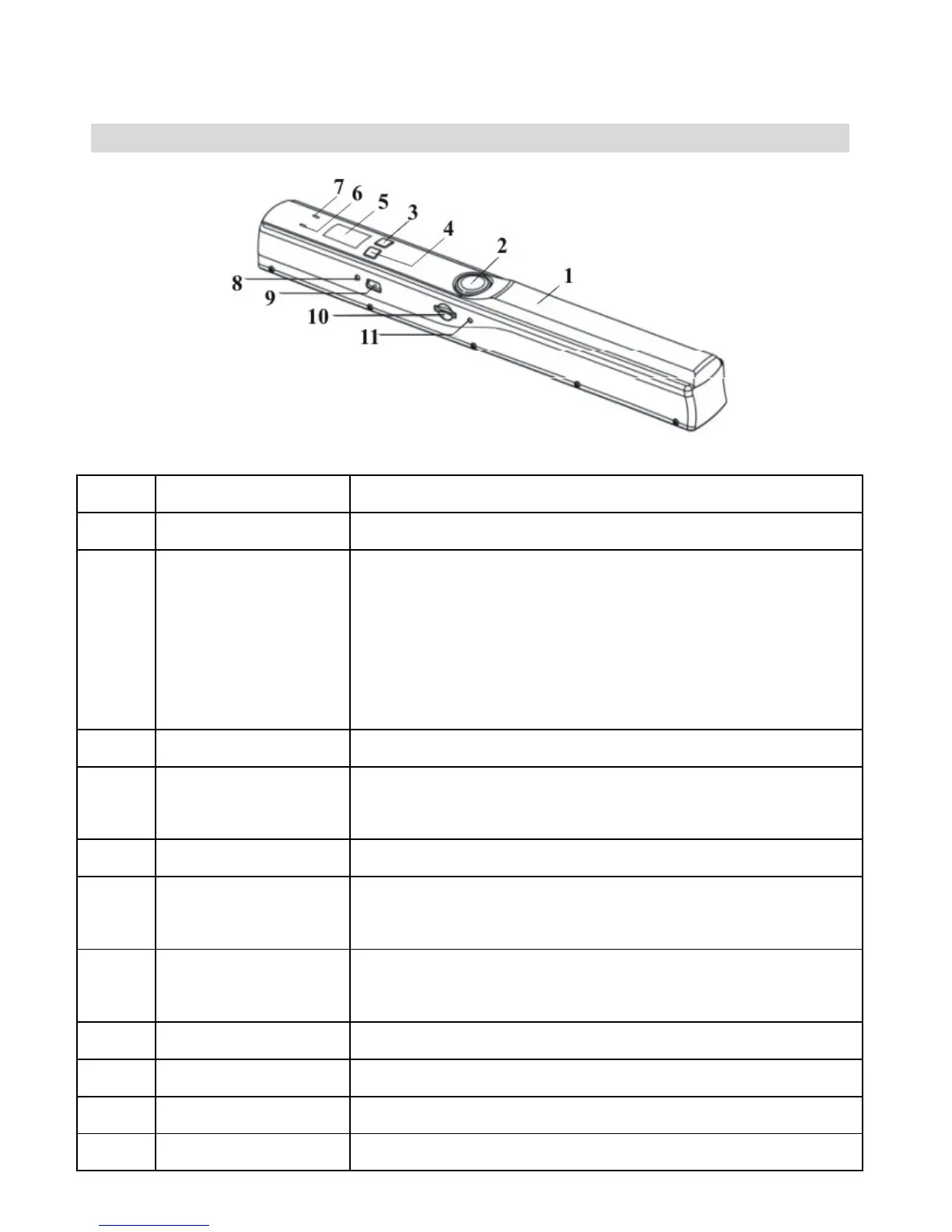
4. Component Guide
Item
Name
Functions
1
Battery door
For 2xAA alkaline batteries
2
POWER/SCAN
Power on/off: Press and hold this button for 2
seconds to turn power on or off.
In power on mode, press this button start
scan; press this button again to stop
scanning.
3
C/BW button
Select Color or Mono scan.
4
DPI button
(Resolution)
Select High (600dpi) or Low (300dpi)
resolution.
5
LCD screen
Scan status display
6
ERR LED
Indicator
Over speed: Red LED on
7
SCAN LED
indicator
Ready for scan: Green LED on
8
TIME SET hole
Setup system time
9
USB port
Upload files to computer via USB cable
10
MicroSD slot
MicroSD memory card, storage Max. 32GB
11
FORMAT hole
Format MicroSD card

Related product manuals