OPERATION
Start-up Settings of the Controller
OPERATION SW-10doc032018 2-6
2
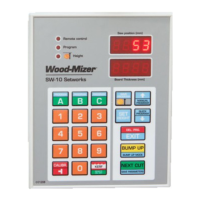
If the blade height on the display is incorrect, press and hold down . The upper display will
show horizontal dashes. Enter the correct blade height dimension (using the keypad) and press
.
The end of the function will be signaled and the normal mode of operation will be restored.
NOTE: If , during the downward movement, the saw head hits the stop bolt,
set the head a little higher than previously and repeat the auto-calibration
procedure.
5. Setting a Head Return Height in BUMP UP Function
It is possible to program two modes of head return height that are available during cutting (LO and HI
modes) by using the button.
In the usual, LO mode, after pushing , the blade is raised above the material being sawn, by a
permanently defined value - ca. 12 mm. When this mode is used, each cut board should be removed before
returning the head to the front of the bed.
In the HI mode, after pressing , the blade is raised by 12 mm + last used board dimension.
For example, if the last cut board is 25 mm thick, the saw head will be raised by 37 mm (12mm + 25mm).
When using this mode, the operator can return the head to the front of the machine without ealier board
removal.
The controller is factory-set for operation in the usual, LO mode.
To change or check the operation mode:
- Turn off power supply to the controller. Wait about 3 seconds and turn it on.
- While ’’SW-10” is being displayed, press and hold down the button for about 3 seconds.
- On the upper display the active operation mode is shown.
- To change the operation mode, use and .


 To Next Page
 Loading...