The Woodpeckers StabilMax Trim Router Base is an accessory designed to enhance the functionality and precision of various trim routers. Its primary function is to provide a stable and versatile platform for trim routers, allowing for improved control, accuracy, and the use of template guide bushings for routing operations. The base is compatible with a range of popular trim router models from manufacturers such as DeWalt, Makita, Porter Cable, Ridgid, Ryobi, Bosch, and Milwaukee, as indicated by the specific router models listed in the manual (e.g., DeWalt DWP611, DCW600B; Makita RT0701C, XTR01Z; Porter Cable PCE6430; Ridgid R2401, R860443B; Ryobi P601; Bosch GKF125CEN, PR20EVS; Milwaukee 2723-20).
Function Description:
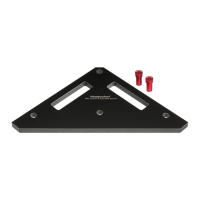
The StabilMax Trim Router Base serves as an intermediary plate between the trim router and the workpiece. It expands the footprint of the router, providing a larger, more stable surface for the router to glide on, which is crucial for achieving smooth and consistent cuts, especially when working on edges or intricate patterns. A key feature is its ability to accommodate template guide bushings, which are essential for following templates and creating precise shapes, dados, and mortises. The base includes a handle that attaches to the top, offering an ergonomic grip for better control and maneuverability during routing tasks. The design incorporates multiple pre-drilled holes to align with the mounting patterns of various trim routers, ensuring broad compatibility. The bottom of the base features counter-bored holes for the mounting screws, ensuring a flush surface that won't mar the workpiece.
Important Technical Specifications:
The StabilMax Trim Router Base consists of three main components:
- Base (Part 1): This is the main plate, typically made of a durable material, featuring a central opening for the router bit and an array of mounting holes. The top surface of the base is marked with a lasered Woodpeckers logo. The bottom surface has counter-bored holes for the mounting screws, ensuring a smooth contact surface with the workpiece.
- Handle (Part 2): An ergonomic handle designed to be secured to the top of the base using a single Handle Screw (1/4-20 x 5/8"). This handle provides a comfortable and secure grip for operating the router.
- Centering Pin (Part 3): A specialized pin used for accurately centering template guide bushings. It is inserted into the router collet and used in conjunction with the template guide bushing to ensure precise alignment.
- Mounting Hardware:
- One Handle Screw (1/4-20 x 5/8") for attaching the handle.
- Four Pan Head Screws (M4 x .7mm) for securing the trim router to the base.
The Centering Pin is designed to work with template guide bushings that have an outer diameter between 1/4" and 9/16". This specification is critical for users who rely on template routing for their projects. The base itself is designed with specific hole patterns (labeled A through G in Figure B) to match the different router models, ensuring a secure and accurate fit. The manual explicitly states that the diagram in Figure B is "actual size to aid in alignment," suggesting a precise manufacturing process to ensure compatibility.
Usage Features:
The manual outlines a clear, step-by-step process for both initial setup and use with template guide bushings:
Initial Setup:
- Handle Attachment: The handle is secured to the top of the base using the provided handle screw. This is a straightforward process that ensures the user has a firm grip on the router assembly.
- Router Alignment: The trim router is aligned with the corresponding mounting holes on the StabilMax Base. The manual provides a detailed diagram (Figure B) illustrating the specific hole patterns for various router brands and models. This diagram is crucial for users to correctly identify the mounting points for their specific router.
- Router Securement: The router is then secured to the base using the four pan head screws. The manual also includes a general recommendation to "Align router so switch faces away from Handle (except Milwaukee)," which is a practical tip for ergonomic and safe operation, ensuring easy access to the power switch.
Using a Template Guide Bushing:
This feature is a core advantage of the StabilMax base, enabling precise template routing:
- Loosen Router Mounting Screws: The pan head screws securing the router to the base are loosened, but not removed, to allow for slight adjustments.
- Insert Template Guide Bushing: The template guide bushing is placed into the base plate and tightened securely.
- Insert Centering Pin: The Centering Pin is inserted into the router collet and tightened.
- Adjust Depth of Cut: The router's depth of cut is adjusted until the cone of the Centering Pin makes contact with the inside of the template guide bushing. This step is crucial for establishing the precise center of the bushing relative to the router's spindle.
- Adjust Base Position: The base is then adjusted until the Centering Pin's cone contacts the template guide bushing uniformly around its circumference. This ensures the bushing is perfectly concentric with the router's spindle.
- Tighten Router Mounting Screws: Once centered, the four pan head screws are tightened to lock the router and base in the correct position.
- Remove Centering Pin: The Centering Pin is removed from the router collet, and the router is now ready for template routing.
Important Note on Centering Pin: The manual specifies that the Centering Pin requires template guide bushings with an outer diameter between 1/4" and 9/16". It also provides a valuable tip: if a project requires a larger template guide bushing, users should first use a bushing within the specified range to center the base, and then switch to the larger bushing before proceeding with the routing operation. This highlights the precision-oriented design of the system.
Maintenance Features:
While the manual does not explicitly detail maintenance steps for the StabilMax Trim Router Base itself, it implicitly suggests good practices through its general safety warnings and recommendations:
- Regular Inspection: Although not stated, it is good practice to regularly inspect all components (base, handle, screws) for wear, damage, or looseness, especially the mounting screws that secure the router.
- Cleanliness: Keeping the base clean of dust and debris will ensure smooth gliding over workpieces and prevent potential inaccuracies.
- Proper Storage: Storing the base and its components in a safe, dry place will protect them from damage and prolong their lifespan.
- Refer to Router Manual: The manual emphasizes referring to the power tool manual for proper setup and use, which would include maintenance guidelines for the router itself, indirectly contributing to the overall system's longevity.
Safety Warnings:
The manual includes prominent safety warnings, which are crucial for any power tool accessory:
- Hands Away from Moving Parts: "WARNING! To reduce the risk of injury keep hands away from moving parts. Refer to your power tool manual for proper setup and use." This is a standard but vital warning for router operations.
- Personal Protective Equipment (PPE): "WARNING! To reduce the risk of injury, wear safety goggles or glasses with side shields, ear protection & a dust mask." This emphasizes the importance of protecting eyes, ears, and respiratory system from wood dust and flying debris.
- Chemical Exposure Warning: "WARNING! This product can expose you to chemicals, including bisphenol, which is known to the State of California to cause cancer and birth defects or other reproductive harm. For more information go to www.P65Warnings.ca.gov." This is a California Proposition 65 warning, common for many manufactured products, informing users about potential chemical exposure.
Woodpeckers provides extensive support resources:
- Online Manuals: The most current instruction manuals are available for download at woodpeck.com under the "Additional Information" or "Instructions" tabs on the product page. This ensures users always have access to the latest information.
- Video Tutorials: A QR code is provided to scan and watch a video tutorial, or users can visit woodpeck.com under the video tab on the product page. This visual guide can be very helpful for understanding setup and usage.
- Customer Service: For missing parts, users can email mailroom@woodpeck.com or call 800-752-0725 during business hours (9:00 a.m. to 4:00 p.m. EST, Monday - Friday).
- Community and Social Media: Woodpeckers encourages engagement through their eClub for new product announcements and sales, YouTube channel for tips and tricks, and social media (Facebook, Instagram, TikTok) for interaction. They also maintain a "KNOTHOLE" Resource Center/Blog for shop tips, project ideas, and tool techniques.
In summary, the Woodpeckers StabilMax Trim Router Base is a well-designed, versatile, and precision-oriented accessory that significantly enhances the capabilities of compatible trim routers. Its focus on stability, template guide bushing compatibility, and user-friendly setup makes it a valuable tool for woodworkers seeking to improve the accuracy and quality of their routing projects. The comprehensive manual and extensive support resources further underscore Woodpeckers' commitment to user satisfaction and safe operation.

 Need help?
 General

 To Next Page