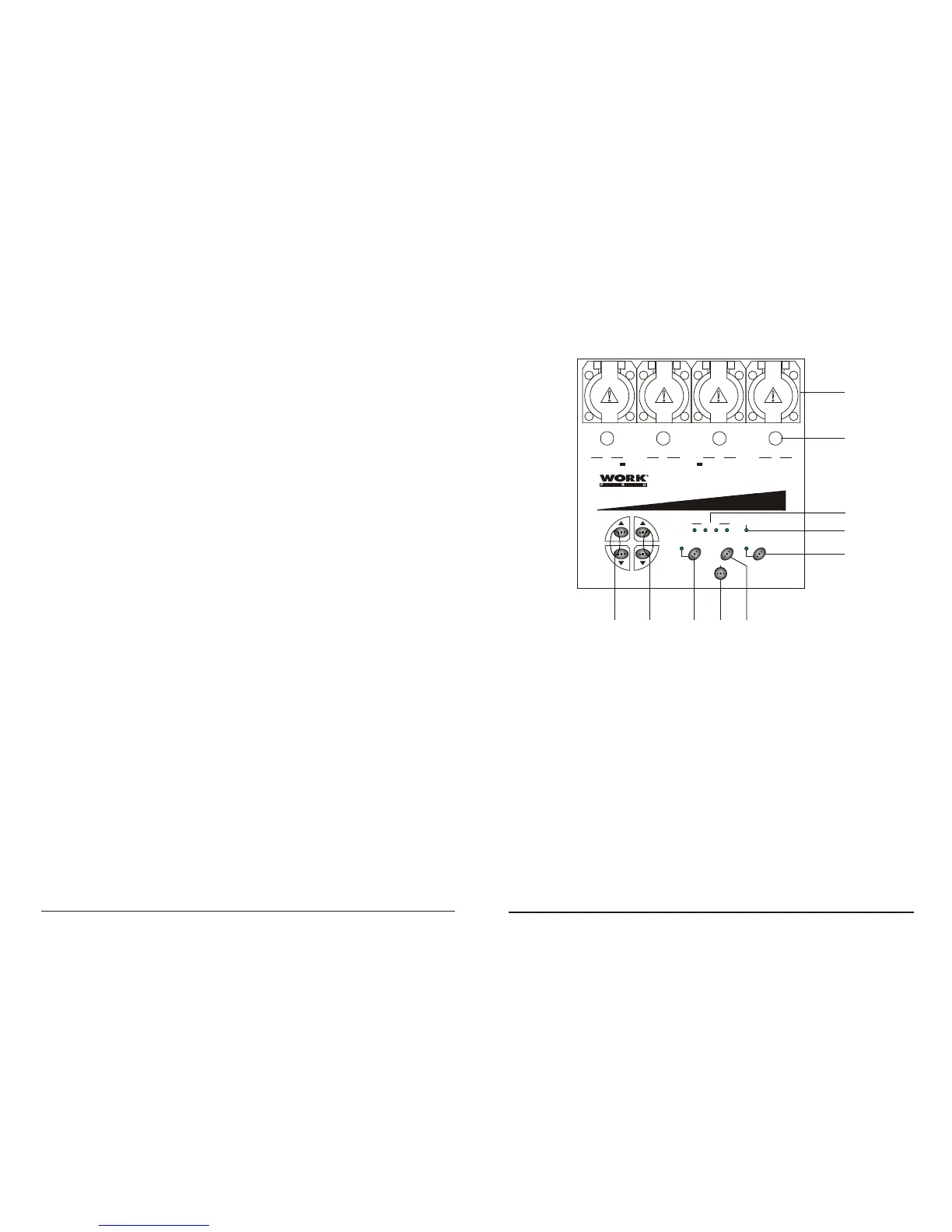
Functions & Controls (Front):
1. Channel Output - 5A per channel, total 16A max.
2. Channel Fuses - Each of the four channels is protected by a 6.3A fuse.
These fuses prevent you from overloading and damaging.
3. LED Indicators - These LEDs will indicate their relevant channel activity.
4. Mic. - This built-in microphone picks up audio signal for audio triggering.
5. Speed UP/DOWN Buttons - These two buttons can be used to increase
or decrease chase speed.
6. Pattern UP/DOWN Buttons - These two buttons allow you to select desired
chase program.
7. Audio/ Chase Button - Press this button to change between Audio and
Chase modes. The LED near this button is lit indicating Audio mode is active.
8. Full On Button - Pressing and holding down this button allows to bring
overall output to full intensity. Release of this button deactivates this function.
9. Stand By Button - This button is used to kill overall temporally, its LED flashes
indicating this operation.
10. Infrared Sensor - This sensor receives infrared signal from the remote control.
1
2
4
9
810
MONITOR
Mic
1 2 3 4
SPEED
PATTERN
Audio/Chase Full on
Infrared sensor
Stand by
WDP-4
I nfr a-l i nk Chas erI nfr a-l i n k Chas erI nfr a-l i n k Chas er
2
3
41
OUTPUT: 5A/CH, TOTAL 16A Max.
FUSES: F6.3A 250V 5x20mm
5
6
7
3
Full on
Full On & Stand By
Stand by
Presione y mantenga pulsado este botón, le permitirá llevar la totalidad de las salidas
a intensidad máxima, a pesar del modo de función activo. Si libera el botón, regresará
al estado anterior.
Presione el botón Stand para acceder a esta función. El LED parpadeará indicando
que la función está activa. En este modo, la totalidad de las salidas se interrumpirá
momentáneamente. Para salir de este estado, pulse el botón Stand otra vez, el LED
se apagará y la unidad regresará al estado anterior.
User Manual / Manual WDP4 ANALOG Page/Página 11
User Manual / Manual WDP4 ANALOG Page/Página 2



 To Next Page