Full on
Pressing and holding down the Full on button allows you to bring overall output
to full intensity despite of any function mode. Release of this button will go back
to previous state.
Full On & Stand By
Stand by
Press the Stand by button to activate Stand by function, its LED flashes
indicating Stand by is active. In Stand by mode, overall output will be interrupted
momentarily. To quit Stand by, just press the button once more, its LED will be
extinguished and this unit will return to its earlier state.
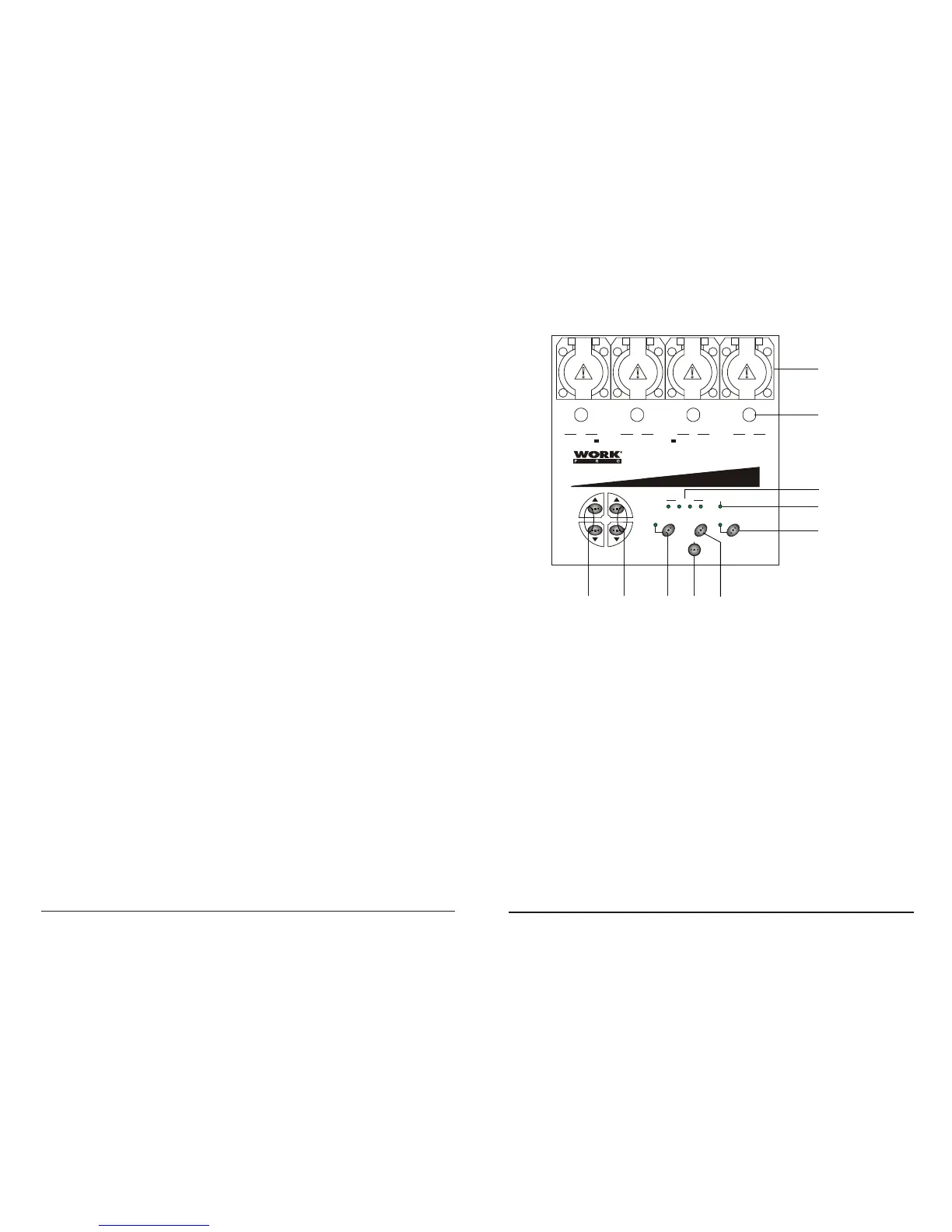
Controles y Funciones (Frontal):
1
2
4
9
810
MONITOR
Mic
1 2 3 4
SPEED
PATTERN
Audio/Chase Full on
Infrared sensor
Stand by
WDP-4
I nfr a-l i nk Chas erI n f r a-l i n k Chas erI nf r a-l i n k Chas er
2
3
41
OUTPUT: 5A/CH, TOTAL 16A Max.
FUSES: F6.3A 250V 5x20mm
5
6
7
3
1. Salida de Canal - 5 A por canal, Total 16A max.
2. Fusibles de canal - Cada canal está protegido por un fusible de 6.3A.
Estos fusibles previenen sobrecargas y daños.
3. Indicadores LED - Estos LED indican la actividad de los canales.
4. Mic - Este micro incorporado, capta señales de audio para el chaser.
5. Botones UP/DOWN (Velocidad) - Estos botones le permiten incrementar
o reducir la velocidad del programa.
6. Botones UP/DOWN (Patrón) - Estos botones le permiten seleccionar
el programa.
7. Botón Audio/Chase - Presione este botón para cambiar entre modos
Audio y Chase. El LED junto a este botón se iluminará en el modo Audio.
8. Botón Full on - Presione y mantenga pulsado este botón para conseguir
el encendido total de todas las salidas. Liberándolo, se desactiva la
función.
9. Botón Stand by - Este botón se usa para eliminar temporalmente la salida,
el LED parpadea , indicando esta función.
10. Sensor Infrarrojo - Este sensor recibe señal infrarroja procedente del control
remoto.
User Manual / Manual WDP4 ANALOG Page/Página 5
User Manual / Manual WDP4 ANALOG Page/Página 8


 To Next Page
 Loading...