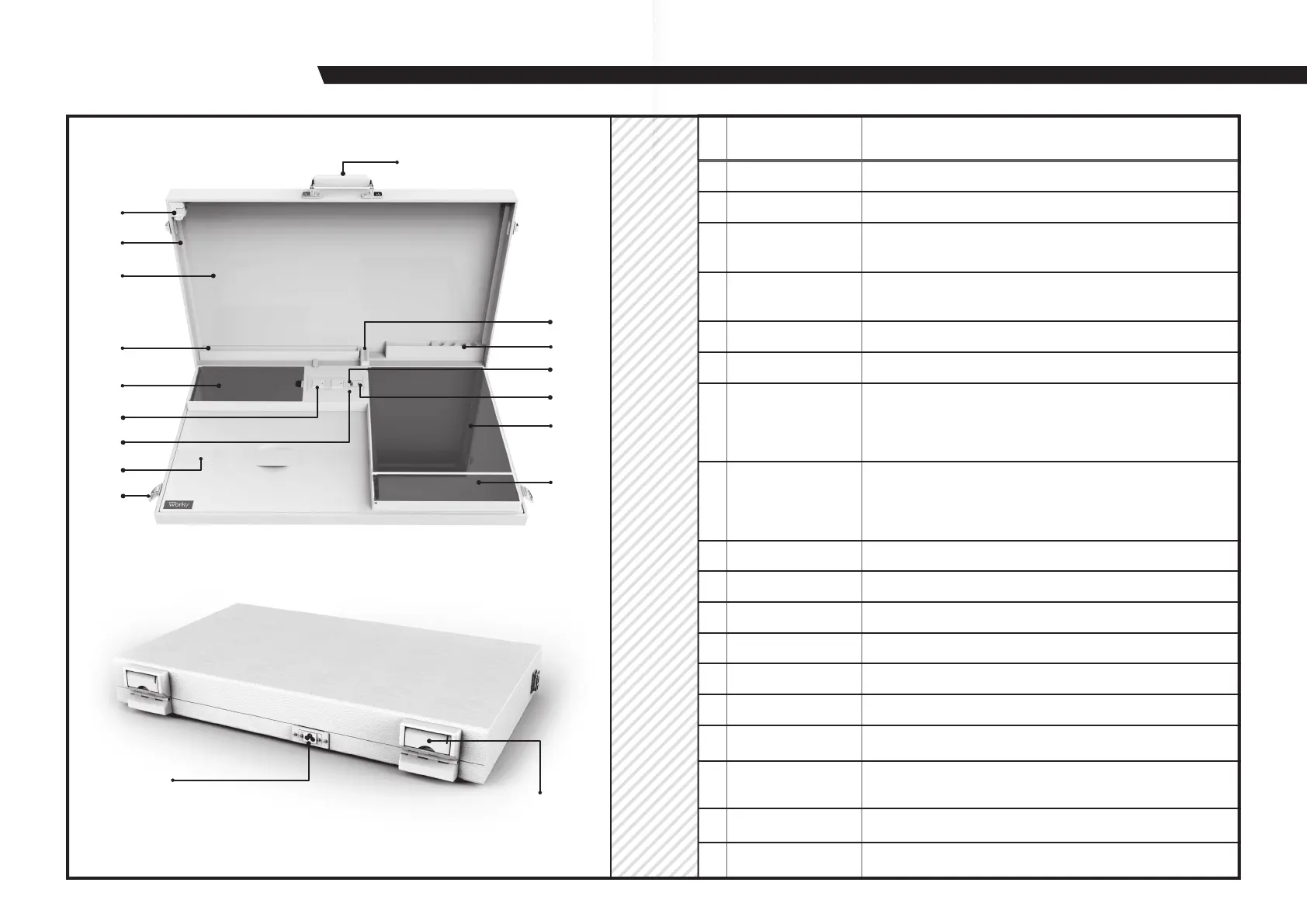
PRODUCT OVERVIEW
1
2
3
4
5
6
7
8
15
16
14
13
12
11
17
18
# ITEM
Handle
This handle provides easy access to The Home Office.
1
Headphone hook
For temporary storage of your headphones.
2
Magnetic dry erase
whiteboard
To be used only with a whiteboard pen.4
Elastic band
For securing your laptop to prevent possible damage in transit.
9
Lock Latch
Before opening the device, please open the Lock Latch downward first.
10
USB-A socket
For charging your external devices.
11
USB TYPE-C socket
For charging your external devices.
12 File box For storing your files.
13
Stationery box
For storing your stationery.
14
AC power jack
Plug the AC power cord into this jack and into a power outlet.
15
Anti-reverse
rotating bracket
Rotate the anti-reverse rotating bracket to make it vertical.
It prevents the lid from accidentally falling down.
Pen holder
For temporarily storing your marking pen, whiteboard pen, etc.
16
17
Bracket
Before you open lid, please lift the bracket up.
18
Place for a tablet
For placing your tablet, iPad, iPod, etc.
5
Power supply box
For storing your power cord.
6
Output AC socket
When using your laptop in this portable work box, you can
plug your laptop’s power cord in here.
Note: You must first connect The Home Office to your home
electrical outlet.
7
LED ON/OFF switch
To adjust the LED light:
Press to turn on the LED light. (Default maximum brightness.)
Press again to dim the lights.
Press a third time to turn off the LED.
8
LED light
Two levels of brightness that can be adjusted by pressing
the LED switch.
3
DESCRIPTION
9
10



 To Next Page