EasyManua.ls Logo

Workzone WZEN 20 - User Manual

Workzone WZEN 20
20 pages
Print Icon
To Next Page IconTo Next Page
Loading...
Now you have purchased a Workzone® product you
can rest assured in the knowledge that as well as your
3 year parts and labour guarantee you have the added
peace of mind of dedicated helplines and web support.
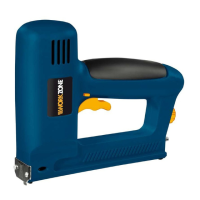
ELECTRIC STAPLE GUN
OPERATING INSTRUCTIONS  USER GUIDE
MODEL: WZEN 20, 03/2014
ELECTRIC STAPLE GUNELECTRIC STAPLE GUN

Other manuals for Workzone WZEN 20

Question and Answer IconNeed help?

Do you have a question about the Workzone WZEN 20 and is the answer not in the manual?

Summary

Welcome

General Information and Safety Instructions

Workplace safety

Keep work area clean, avoid explosive environments, keep children away.

Electrical safety

Plug fit, avoid grounded surfaces, keep away from moisture.

Personal safety

Be alert, use PPE (goggles, headgear, ear defenders), ensure tool is off.

Using and treating electric tools

Do not overload, use in good working order, check cord, not for persons with reduced capabilities.

Service

Have tool repaired by authorized specialists using original parts.

Additional safety instructions

Assume tool contains fasteners, do not point at self/others, ensure firm contact, disconnect for jams.

Assembly and Parts List

Component Identification

Identifies parts like trigger, magazine slide, and staple gun head using figures.

Getting Started

Proper use

For textiles, leather, wood; intermittent operation; not for commercial use.

Features

Technical data

Supply voltage, power consumption, staple/nail dimensions, weight, protection class.

Sound and vibration information

Noise and vibration values measured according to EN 60745.

Wear ear defenders

Explains impact of noise and vibration, lists emission values.

Instructions

Minimising noise and vibration

Use in order, service, adapt style, do not overload.

Residual risks

Potential hazards like lung damage, hearing damage, hand-arm vibration.

Starting up

Steps to insert staples/nails, load magazine.

Setting the stapling force

Pre-select force based on staple length, nail length, and material strength.

Operation and Triggering

Check filling level, close magazine, set trigger interlock, and operate trigger.

Loading staples and nails

Load staples or nails into the magazine as shown in figures.

Stapling different materials

Stapling textiles, leather, wood strips; check filling level.

Cleaning and Maintenance

Remove plug before cleaning, clean parts, regular maintenance.

Removing jammed staples

Pull magazine slide, remove staples with pliers, push slide back.

Ordering spare parts

Provides data to quote when ordering replacement parts.

Disposal and recycling

Follow WEEE directive, do not discard with household rubbish.

FAQ

Warranty claims

Fill warranty card, contact after-sales support or website.

Obtaining spare parts

Contact after-sales support or website for parts information.

Damaged mains cable

Get an electrician to fit a waterproof connector or replace the cable.

Warranty Card

Summary

Welcome

General Information and Safety Instructions

Workplace safety

Keep work area clean, avoid explosive environments, keep children away.

Electrical safety

Plug fit, avoid grounded surfaces, keep away from moisture.

Personal safety

Be alert, use PPE (goggles, headgear, ear defenders), ensure tool is off.

Using and treating electric tools

Do not overload, use in good working order, check cord, not for persons with reduced capabilities.

Service

Have tool repaired by authorized specialists using original parts.

Additional safety instructions

Assume tool contains fasteners, do not point at self/others, ensure firm contact, disconnect for jams.

Assembly and Parts List

Component Identification

Identifies parts like trigger, magazine slide, and staple gun head using figures.

Getting Started

Proper use

For textiles, leather, wood; intermittent operation; not for commercial use.

Features

Technical data

Supply voltage, power consumption, staple/nail dimensions, weight, protection class.

Sound and vibration information

Noise and vibration values measured according to EN 60745.

Wear ear defenders

Explains impact of noise and vibration, lists emission values.

Instructions

Minimising noise and vibration

Use in order, service, adapt style, do not overload.

Residual risks

Potential hazards like lung damage, hearing damage, hand-arm vibration.

Starting up

Steps to insert staples/nails, load magazine.

Setting the stapling force

Pre-select force based on staple length, nail length, and material strength.

Operation and Triggering

Check filling level, close magazine, set trigger interlock, and operate trigger.

Loading staples and nails

Load staples or nails into the magazine as shown in figures.

Stapling different materials

Stapling textiles, leather, wood strips; check filling level.

Cleaning and Maintenance

Remove plug before cleaning, clean parts, regular maintenance.

Removing jammed staples

Pull magazine slide, remove staples with pliers, push slide back.

Ordering spare parts

Provides data to quote when ordering replacement parts.

Disposal and recycling

Follow WEEE directive, do not discard with household rubbish.

FAQ

Warranty claims

Fill warranty card, contact after-sales support or website.

Obtaining spare parts

Contact after-sales support or website for parts information.

Damaged mains cable

Get an electrician to fit a waterproof connector or replace the cable.

Warranty Card

Workzone WZEN 20 Specifications

General IconGeneral
BrandWorkzone
ModelWZEN 20
CategoryStaple Gun
LanguageEnglish