This document serves as a Quick Reference Guide for the WOW! tv+ Box, model WOWtv, providing essential information for its setup, operation, and maintenance. It outlines safety instructions, lists included accessories, details the hardware structure, explains the remote control functions, and offers troubleshooting tips.
Function Description:
The WOW! tv+ Box is a set-top box designed to deliver television content and network services. It functions as a central hub for accessing various media and internet-based applications on your television. The device supports both wired (Ethernet) and wireless (Wi-Fi) network connections, allowing users to stream content, browse the internet, and utilize other network-dependent features. It outputs video via HDMI or AV, making it compatible with a wide range of televisions. The box is controlled by a dedicated remote, which includes universal power functions, input selection, recording controls, video playback controls, settings access, mute audio, back navigation, TV guide access, Bluetooth pairing, and dedicated buttons for popular streaming services like Netflix and Amazon Prime Video. It also features a Google Assistant button for voice commands and a Mini Guide for quick channel browsing.
Usage Features:
- Connectivity: The WOW! tv+ Box offers flexible connectivity options. For video output, it supports HDMI 2.1 and AV, with HDMI being the recommended method for optimal quality. Network connectivity can be established via an Ethernet cable (LAN, RJ45) for a stable wired connection or through Wi-Fi (2.4G/5.0GHz 802.11 a/b/g/n/ac) for wireless convenience.
- Setup: The setup process involves connecting the box to your TV using either an HDMI or AV cable, ensuring the TV's input source matches the connected port. Subsequently, the box needs to be connected to your home network, either by plugging in an Ethernet cable or by configuring the Wi-Fi connection through the on-screen guide after powering on the device. The power adapter is inserted into a wall outlet and then connected to the TV box, which will automatically power on.
- Remote Control Functionality: The included remote control is comprehensive, offering a wide array of functions:
- Universal Power: Turns the device on/off or puts it into standby.
- INPUT: Selects the correct input source on your WOW! tv+.
- Set Recordings: Initiates recordings.
- Adding to Favorites: Bookmarks titles.
- Video Controls: Play, pause, and fast-forward/rewind content.
- Info: Displays information about the content being viewed.
- Settings: Accesses device settings, including parental controls and purchase PIN code.
- Last: Navigates to the last viewed channel.
- Mute Audio: Toggles audio mute.
- WOW! tv+ Home Screen: Returns to the home screen.
- Back: Returns to the previous menu option.
- Google Assistant: Activates voice commands for searching content and controlling smart home devices.
- TV Guide: Accesses the TV guide.
- Mini Guide: Provides a quick guide while watching live channels.
- Bluetooth Pairing: Pairs the remote by holding HOME and OK buttons simultaneously.
- Netflix and Amazon Prime Buttons: Direct access to these streaming applications.
- Indicator Lights: The front panel features LED indicators for Standby, Power, IR (Infrared), and Network status, providing visual feedback on the device's operational state.
- Ports: The back panel includes Ethernet, AV output, HDMI output, and DC IN ports. The right side panel offers two USB ports (USB Port 1, USB Port 2) and a RESET button.
Maintenance Features:
- Safety Guidelines: The manual emphasizes several safety instructions to ensure proper functioning and longevity of the device:
- Maintain a horizontal position for the product.
- Use only the manufacturer-provided power adapter and avoid damaged cords/plugs.
- Protect the equipment from moisture or liquids.
- Do not disassemble or modify the TV box.
- Keep the device away from heat sources and in a dry, well-ventilated, dust-free area.
- Unplug the device immediately if it emits smoke or an unpleasant odor.
- Unplug the power adapter during long periods of non-use.
- Troubleshooting: A dedicated troubleshooting section helps users diagnose and resolve common issues:
- No display after powering on: Checks power cord connection, TV input source, and ensures the TV is powered on.
- TV has images but no sound: Advises checking audio cable connection, mute status, audio settings, and volume level.
- Fail to connect to the network (internet): Guides users to check Ethernet cable connection, Wi-Fi status (on/off, signal strength), and router status. For Wi-Fi issues, restarting the Wi-Fi or adjusting device/router position is suggested. For Ethernet, replacing the cable and ensuring the router is on are recommended.
- Remote Control Maintenance: If the remote control fails, the guide suggests aiming the remote correctly, checking for obstructions, replacing batteries if the voltage is low, and contacting customer care if the remote is broken.
- Environmental Considerations: The device is designed for operation within a temperature range of 0°C to 40°C.
- FCC Compliance: The device adheres to FCC regulations, including guidelines for RF exposure, recommending a minimum distance of 20cm from the radiator to the body. It is restricted to indoor use when operating in the 5150 to 5350MHz frequency range.

 Need help?
 General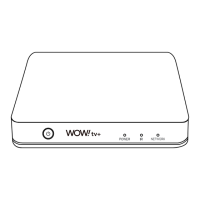

 To Next Page