5
getting started
Important battery information
Use only fresh batteries of the required size and recommended type.•
Do not mix old and new batteries, dierent types of batteries [standard (Carbon- zinc), Alkaline or rechargeable] or •
rechargeable batteries of dierent capacities.
Remove rechargeable batteries from the toy before recharging them.•
Rechargeable batteries are only to be charged under adult supervision.•
Respect the correct polarity, (+) and (-).•
Do not try to recharge non-rechargeable batteries.•
Do not dispose batteries in a re.•
Replace all batteries of the same type/brand at the same time.•
The supply terminals are not to be short-circuited.•
Remove exhausted batteries from the toy.•
Batteries should be replaced by adults.•
Remove batteries if the toy is not going to be played with for some time.•
Installing or changing batteries in the Lite Wand
The Lite Sprites Lite Wand requires 4 x “AAA” alkaline batteries
(not included).
The Lite Wand lets you know when its batteries need
to be replaced by playing a sound, ashing 5 times and
then powering o. If the Lite Wand is consistently having
diculties recognizing colors when you try to collect them
with the Color Collector, the batteries might need
to be replaced.
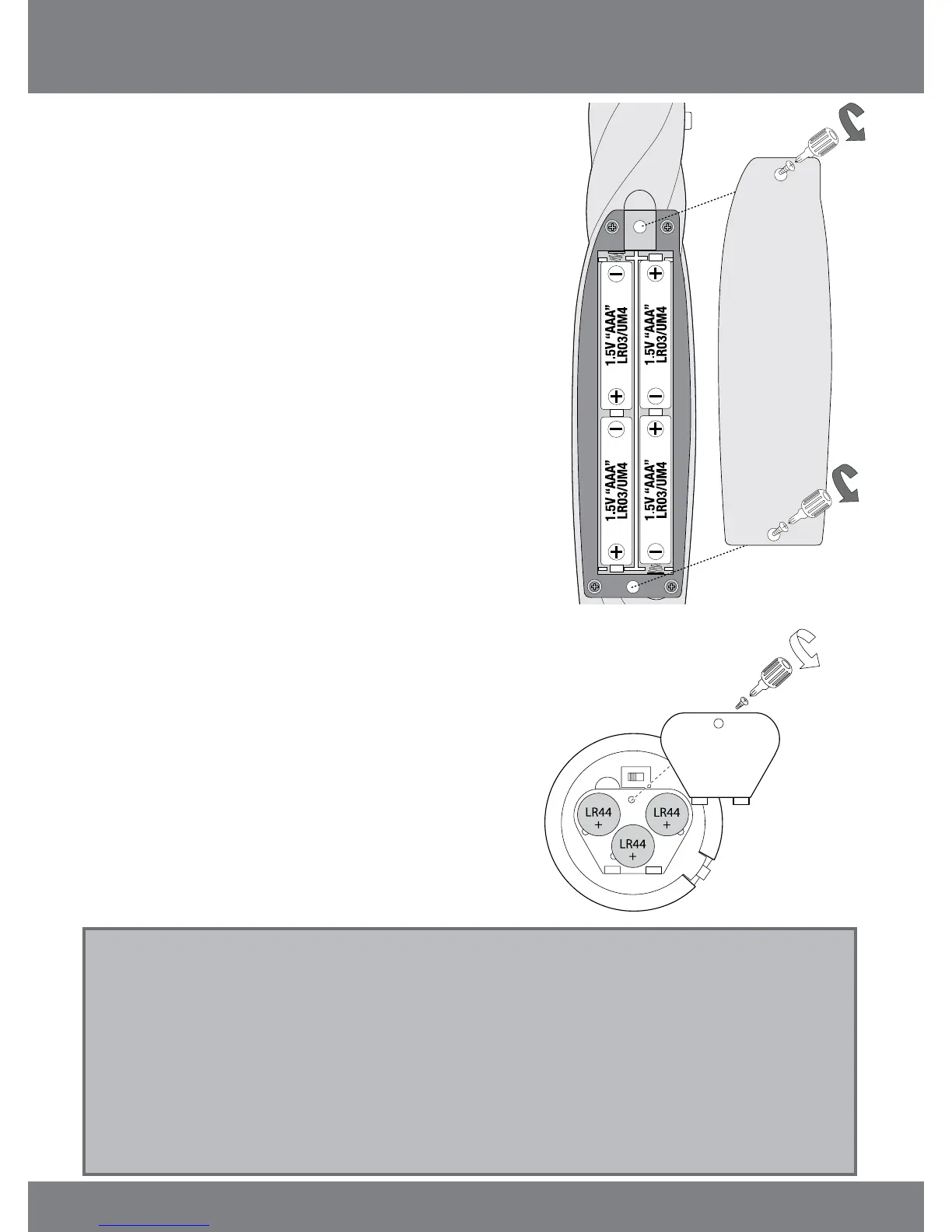
Insert or replace the batteries according to the diagram to
the right.
Open the battery compartment using a Phillips 1.
screwdriver (not included) to remove the screws
on the battery compartment cover.
Insert the batteries. Ensure that the positive and 2.
negative polarities match the illustrations inside
the battery compartment.
Replace the battery compartment cover and 3.
replace the screws using the screwdriver. Do not
over-tighten.
Installing or changing batteries in Prisma
Prisma requires 3 x “LR44” button-cell batteries (included).
If her colors start to appear dim, the batteries might need
to be replaced. Insert or replace the batteries according to
the diagram to the right.
Open the battery compartment on the 1.
bottom of Prisma using a Phillips screwdriver
(not included).
Insert the batteries. Ensure that the positive 2.
and negative polarities match the illustrations
inside the battery compartment.
Replace the battery compartment cover and 3.
replace the screws using the screwdriver. Do
not over-tighten.
Battery details














 To Next Page