4
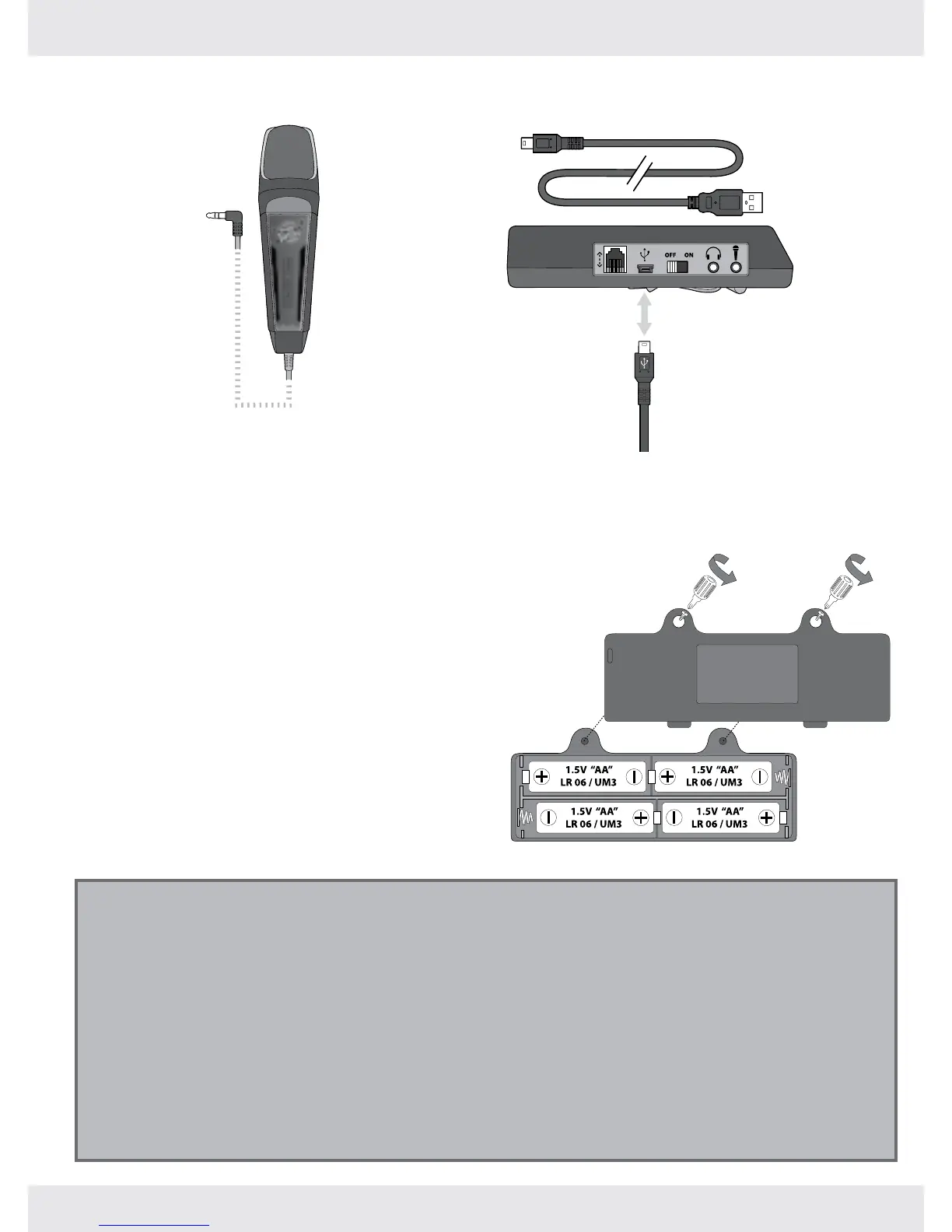
Installing or changing batteries in your microphone
The Paper Jamz Pro microphone requires 4 x “AA” size batteries (not included). Insert or
replace batteries according to the diagram.
Open the battery compartment using a 1.
Phillips screwdriver (not included).
Ensure that the positive and negative 2.
polarities match the illustrations inside the
battery compartment.
Replace the battery compartment cover. 3.
Do not over-tighten.
Important battery information
Use only fresh batteries of the required size and recommended type.•
Do not mix old and new batteries, different types of batteries [standard (Carbon- zinc), Alkaline or rechargeable] or •
rechargeable batteries of different capacities.
Remove rechargeable batteries from the toy before recharging them.•
Rechargeable batteries are only to be charged under adult supervision.•
Respect the correct polarity, (+) and (-).•
Do not try to recharge non-rechargeable batteries.•
Do not dispose batteries in a re.•
Replace all batteries of the same type/brand at the same time.•
The supply terminals are not to be short-circuited.•
Remove exhausted batteries from the toy.•
Batteries should be replaced by adults.•
Remove batteries if the toy is not going to be played with for some time.•
Introduction
Microphone overview
Cable (connects to
effects amp)
Battery details
USB to mini-USB cable overview


 To Next Page