For Internal Use: FI.WR.INS.136_WBIN00032_InfinityPlus_DrawerBox_Rev1 Page 2
DRAWER BOX
ADJUSTMENT & REMOVAL
INFINITY PLUS
Step 1.
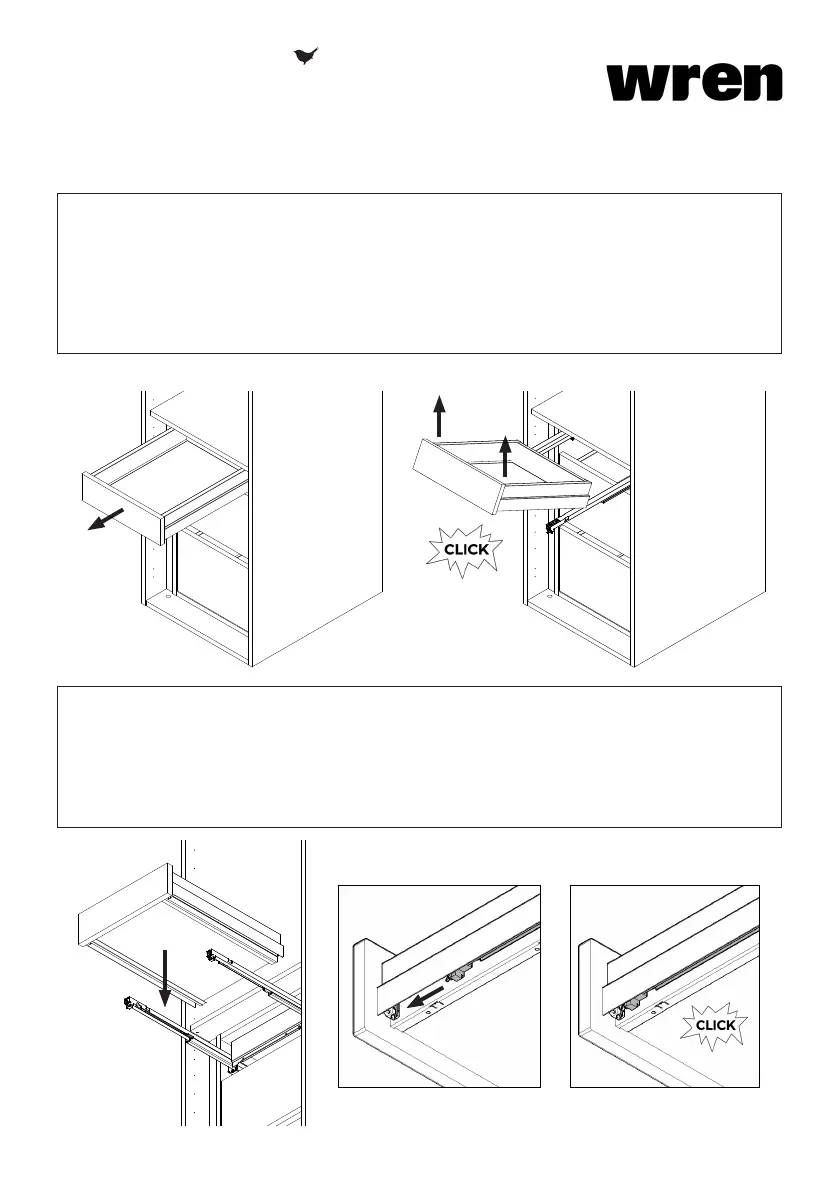
Open the drawer that is required to be removed. Pull out the drawer until the runners are at full extension.
In one smooth motion, lift the front of the drawer, this will disconnect the runner from the connectors on the
base of the drawer. Once properly separated a click will be heard and the drawer will be separate from the
runner.
If this motion is not done with enough force then the drawer may need to be lifted again.
Be careful not to lift the runners whilst lifting the drawer.
Step 2.
Fully extend the drawer runners out of the unit (for the drawer you are inserting). Place the drawer onto the
runners, making sure that the groove of the drawer sides and the runner mechanism are aligned.
Once the drawer is placed onto the runners, pull forward the protruding lips on the ends of the runners until
a click is heard. Once the click is heard the drawer is properly located and secured to the runner.
Push the drawer back into the Unit.



 To Previous Page