The X-ONE H1 is an advanced mechanical and electronic device, combining traditional watchmaking with smart functionalities. It features an automatic mechanical movement, ensuring timekeeping even when not actively used, though it requires manual rewinding (30 rewinds) if left inactive for a period. The watch is designed to be connected with a mobile device via Bluetooth, utilizing a dedicated X-ONE mobile application for enhanced features and control.
Charging and Activation:
To charge the X-ONE H1, it must be placed in its docking station, connected to an electric supply via a USB cable. The charging indicator light on the docking station will be red when not charging and blue when charging. There is no specific indication of a full charge, so users should charge until the battery is fully replenished.
To activate the watch, users need to long-push both Pusher A and Pusher B simultaneously. To lock the watch, a double-click on both Pusher A and Pusher B at the same time is required. If the watch is not functioning correctly, a restart (activation) of both the X-ONE H1 and the mobile phone is recommended. During a reset, users should wait more than 30 seconds before initiating any new action.
Time Setting and Modes:
The watch crown has two positions. Position 1 is the manual winding position. Position 2, achieved by pulling the crown out, is used for correcting the hour and minutes. After setting the time, the crown should be pushed back into Position 1.
To change modes, a long push on Pusher B is followed by moving between modes by pushing Pusher A. The selected mode is confirmed by pushing Pusher B. A vibration feedback (if activated in settings) indicates that the watch is ready to change modes.
Mobile Application Integration:
The X-ONE mobile application is essential for unlocking the full potential of the watch. It can be downloaded from app stores (Google Play for Android). Only one watch can be connected to a mobile device at a time; to connect a different watch, the current one must be disconnected first. The application allows users to update the X-ONE H1 software under the "SETTINGS" and "Update" sections. It also displays the battery level of the watch on the home screen.
Basic Features and Displays:
The X-ONE H1 offers several basic features, including a Perpetual Calendar, GMT (Greenwich Mean Time), Electric Power (EP) indicator, User I and User II modes, Alarm, and Notifications.
- Perpetual Calendar: This feature indicates dates, months, and leap years. Dates and leap years are shown on the counter on the right side of the watch, while months are displayed on the linear display on the left side. Manual synchronization of the date with the watch is required via the mobile application settings.
- GMT: The GMT feature displays a second local time based on the user's location on a twelve-hour scale. The GMT selection is made on the counter on the right side, and the time zone is indicated on the linear display on the left side. Manual synchronization of the time zone with the watch is required via the mobile application settings.
- Electric Power (EP): The EP indicator shows the battery level of the watch. The EP selection is made on the counter on the right side, and the battery level (12=100%) is indicated on the linear display on the left side.
- User I and User II: These modes allow users to select and display specific features on the watch. These features can include a Pedometer, Music remote control, and Countdown. The selection of these features for User I and User II is managed through the X-ONE mobile application. The selected feature for User I or User II is indicated on the counter on the right side, and the corresponding information is displayed on the linear display on the left side.
- Music Control: This feature allows users to control audio playback and volume on their mobile phone.
- Play/Pause music: Long push Pusher A.
- Next music: Quick push Pusher A.
- Previous music: Quick push Pusher B.
- Volume +: Double quick push Pusher A.
- Volume -: Double quick push Pusher B.
- Notifications: The watch displays notifications for incoming calls, messages, and personalized applications. The type of notification is shown on the counter on the right side through a round opening, and the contact is indicated on the linear display on the left side.
- Incoming Calls (Android devices only): Notifications indicate a preselected contact is calling. The type of notification is displayed on the counter on the right side, and the contact is shown on the linear display on the left side.
- Incoming Messages (Android devices only): Notifications indicate a preselected contact is texting. The type of notification is displayed on the counter on the right side, and the contact is shown on the linear display on the left side.
- Calls & Messages Actions (Android devices only): Users can mute calls and send automatic replies to callers with an incoming call (Pusher A). Automatic replies to incoming messages can also be sent (Pusher A). To hang up and send a message, simply press Pusher A. Default messages can be edited under "SETTINGS" in the X-ONE application, and private messages can be edited under "CONTACTS."
- Favorite Contacts (Android devices only): Users can configure up to 12 favorite contacts. This is done through the "NOTIFICATION" and "MESSAGE/CALL" sections of the X-ONE application. To receive incoming calls and messages from favorite contacts, "Incoming calls" and "Messages" must be activated under "SETTINGS."
- Alarm Setting: Alarms are set up via the "SETTINGS" and "ALARM" sections of the X-ONE application. New alarms can be added by clicking "NEW ALARM," choosing the day and time, and clicking "SAVE." Existing alarms can be modified or deleted by selecting them and choosing "MODIFY" or "DELETE."
Safety and Maintenance:
The X-ONE H1 contains built-in batteries that should not be disassembled by the user. The manufacturer is not responsible for damage or injury resulting from battery removal. The device should not be exposed to extreme temperatures, high-pressure water (like ocean waves or waterfalls), or used in saunas or steam rooms. Batteries should not be disposed of in fire and must be recycled according to local regulations. Only the provided charging dock station should be used for charging, and charging should not exceed 24 hours. Repairs and maintenance should only be performed by authorized technicians. For prolonged non-use, it is advisable to charge the watch regularly (approximately once a month).

 Need help?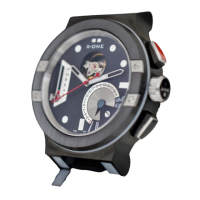

 To Next Page
 General