Need help?
Do you have a question about the X10 XPMT4 and is the answer not in the manual?
Explains the basic principle of how the Mini Timer transmits signals to X10 PRO Modules over house wiring.
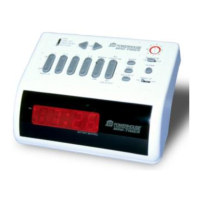
Provides a brief overview of the Mini Timer's keyboard layout and functions before detailed steps.
Step-by-step instructions on programming specific ON/OFF times for modules.
Describes the function of special buttons like Mode, Clear, Wake, and Selector Switch.
Guides on how to set the current time on the Mini Timer using the time rocker.
Details on how to set up and test your X10 PRO Modules for instant control.
Instructions for programming daily timed events for modules.
Modifies a programmed event to occur only one time.
Programs events to occur at slightly different times each day.
Allows users to view or delete existing programmed timer events.
Guidance on what to do when the timer's memory is full.
Explains the function of the selector switch for modules 1-4 or 5-8.
How to use the selector switch for immediate control of modules.
How to enable and use the built-in alarm buzzer with Module 1.
Instructions on how to temporarily suspend the alarm and wake-up features.
Methods to cancel or use the snooze feature for the alarm.
Guide to setting the House Code and Unit Code for Lamp Modules.
Guide to setting the House Code and Unit Code for Appliance Modules.
Troubleshooting steps for when a module won't turn on or off.
Steps to take if the Mini Timer cannot control any modules.
Information on potential interference from intercom systems.
How power outages affect module states and the Mini Timer.
Explanation of the battery backup feature for time and programs.
Information on the low battery indicator and battery replacement.
Overview of available X10 PRO switch and control modules.
Information on adding wireless remotes for home automation.
Details on available plug-in controllers like Touch-Tone and PC control.
Compatibility of Mini Timer modules with X10 Wireless Security Systems.

 To Next Page
 General