Need help?
Do you have a question about the X10 PHT02 and is the answer not in the manual?
Important precautions and considerations before operating the Mini Timer.
Overview of the Mini Timer's features, including wake-up and manual control.
Explanation of signal transmission over house wiring to control X-10 PRO modules.
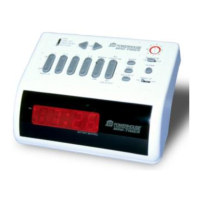
Detailed breakdown of the Mini Timer's keyboard sections and their functions.
Step-by-step guide to setting up timed ON/OFF events for modules.
Explanation of special function buttons like Once, Security, Sleep, and Selector.
Instructions for setting the current time on the Mini Timer.
Steps to ensure proper connection and initial control of X-10 PRO modules.
How to adjust the brightness of connected lights using rocker keys.
Using the 'All Lights On' and 'All Units Off' functions for overall system control.
How to program modules to turn on/off at the same time every day.
Setting a timed event to occur only once, without daily repetition.
Programming events to occur at slightly varying times daily for a live-in effect.
Using the sleep function to turn modules on or off after a set delay.
How to view, confirm, or delete programmed timer events from memory.
Understanding the selector switch for controlling module groups 1-4 or 5-8.
How the selector switch impacts programming for module groups 1-4 and 5-8.
How to enable and configure the wake-up buzzer function.
Methods to stop the alarm buzzer, including snooze and permanent cancel.
How to temporarily disable the alarm and timed events for specific periods.
Diagnosing why individual modules may not respond to rocker key commands.
Troubleshooting steps when no modules respond to the Mini Timer.
Potential interference from intercom systems and mitigation strategies.
How power outages affect module states and the timer's program memory.
Importance of battery backup and procedures for testing battery condition.
Details of the product's warranty coverage, terms, and conditions.
 General
| Model | PHT02 |
|---|---|
| Category | Timer |
| Type | Programmable Timer |
| Protocol | X10 |
| Timer Resolution | 1 minute |
| Battery Backup | Yes |
| Voltage | 120V AC |
| Maximum Load | 15A Resistive, 1/2 HP Motor |
| Number of Events | 8 |
| Weight | 0.5 lbs |


 To Next Page