Need help?
Do you have a question about the Xaar XJ128 Series and is the answer not in the manual?
Provides an overview of the XJ128 printhead, its operation, and the document's structure.
Details crucial safety precautions for using the XJ128 printhead, emphasizing handling and liquid contact.
States terms of use, accuracy, and liability regarding the manual and the XJ128 printhead.
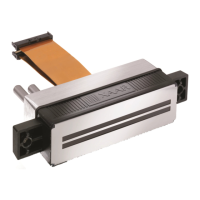
Describes the XJ128 printhead's composition: piezo-based, 128-channel actuator, ink-supply filter, and drive circuitry.
Explains Xaar's patented shear mode, shared wall piezo-based technology used in the printhead.
Covers essential precautions for handling and installing the XJ128 printhead, including ESD and cleanliness.
Highlights the need for ESD precautions when handling static-sensitive Xaar printheads.
Warns about sensitive nozzle plates and the need to avoid contact to prevent performance degradation.
Advises on potential residual fluid in printheads and the need for pre-flushing with specific fluids.
Prohibits connecting/disconnecting the printhead to electrical supply while power is on to prevent damage.
Provides guidelines for storage conditions and shipping to maintain printhead integrity and warranty.
Details the main components of the XJ128 printhead, illustrated with an isometric view.
Describes the actuator's location and function: converting electrical energy into pressure waves for ink ejection.
Identifies the interface for connecting the printhead to the user's external electronics.
Details the ink inlet port and the integral 15µm stainless steel mesh filter for nozzle protection.
Differentiates nozzle plate properties for XJ128/200, XJ128/360 (non-wetting) and XJ128/200 Plus (wetting).
Presents performance specifications for XJ128 models tested under standard operational conditions.
Defines nozzle numbering (1-128) and orientation on the printhead for mechanical integration.
Details care required for printhead mounting, emphasizing nozzle plate protection and load relief.
Specifies recommended printing distance and warns about reduced quality at greater distances.
Emphasizes managing printhead temperature, with a maximum limit of 55°C to prevent damage.
Details the ink inlet port and recommends tubing size and cleanliness for ink supply.
Recommends protecting the printhead from shock and vibration to maintain image quality and life.
Introduces the major electrical control functions and signals for the XJ128 printhead.
Details the function of each signal pin (nSS, VDD, VPPL, VPPH, nFAULT, nRESET, MOSI, etc.).
Specifies the 30-pin AMP™™ connector type and part number for electrical interfacing.
Provides guidelines for proper grounding and isolation of power supplies to prevent damage.
Details the printhead's ICs, interface, and power supply requirements (VDD, VPPH, VPPL).
Lists critical voltage and current ratings; exceeding them can cause permanent damage.
Stresses the importance of correct power supply sequencing for IC protection during power-up/down.
Specifies recommended voltage, current, and clock frequency for reliable printhead operation.
Explains nozzle grouping into three cycles (A, B, C) for synchronized firing.
Defines the bit order and loading sequence for pixel data to the printhead.
Stresses material compatibility for ink system components to ensure printhead longevity and performance.
Covers requirements for using approved inks and proper storage to maintain performance and prevent damage.
Details the integral filter's function and the necessity of primary system filtration for longevity.
Explains the need for negative ink supply pressure to control ink flow and prevent uncontrolled ejection.
Details essential components for a well-designed ink supply system, including reservoir, pump, and filter.
Highlights the importance of adequate system ink filtration to protect the printhead's integral filter.
Covers procedures for cleaning the ink supply system and filling the printhead.
Describes the initial start-up maintenance cycle required before printing.
Explains the critical role of printhead maintenance for performance and reliability.
Outlines different maintenance approaches: operational, short-term, and long-term.
Introduces various techniques for printhead maintenance, referencing specific ink compatibility.
Describes pressure purge for cleaning nozzles and the nozzle plate, detailing pressure and duration.
Explains vacuum purge for cleaning nozzles and the nozzle plate using vacuum application.
Details wiping procedures, applicable only to wetting nozzle plates, to remove fibres and contamination.
Describes vacuum wiping to remove excess ink and contamination without nozzle plate contact.
Describes capping as a protective measure for the nozzle plate during non-operational periods.
Discusses the importance of image processing for print quality, varying with application complexity.
Lists common digital image file formats (TIFF, BMP, JPEG, PSD) used in printing applications.
Mentions software like Adobe Photoshop for image manipulation and RIPs for advanced applications.
Explains colour spaces (RGB, CMYK, CIE LAB) and their relevance to achieving accurate colour reproduction.
Outlines the general workflow for preparing images for printing with the XJ128 printhead.
Provides a flowchart detailing image processing steps from opening to printing.
Explains how image pixel size and resolution affect printed output size and printhead compatibility.
Describes converting image colour spaces (e.g., RGB to CMYK) for printing requirements.
Discusses adjusting ink levels based on substrate and pixel values for optimal print coverage.
Details splitting colour images into component channels (C, M, Y, K) for printhead processing.
Covers methods like dithering and halftone screens for representing grayscale data in monochrome images.
Guides on saving processed images in the correct format (e.g., 1-bit bitmap) for the printer driver.
Explains how mounting angles and image slanting are used to align printed dots.
Describes extracting image data as slanted slices for slanted printheads.
Directs users to relevant sections for troubleshooting printhead issues.
Provides instructions for returning printheads to Xaar, including warranty voidance warnings.
Invites users to provide feedback for improving the manual's usefulness.
Lists contact information for Xaar Technical Support in different regions.
Covers guidelines for disposing of packaging and recycling printhead components.
Details revision history and document changes for the manual.
Lists patents, trademarks, product marking information, copyright, and safety standards.
Discusses CE compliance, ESD testing, and suitability for light industrial environments.
References Appendix D for detailed mechanical drawings of the printhead.
Describes the Xaar flex-cable, its connector, and pin connections for system integration.
 General
| Brand | Xaar |
|---|---|
| Model | XJ128 Series |
| Category | Printer Accessories |
| Language | English |

 To Next Page