Model PA435X Page 9
© 2003 Xantech Corporation
NOTE: You should consider some sort of rear support for rack mounted units when used in mobile applications
or when located in seismically-active areas.
CONNECTING THE PA435X
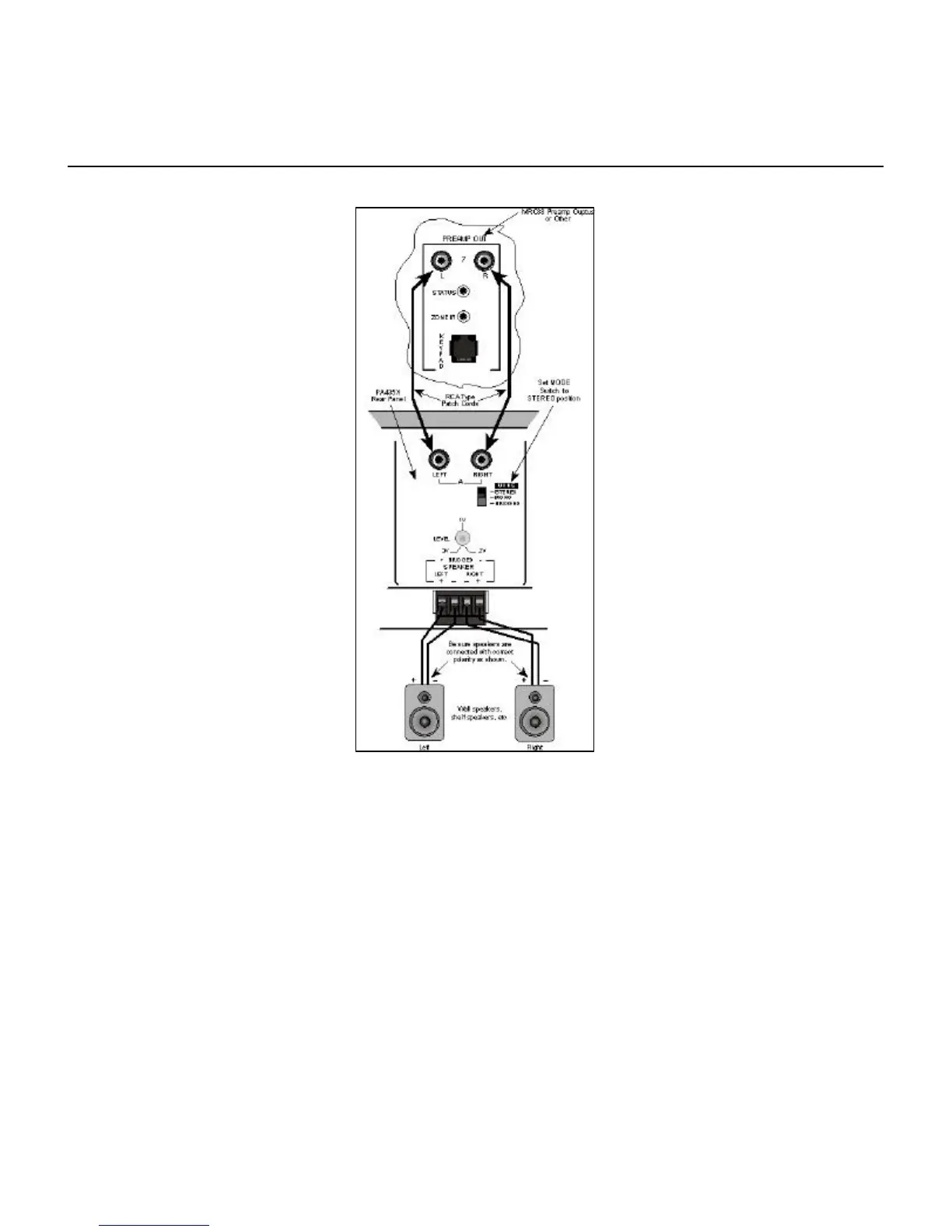
Figure 6 - PA435X Stereo Mode Connections
When making connections to the PA435X be sure the power cord is unplugged. Proceed as follows:
Stereo Mode Connections
1. Using good quality RCA-type patch cables connect the L and R OUTPUT jacks of the MRC88 Pre Amp Output or
other driving preamp to the LEFT and RIGHT input jacks on the PA435X. Do this for each amplifier pair. Refer to
Fig. 6.
2. Slide the MODE switch to the STEREO position.
3. Using good quality speaker wire, connect the individual speaker leads to the 4-terminal "SPEAKER" connectors
on the PA435X as shown.
4. The PA435X is 4-Ohm safe in Stereo Mode. Make sure the impedance presented to the speaker terminals by the
speakers (or any combination of speakers) is 4-Ohms minimum.


 To Next Page