EasyManua.ls Logo

XBOX 360 HDMI - User Manual

XBOX 360 HDMI
6 pages
Print Icon
To Next Page IconTo Next Page
Loading...
Xbox 360 HDMI
10
Game Vol Audio Source
XBOXVoice Vol
X
PS3 XBOX
PC 1 PC 2
Game Vol Audio Source
XBOXVoice Vol
Game Vol Audio Source
XBOXVoice Vol
PC1 = USB Voice Chat
PC2 = 3.5mm (Pink) Voice Chat
Question and Answer IconNeed help?

Do you have a question about the XBOX 360 HDMI and is the answer not in the manual?

Summary

Xbox 360 HDMI Connection

Headset Earcup Safety Warning

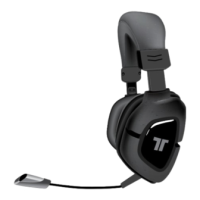
Microphone Insertion

Insert Microphone

Align the small dot on the microphone with the corresponding mark on the headset.

Secure Microphone

Firmly press the microphone into place until it is securely seated.

Rotate Microphone

Rotate the microphone 180 degrees in a clockwise direction.
Summary

Xbox 360 HDMI Connection

Headset Earcup Safety Warning

Microphone Insertion

Insert Microphone

Align the small dot on the microphone with the corresponding mark on the headset.

Secure Microphone

Firmly press the microphone into place until it is securely seated.

Rotate Microphone

Rotate the microphone 180 degrees in a clockwise direction.

XBOX 360 HDMI Specifications

General IconGeneral
BrandXBOX
Model360 HDMI
CategoryHeadsets
LanguageEnglish

Related product manuals