2. Set this unit as COAXIAL/OPTICAL input, use Coaxial/Optical cable to connect
with player or CD which with Coaxial /Optical audio output, playing music,
connect headphone and enjoy it.
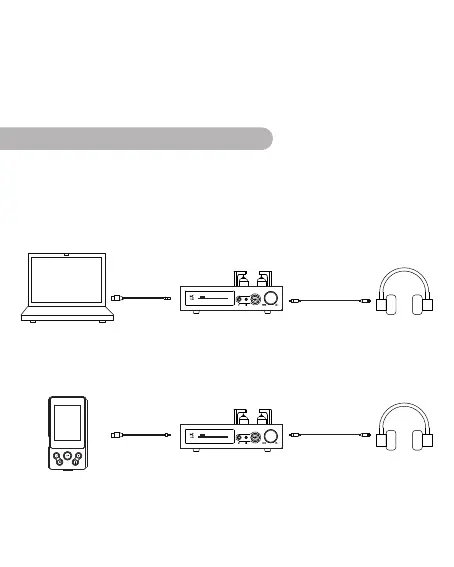
1.Set this unit as USB input, and use the USB cable or OTG cable(if connect
mobile phone), connect to the PC, mobile phone or Hi-Fi player, then connect
headphone, playing music on computer and enjoy it.
*Note: When you connect the phone for the first time, you need to set the
volume of the phone to maximum, otherwise there will be no sound output.
ConnectingtotheAudioDevice
11.2 8MHz
USB 47KCUT GAIN =H
DSD
5.64 MHz
COAXIAL
47KCUT GAIN =H
DSD
11.Size:26.0*21.0*14cm
12.Weight:3kg
10.Suitable Earphone Impedance:16Ω~600Ω
13.Accessories:AC Cable *1、USB Cable*1、User's Manual *1、Warranty Card *1、
6.5 to 3.5 converter


 To Next Page