
 Need help?
Do you have a question about the Xiaomi AW300 and is the answer not in the manual?
Lists all items included in the product package for setup and usage.
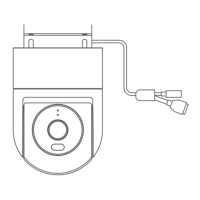
Instructions on powering on the camera, including connecting the power cord and using waterproof tape.
Guide on connecting the camera to the Mi Home/Xiaomi Home app for control and smart home integration.
Explains indicator light meanings for connection and operation status.
Detailed steps for inserting a microSD card into the camera for storage.
Instructions on performing a factory reset by holding the reset button.
Information on the proper disposal of electronic waste according to WEEE directive.
States compliance with EU directives for the radio equipment.
Warning about potentially hazardous optical radiation from the product's operating lamp.
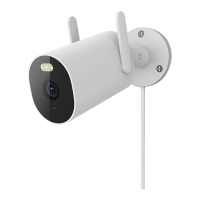
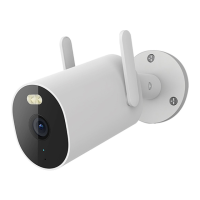
The Xiaomi Outdoor Camera AW300 is a sophisticated outdoor surveillance device designed to provide comprehensive monitoring and security for your property. This user manual outlines its features, usage, and maintenance to ensure optimal performance and longevity.
The Xiaomi Outdoor Camera AW300 serves as a robust outdoor security camera, capable of capturing high-quality video footage to monitor your surroundings. It is equipped with advanced features for both day and night surveillance, ensuring continuous protection. The camera integrates seamlessly with the Mi Home/Xiaomi Home app, allowing for remote control and interaction with other smart home devices within the Xiaomi ecosystem. Its primary function is to provide real-time video feeds, record events, and offer peace of mind through reliable outdoor monitoring. The inclusion of night vision capabilities, supported by IR lights and LED spotlights, ensures clear visibility even in low-light conditions.
To begin using the Xiaomi Outdoor Camera AW300, the first step is to properly power it on. After plugging in the power cord, it is crucial to wrap the power port with the provided waterproof tape. This measure is essential to prevent water ingress into the port, ensuring the camera's durability and safe operation in outdoor environments.
Connecting the camera to the Mi Home/Xiaomi Home app is a straightforward process that unlocks its full potential. The camera is designed to work exclusively with 2.4 GHz Wi-Fi networks; 5 GHz networks are not supported. Users can download the Mi Home/Xiaomi Home app by scanning the QR code provided in the manual or by searching for it in their respective app stores. Once installed, open the app, tap the "+" icon in the upper right corner of the home page to enter the device adding page, and then scan the QR code located on the camera. Follow the in-app instructions to complete the connection. The camera's indicator light will blink orange while awaiting connection, turn blue when connecting, and remain solid blue once successfully connected. If a network connection error occurs, the indicator will turn orange. During an OTA update, it will blink blue.
Installing a microSD card is recommended for local storage of video footage. To do this, remove the protective cover with a screwdriver to expose the microSD card slot and the reset button. Insert the microSD card with its contact points facing the reset button, pressing gently until it is secured. After insertion, tighten the protective cover with a screw to prevent water ingress, maintaining the camera's waterproof integrity.
The physical installation of the camera involves a few key steps to ensure proper positioning and stability. First, paste the mounting template sticker onto a suitable wall position. Then, drill holes on the wall that align with the template, with a diameter of approximately 6 mm and a depth of about 35 mm. Install the provided wall plugs into these drilled holes. Finally, mount the camera's base to the wall using the screws.
Once mounted, the camera's angle can be adjusted for optimal viewing. Loosen the angle adjustment screw on the base to manipulate the camera's position. The adjustable rod allows for a 0°–360° rotation, while the ball joint offers 0°–360° pan and 0°–90° tilt adjustments. After achieving the desired angle, re-tighten the angle adjustment screw to secure the camera in place. It is important to adjust the camera antenna angle according to actual needs to obtain a better signal. When installing, ensure the speaker faces downwards to prevent water accumulation in the sound cavity, which could affect sound quality after rain.
The camera features an indicator light, a microphone for audio capture, a speaker for two-way communication, and a spotlight for enhanced visibility and deterrence. The reset button, located near the microSD card slot, allows users to restore factory settings by pressing and holding it for 10 seconds.
The Xiaomi Outdoor Camera AW300 is designed with durability in mind, boasting an IP66 dustproof and waterproof rating. However, certain precautions are necessary to ensure its long-term performance. It is crucial to avoid using the camera in extremely humid environments or locations prone to water ingress, as this could compromise its electronic components despite its rating.
The operating temperature range for the camera is -30°C to 60°C. Do not use the camera in environments with temperatures outside this specified range, as extreme temperatures can negatively impact its functionality and lifespan. Similarly, the power adapter, which is not waterproof and intended for indoor use only, has an operating temperature range of -30°C to 45°C. Ensure the power adapter is used within its specified temperature range and kept away from humid conditions. Always use the original power adapter provided by the manufacturer to prevent compatibility issues and potential damage.
To optimize image quality, avoid placing the camera's lens directly facing or next to reflective surfaces such as glass windows or white walls. Reflective surfaces can cause areas close to the camera to appear overly bright while making distant areas darker, hindering clear surveillance.
For reliable Wi-Fi connectivity, install the camera in an area with a strong Wi-Fi signal. Keep the camera away from microwave ovens and other devices or locations that might interfere with its Wi-Fi signal, as this can lead to unstable connections or signal loss.
The camera should be kept away from fire or other heat sources to prevent damage to its internal components. A normal operational characteristic of the camera is a slight clicking sound when the infrared cut-off filter switches, which occurs when enabling or disabling night vision. This is not an indication of a fault.
In case of any issues or to reset the camera's configuration, the factory settings can be restored by pressing and holding the reset button for 10 seconds. This can be useful for troubleshooting or reconfiguring the device. Always ensure the protective cover of the microSD card slot is tightened with a screw before use to prevent water ingress, which is a critical step for maintaining the camera's waterproof integrity in outdoor conditions.
 General
| Resolution | 2560x1440 |
|---|---|
| Video Resolution | 2560x1440 |
| Wireless Connectivity | Wi-Fi IEEE 802.11b/g/n 2.4GHz |
| Effective Pixels | 4MP |
| Image Resolution | 2560x1440 |
| Storage Media | MicroSD |


 To Next Page