How to Use
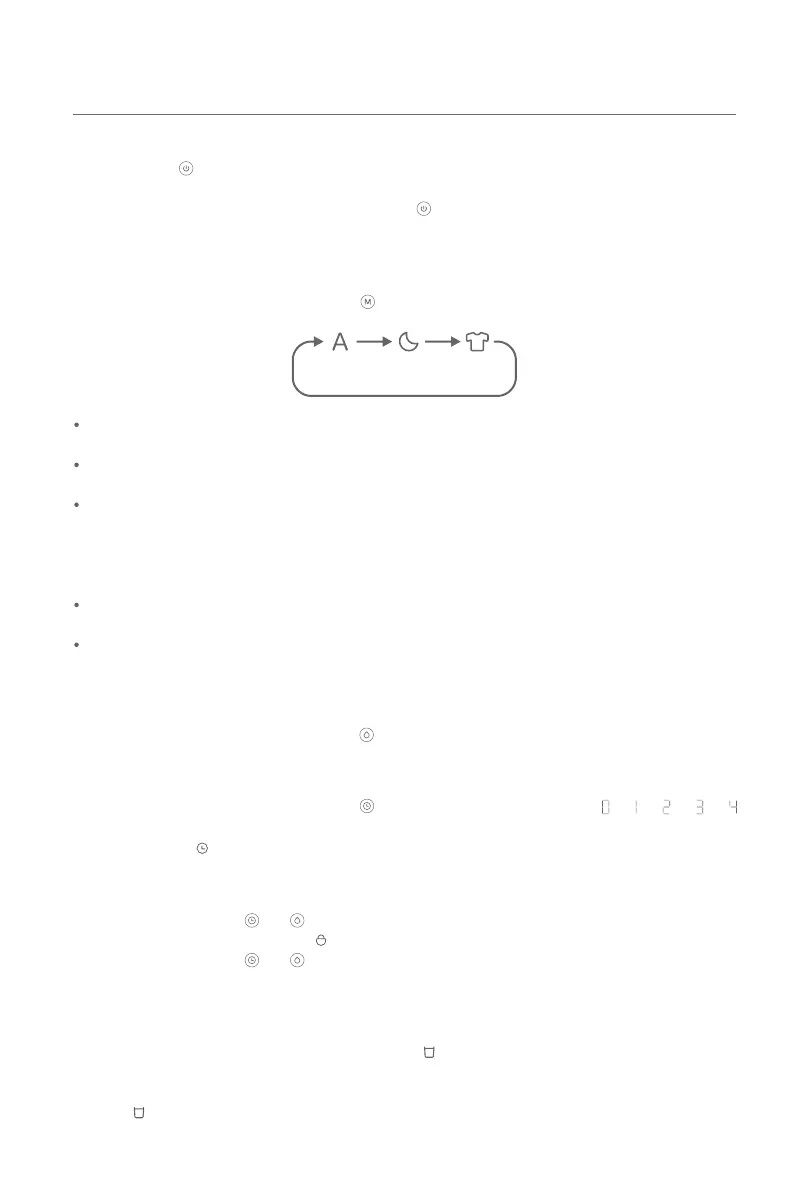
On/Off Buon
Press the buon to turn the dehumidifier on or off.
Note: The dehumidifier will dry for 40 minutes by default aer being turned off. It will turn off automatically
once it has finished drying, or you can press the buon during drying to turn it off manually. This function
can be disabled in the app.
Humidity Seing Buon
When the dehumidifier is on, press the buon to cycle through humidity seings: 40%→50%→60%→70%.
Timer Buon
When the dehumidifier is on, press the buon to cycle through the turn-off times: → → → →
hours. Once the desired turn-off time is selected with no operation for 5 seconds, the timer will automatically
be set and the icon will appear on the display.
Enabling/Disabling the Child Lock
Press and hold the buons and simultaneously for 7 seconds to enable the child lock. Once it is
enabled, the display will show the icon and the dehumidifier will not respond to buon operations.
Press and hold the buons and for 7 seconds again to disable the child lock.
Water Full Alert
When the dehumidifier is running, if the water tank gets too full or is not correctly installed, the dehumidifier
will beep 5 times as an alert, and the water full indicator will continuously blink (on for 0.5 seconds and
off for 0.5 seconds). All buons except for the on/off buon cannot function. Once the water level in the
tank returns to normal or the water tank is secured properly in place, the alert will stop and the water full
indicator will go out.
13
Mode Buon
When the dehumidifier is on, press the buon to cycle through three modes of smart, sleep, and clothes
drying.
Smart Mode
Sleep Mode
Clothes
Drying Mode
Smart mode: The dehumidifier will automatically adjust its seings and fan speed based on the room's
humidity level and the expected humidity that you set.
Sleep mode: The dehumidifier will start and stop automatically at a low fan speed based on the room's
humidity level and the expected humidity that you set.
Clothes drying mode: The dehumidifier will run continuously at a high speed, delivering powerful
dehumidifying performance. In this mode, the humidity cannot be set. For optimal drying effect, it is
recommended to spin-dry the clothes first and then continue to dry clothes by using this mode in an
enclosed room.
Notes:
When the dehumidifier is turned on for the first time, the default mode is smart mode and the humidity is
50% by default.
The dehumidifier is running very low noise, so the differences in noise level among the three modes are
not obvious. This is normal.


 To Next Page