Reseing the Wi-Fi
Press and hold the buons and simultaneously for 7 seconds to reset the Wi-Fi connection.
Wi-Fi Status Description
Wi-Fi Icon
Awaiting connection
Connecting
Connected
Description
Blinks slowly
Blinks quickly
Remains on
Humidity Status Indicator
Orange: Dry, relative humidity < 30%.
Cyan: Comfortable, 30% ≤ relative humidity ≤ 70%.
Blue: Humid, relative humidity > 70%.
Auto-defrost Function
When the dehumidifier is running, it will automatically defrost if it gets covered in frost. The compressor will
stop operating and the fan will continue to run until the defrosting is complete. When the defrosting is in
process, the icon will blink on the display. Once the defrosting is finished, the icon will stop blinking and
the dehumidifier will start running normally again.
Drying Function
Once the dehumidifier has been turned off, the fan will continue to run at the speed of the sleep mode for
40 minutes to speed up the water evaporation inside the dehumidifier. Drying can help reduce the possibility
of bacteria buildup in a humid environment. Since the humidity sensor may be affected by residual water
vapor inside the dehumidifier aer the dehumidifier is turned off, drying can also ensure that the humidity
value detected by the sensor is not higher than the actual humidity. It is recommended to enable this
function.
Continuous Water Drainage
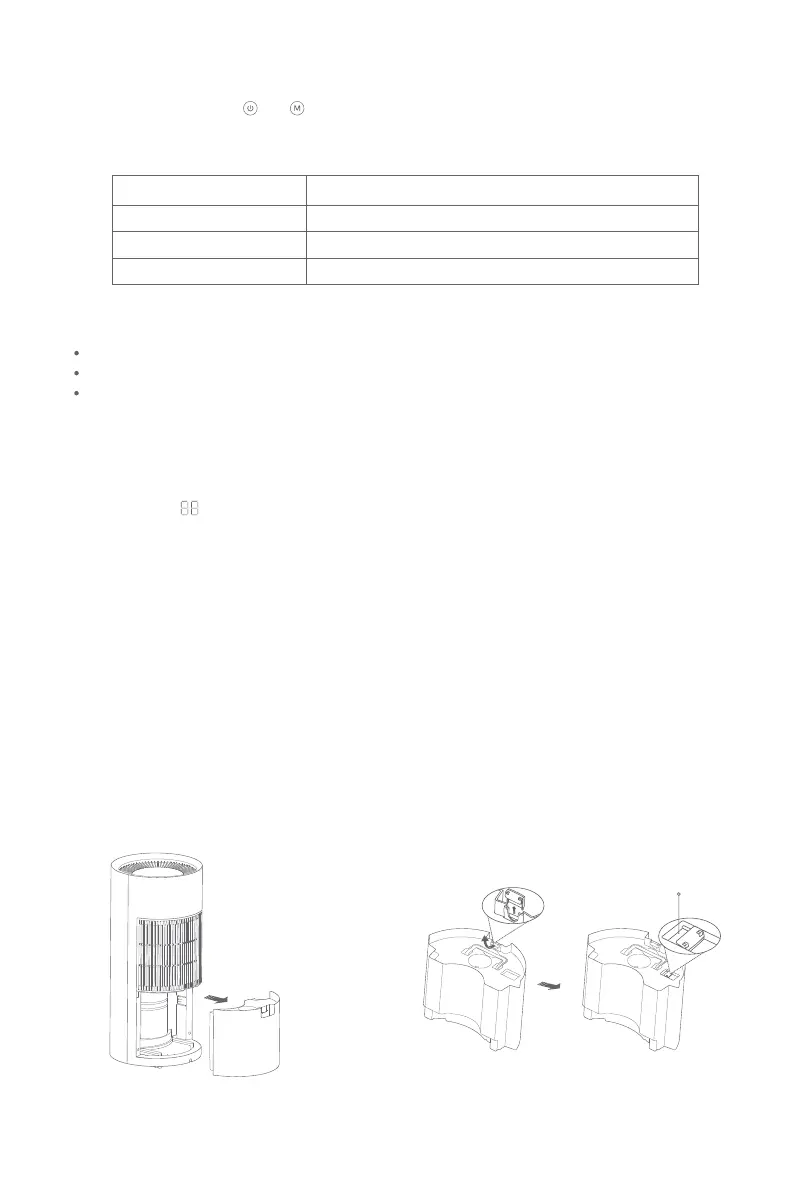
1. Pull the water tank out horizontally from
the opening at the top of the water tank.
Baffle Board
2. Remove the baffle board from the water tank,
and secure it onto the cover so the board does
not get lost.
14


 To Next Page