623E5198
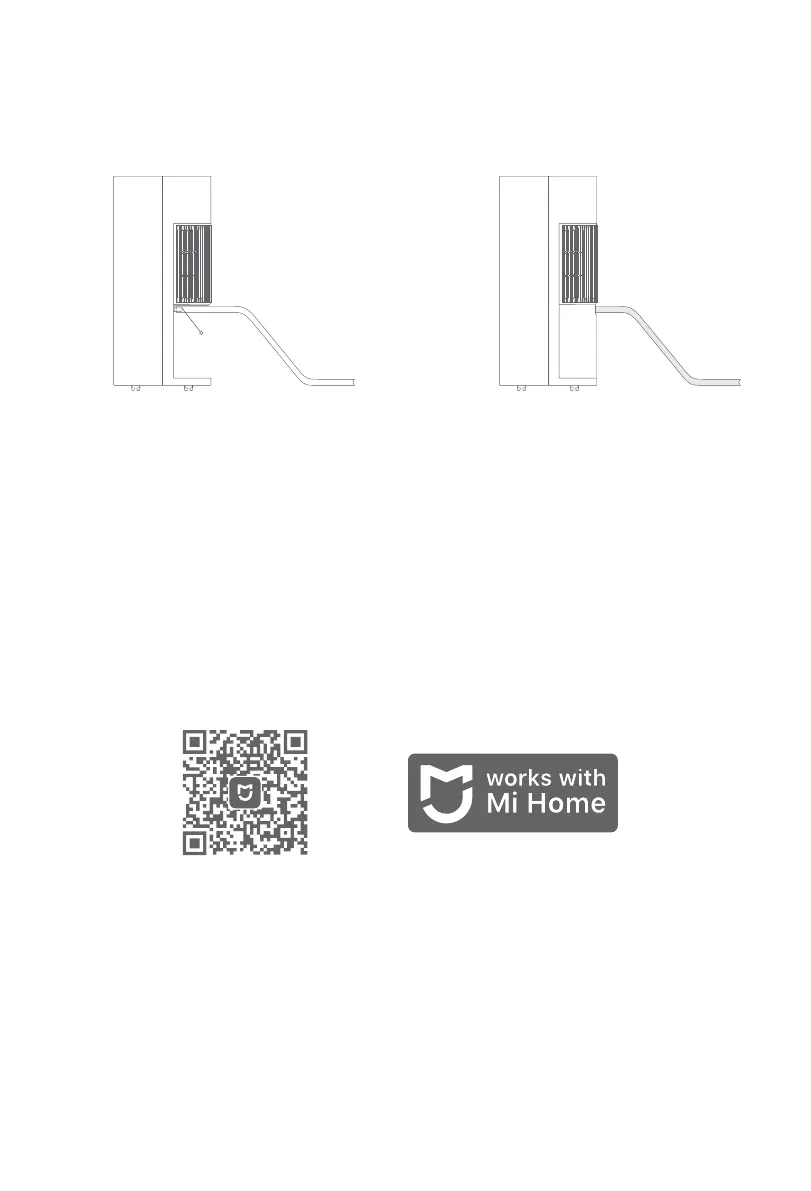
Note: When using the function of continuous water drainage, the end of the drainage hose should be lower
than the dehumidifier's water outlet to ensure the water can be drained away successfully. Make sure the
hose hangs down smoothly without being wavy and is not overly bent.
Water Outlet
3. Connect the drainage hose to the water
outlet.
4. Reinstall the water tank and connect the
other end of the drainage hose to the drainage.
Then the dehumidifier can drain water
automatically.
Connect with Mi Home/Xiaomi Home App
This product works with Mi Home/Xiaomi Home app *. Use the Mi Home/Xiaomi Home app to control your
device, and to interact with other smart home devices.
Scan the QR code to download and install the app. You will be directed to the connection setup page if the
app is installed already. Or search "Mi Home/Xiaomi Home" in the app store to download and install it.
Open Mi Home/Xiaomi Home app, tap "+" on the upper right, and then follow prompts to add your device.
* The app is referred to as Xiaomi Home app in Europe (except for Russia). The name of the app displayed
on your device should be taken as the default.
Note: The version of the app might have been updated, please follow the instructions based on the current
app version.
15


 To Next Page