5
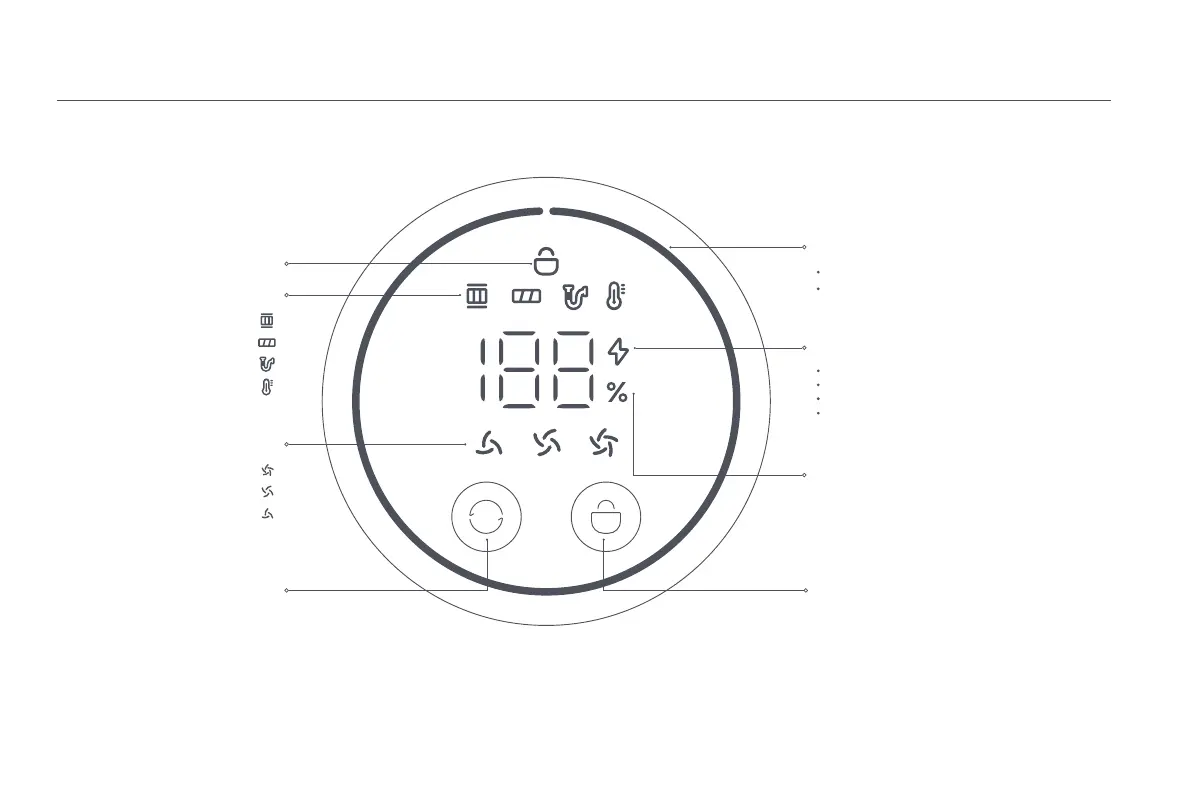
Display Screen
Note: If the vacuum cleaner experiences a malfunction, the display screen will show an error message. For a solution, please refer to the Troubleshooting section.
Lock/Unlock Status
Battery Level Indicator
Electronic Lock Button
Charging/Low Battery Level Indicator
Battery Level Percentage
The indicator displays the remaining battery.
When the battery level is lower than 10%, the
indicator will change from green to red.
Error Message
Modes
Suction Level Button
Blinking red: Battery level ≤ 10%
Green: Battery level > 10%
Pulsing red: Battery level ≤ 10% (charging)
Pulsing green: Battery level > 10% (charging)
When the display shows "LO", it indicates that the
battery level is lower than 10%.
Filter Not Installed
Roller Brush Stuck
Airway Blocked
High-temperature Alert
High Power
Standard
Eco
Press to enable/disable the continuous mode
Press to switch the suction levels






 To Next Page