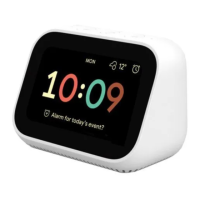
The Xiaomi Temperature and Humidity Monitor Clock is a versatile device designed to display time, temperature, and humidity, while also offering smart connectivity features. This user manual provides a comprehensive overview of its functions, installation, usage, maintenance, and troubleshooting.
Function Description
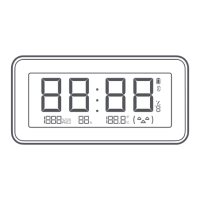
The primary function of the Xiaomi Temperature and Humidity Monitor Clock is to provide real-time readings of temperature and humidity, alongside the current time. It features a clear digital display that shows these parameters, along with additional symbols for low battery, data transfer, and comfort level. The device is designed to be user-friendly and can be integrated into a smart home ecosystem through the Mi Home/Xiaomi Home app.
Important Technical Specifications
- Name: Xiaomi Temperature and Humidity Monitor Clock
- Model: LYWSD02MMC
- Materials: ABS + PC
- Item Dimensions: 110 × 55 × 10.1 mm
- Net Weight: 57 g
- Rated Voltage: 3 V
- Battery Type: CR2032 (two required, purchased separately)
- Wireless Connectivity: Bluetooth® 5.0 (Bluetooth Low Energy)
- Operation Frequency: 2402-2480 MHz
- Maximum Output Power: 4 dBm
- Time Resolution: 1 min
- Temperature Range: 0°C to 60°C
- Temperature Resolution: 0.1°C
- Humidity Range: 0-99% RH
- Humidity Resolution: 1% RH
The device's SN code contains digits (8th to 10th) that represent the factory code.
Usage Features
The Xiaomi Temperature and Humidity Monitor Clock offers flexible installation options and smart connectivity:
Installation:
- Battery Installation: Remove the cover from the back of the clock. Insert two CR2032 batteries (negative side down). Reinstall the cover. It is crucial to connect the clock to the Mi Home/Xiaomi Home app for the first time to ensure automatic time calibration.
- Placement Options:
- Using the Stand: Remove the release liner from the stand, align it with the guide marks on the back of the clock, and press firmly to stick it. The clock can then be placed on a desk, TV cabinet, or any other flat surface.
- Using the Adhesive Sticker: Remove the release liner from one side of the adhesive sticker and stick it to the back of the clock. Then, remove the release liner from the other side and stick the clock to a wall.
- Using the Flexible Magnet: Remove the release liner from the flexible magnet and stick it to the back of the clock. The clock can then be attached to any magnetic surface, such as a refrigerator.
The display shows:
- Time: Current time.
- Humidity: Current relative humidity percentage.
- Temperature: Current temperature in Celsius.
- Low Battery Symbol: Indicates when batteries need replacement.
- Data Transfer Symbol: Appears during data transfer.
- Comfort Level Symbol: An emoji-based indicator of comfort level based on temperature and humidity:
- Less than 20% Humidity:
- Less than 19°C: (-^-)
- Between 19°C and 27°C: (^_^ )
- More than 27°C: (-^-)
- Between 20% and 85% Humidity:
- Less than 19°C: (-^-)
- Between 19°C and 27°C: (^_^ )
- More than 27°C: (-^-)
- More than 85% Humidity:
- Less than 19°C: (-^-)
- Between 19°C and 27°C: (-^-)
- More than 27°C: (-^-)
Refresh Notification:
To maintain display quality and prevent after-images, the display will blink (colors inverted) every 30 minutes to refresh.
Low Battery Notification:
A low battery symbol will appear in the top right corner of the display when the batteries need to be replaced.
Smart Connection:
- Mi Home/Xiaomi Home App: The device connects to the Mi Home/Xiaomi Home app (referred to as Xiaomi Home app in Europe, except Russia). Users can download the app by scanning a QR code or searching for "Mi Home/Xiaomi Home" in the app store. After opening the app, tap "+" on the upper right and follow the prompts to add the device. The app automatically calibrates the time upon successful connection.
- Connecting with Other Devices: Once connected to the app, users can access the Xiaomi Temperature and Humidity Monitor Clock plugin and select "Smart scenes" to set up smart connections with other devices.
- Notes on Smart Connection:
- Smart connection requires devices with Bluetooth gateway functionality, which must be purchased separately.
- App versions may vary, so users should follow instructions based on their current app version.
Restoring Factory Settings:
To restore factory settings, remove the back cover. While the clock is working, use a metal conductive material to connect the "Reset" and "Gnd" metal points near any battery for more than 7 seconds. The clock will restart, and factory settings will be restored.
Maintenance Features
- Cleaning: Prevent water from entering the clock. For a dirty surface, wipe with a damp soft cloth and a neutral detergent.
- Precautions:
- Do not submerge ventilation holes in water.
- Avoid forcefully removing the clock from a wall if attached with an adhesive sticker to prevent damage.
- Not suitable for temperatures below 0°C.
- Keep away from harsh environments with high temperatures or humidity.
- Designed for lifestyle facilitation, not as a precise measuring tool.
Troubleshooting
- Display stops refreshing:
- Possible Cause: Battery is depleted.
- Solution: Replace the battery.
- Possible Cause: Wrong connection of battery negative and positive sides.
- Solution: Reinstall the battery.
- Time is inaccurate:
- Possible Cause: No calibration for an extended period of time.
- Solution: Calibrate the time via Mi Home/Xiaomi Home app.
- Temperature and humidity are inaccurate:
- Possible Cause: Ventilation holes are blocked.
- Solution: Clear any blockage.
- Possible Cause: Water gets into the ventilation holes.
- Solution: Place in a well-ventilated location or use tissue paper to thoroughly dry out.


 To Next Page
 General