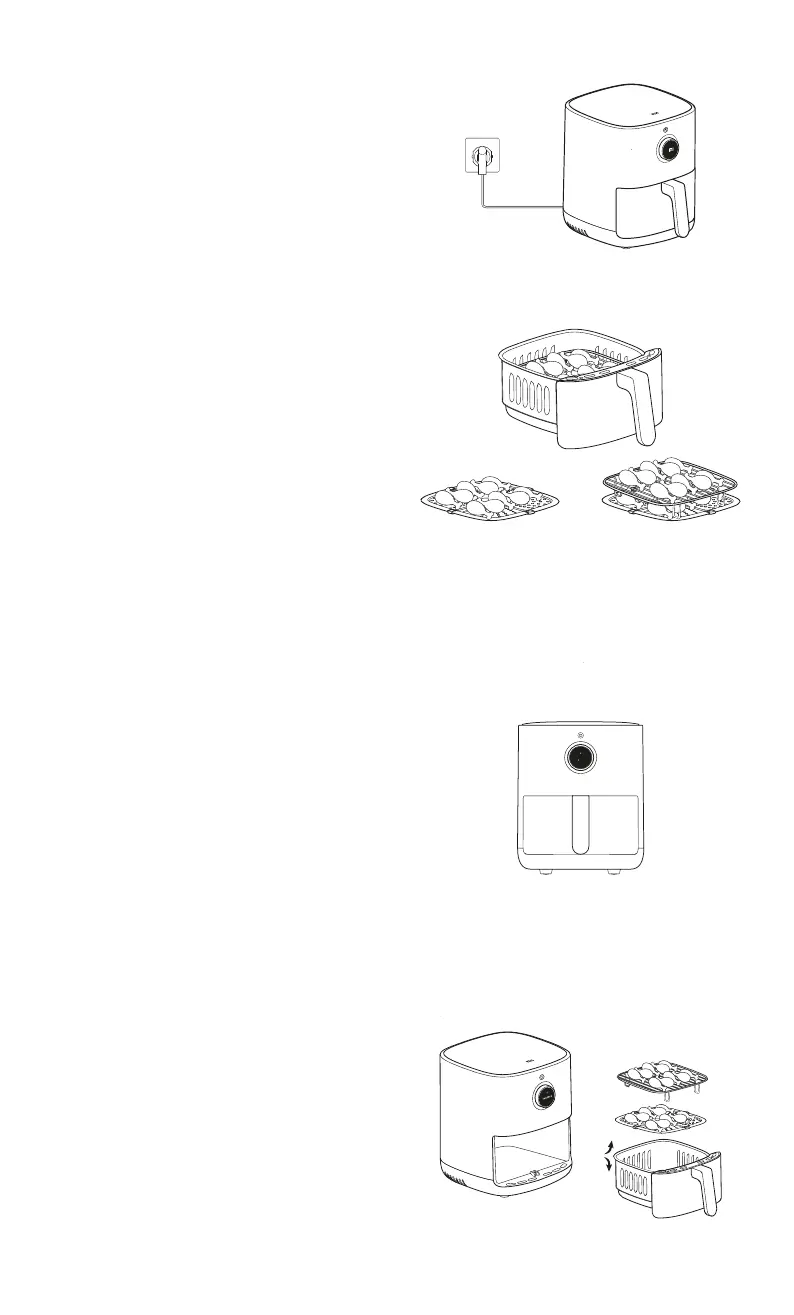
4. Some ingredients need to be turned over
during cooking, please follow the air fryer's
instructions and pull out the basket to turn
over the ingredients, then place the basket
completely back into the air fryer and press
the control knob to continue cooking.
2. Place the frying plate into the basket and
add the ingredients one by one. If there are
more ingredients, use the grill to place them
in two layers.
Note: Stacking ingredients without using the grill will aect
the cooking.
reyal elbuoDreyal elgniS
1. Place the air fryer on a stable, level surface
and ensure that there is air circulation
around the air fryer.
Starting a cooking program
3. Once the basket is completely inserted into
the air fryer, press the power button to turn it
on, and turn the control knob to select the
menu for the corresponding cooking program
and press the control knob to confirm. Then
press the control knob to select the amount
of ingredients (single layer/half/full/double
layer), and finally press the control knob to
confirm and start cooking.
Notes:
2. Once you turn the control knob to adjust the cooking
time or temperature, you need to press the control knob
to confirm, otherwise it will continue to cook at the
original time and temperature after five seconds.
1. The cooking time and temperature can be adjusted by
turning the control knob during cooking.
Half
Full
Quantity



 To Next Page