EasyManua.ls Logo

Xiaomi MAF02 - User Manual

Xiaomi MAF02
9 pages
Print Icon
To Next Page IconTo Next Page
Loading...
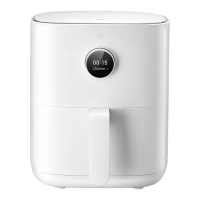
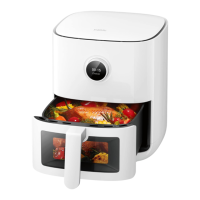
Mi Smart Air Fryer (3.5L)
User Manual
Question and Answer IconNeed help?

Do you have a question about the Xiaomi MAF02 and is the answer not in the manual?

Summary

Safety Instructions

General Safety Precautions

General safety precautions for using the air fryer, including warnings for children, electrical safety, and usage conditions.

Usage Restrictions and Warnings

Restrictions on air fryer usage, such as blocking vents, modifying wiring, using unauthorized fuels, and handling the power cord.

How to Use: Powering On and Off

How to Use: Connecting to Mi Home App

Starting a Cooking Program

Maintenance and Cleaning

Repair and Service Contact Information

Information on who should perform repairs and when to contact customer service for abnormal air fryer behavior.

General Cleaning Precautions

Precautions for cleaning and maintaining the air fryer, including unplugging, cooling, and avoiding abrasive materials.

Cleaning Precautions

Post-Use Cleaning Guidelines

Guidelines for cleaning after use, including unplugging, avoiding fire sources, water immersion, and proper plug placement.

Cleaning Material Restrictions

Restrictions on using abrasive or corrosive cleaning materials and detergents to maintain the air fryer's service life.

Troubleshooting

Common Issues and Solutions

Table listing common issues, causes, and solutions for troubleshooting the air fryer.

Specifications

Product Technical Specifications

Technical specifications of the Mi Smart Air Fryer, including capacity, power, voltage, dimensions, weight, and wireless connectivity.

Summary

Safety Instructions

General Safety Precautions

General safety precautions for using the air fryer, including warnings for children, electrical safety, and usage conditions.

Usage Restrictions and Warnings

Restrictions on air fryer usage, such as blocking vents, modifying wiring, using unauthorized fuels, and handling the power cord.

How to Use: Powering On and Off

How to Use: Connecting to Mi Home App

Starting a Cooking Program

Maintenance and Cleaning

Repair and Service Contact Information

Information on who should perform repairs and when to contact customer service for abnormal air fryer behavior.

General Cleaning Precautions

Precautions for cleaning and maintaining the air fryer, including unplugging, cooling, and avoiding abrasive materials.

Cleaning Precautions

Post-Use Cleaning Guidelines

Guidelines for cleaning after use, including unplugging, avoiding fire sources, water immersion, and proper plug placement.

Cleaning Material Restrictions

Restrictions on using abrasive or corrosive cleaning materials and detergents to maintain the air fryer's service life.

Troubleshooting

Common Issues and Solutions

Table listing common issues, causes, and solutions for troubleshooting the air fryer.

Specifications

Product Technical Specifications

Technical specifications of the Mi Smart Air Fryer, including capacity, power, voltage, dimensions, weight, and wireless connectivity.

Overview

The Mi Smart Air Fryer (3.5L) is a household appliance designed for cooking food with hot air, offering a healthier alternative to traditional frying methods. It features a user-friendly interface with a control knob and a display screen, making it easy to operate and monitor cooking progress. The device is equipped with safety features and designed for efficient heat distribution to ensure even cooking.

Function Description

The primary function of the Mi Smart Air Fryer is to cook food using circulating hot air, which allows for frying, roasting, and baking with little to no oil. This process results in crispy textures similar to deep-frying but with significantly less fat. The air fryer includes a basket, a frying plate, and a grill, providing versatility for various types of ingredients and cooking styles. The basket is where food is placed for cooking, while the frying plate and grill offer options for single-layer or double-layer cooking, accommodating different quantities of food.

The device operates by drawing air through an air inlet, heating it with a heating element, and then circulating the hot air around the food in the basket using a high-speed motor and fan. The air outlet and heat dissipation vents ensure proper airflow and prevent overheating. A safety switch is integrated to ensure the appliance only operates when the basket is correctly in place.

The Mi Smart Air Fryer can be controlled manually or through pre-set cooking programs. It also offers smart connectivity features, allowing users to control the device via the Mi Home/Xiaomi Home app. This app integration enables remote control, access to additional recipes, and interaction with other smart home devices.

Usage Features

The Mi Smart Air Fryer is designed for ease of use, from initial setup to cooking and smart integration.

Turning On/Off: To turn on the air fryer, simply connect the power cord and press the power button. To turn it off, press the power button again, regardless of its current state.

Control Knob Operations: The control knob is central to navigating the air fryer's functions:

  • Confirmation: Press the knob to confirm a selection.
  • Return to Previous Menu: Press and hold the knob for 0.5 seconds to go back to the previous menu.
  • Changing Functions/Values: Turn the knob left or right to scroll through options or adjust settings like cooking time and temperature.
  • Power On/Off: The power button is also integrated into the control knob, allowing for a single point of interaction for basic power control.

Starting a Cooking Program:

  1. Placement: Place the air fryer on a stable, level, heat-resistant surface, ensuring adequate air circulation around it.
  2. Loading Ingredients: Insert the frying plate into the basket, then add ingredients. For larger quantities, use the grill to create two layers, preventing overcrowding and ensuring even cooking. Stacking ingredients without the grill can affect cooking quality.
  3. Program Selection: Once the basket is fully inserted and the air fryer is on, turn the control knob to select a cooking program from the menu. Press the knob to confirm.
  4. Ingredient Amount: Select the amount of ingredients (e.g., single layer, half, full, double layer) and press the knob to confirm and start cooking.
  5. Adjustments During Cooking: Cooking time and temperature can be adjusted by turning the control knob during the process. Confirm any changes by pressing the knob; otherwise, the original settings will resume after five seconds.

Turning Over Food: For many recipes, especially those with longer cooking times (over 8 minutes, excluding cakes and dried fruits), the air fryer will prompt the user to turn over or shake the food. "Please shake the food" will blink on the display, accompanied by three beeps. Users should pull out the basket, turn or shake the food, then reinsert the basket completely and press the control knob to continue cooking.

Program Completion: Upon completion of a cooking program, the air fryer will beep, and "Program completed" will appear on the display. The basket will be very hot, so clamps should be used to remove the food carefully to avoid scalding.

Other Operations:

  • Language Settings: Access language settings through the control knob, select the desired language, and confirm.
  • Manual Mode: In standby, select manual mode to set desired cooking temperature and time using the control knob, then press to start.
  • Scheduled Cooking: The schedule function allows users to set a completion time, cooking program, temperature, and time. The air fryer will then complete the cooking program by the scheduled time. The scheduled time cannot be shorter than the actual cooking time.

Pausing and Stopping:

  • Pausing: Press the control knob to pause an ongoing cooking program. Press it again to resume.
  • Stopping: Press and hold the control knob for 0.5 seconds. The display will ask for confirmation to cancel the program. Select "Yes" or "No" using the control knob. If cancelled, the air fryer enters standby mode.

Wi-Fi Connectivity: The air fryer supports Wi-Fi connectivity, enabling smart features through the Mi Home/Xiaomi Home app.

  • Enabling/Disabling Wi-Fi: In the "Wi-Fi" screen, use the control knob to select "Enable/Disable Wi-Fi" and confirm.
  • Resetting Wi-Fi: In the "Wi-Fi" screen, select "Reset Wi-Fi" and confirm.
  • App Connection: Scan a QR code to download the Mi Home/Xiaomi Home app, or search for it in an app store. Open the app, tap "+" to add the device, and follow the prompts. The app allows for remote control and integration with other smart home devices. The Wi-Fi indicator provides status updates (blinking slowly for awaiting connection, quickly for reconnecting, continuously on for connected, blinking twice for updating). If not connected within 30 minutes, the Wi-Fi indicator turns off.

Maintenance Features

Proper cleaning and maintenance are crucial for extending the lifespan of the Mi Smart Air Fryer and ensuring safe operation.

General Precautions:

  • Always unplug the power cord before cleaning or maintenance.
  • Allow the air fryer to cool down to room temperature or a safe temperature before handling.
  • Do not immerse the air fryer in water or place it near a fire source.
  • Avoid placing the power plug directly on the air fryer to prevent scratching.
  • Do not use corrosive or abrasive cleaning materials or detergents, as these can damage the appliance.

Cleaning Specific Parts:

  • Air Fryer Surface: Wipe the exterior with a dry, soft cloth or a sponge moistened with a neutral cleaning detergent.
  • Cavity (Inside): For stubborn stains, apply a suitable amount of detergent diluted in hot water to the cavity surface and let it sit for about 10 minutes. Then, use a soft sponge moistened with water to wipe away detergent residue.
  • Basket: Clean the basket after each use. The basket has a coating, so avoid using steel wool or other abrasive cleaning materials that could damage it.
  • Frying Plate/Grill: These can be cleaned with a soft, cotton cloth or sponge moistened with neutral detergent, followed by a water-moistened cloth to remove residue.

Dishwasher Compatibility: The basket, frying plate, and grill are detachable and can be safely cleaned in a dishwasher. However, the main air fryer unit itself cannot be washed in water or cleaned in a dishwasher.

Troubleshooting: The manual provides a troubleshooting guide for common issues, such as the air fryer not functioning, display errors, fan not rotating, white smoke, difficulty inserting the basket, schedule function problems, and Wi-Fi connectivity issues. This guide helps users identify possible causes and solutions before contacting customer service. Only professionally trained technicians should repair the air fryer to avoid serious consequences. If issues persist, unplug the device and contact after-sales service.

Xiaomi MAF02 Specifications

General IconGeneral
CategoryFryer
ModelMAF02
Capacity3.5L
Rated Voltage220-240V
Rated Power1500W
Power1500W
Rated Frequency50-60Hz
Frequency50-60Hz
App SupportYes, Mi Home app
Temperature Range40-200°C
TimerUp to 24 hours
Weight3.9 kg
MaterialPlastic, metal
Temperature ControlAdjustable
Non-stick CoatingYes
ConnectivityWi-Fi
Safety FeaturesOverheat protection

Related product manuals