07
CAUTIONS:
○The wall must be able to support at least three times the total weight of the camera.
○To prevent possible injury, the camera must be securely fixed to the wall according to the
installation instructions.
○Do not install near a heat source, such as an outdoor air conditioning unit, range hood outlet, or
gas water heater outlet.
Installing the waterproof network port accessories
E-1-1. Sealing Ring
E-2-1. Network Cable
E-2-2. Waterproof Sleeve
E-2-3. Stopper
E-2-4. Waterproof Rear
Cover
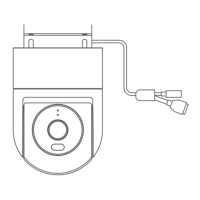
The waterproof network port accessories include: sealing ring, waterproof sleeve, stopper,
and waterproof rear cover. Once installed, the network port’s waterproof performance will be
improved. Place the sealing ring on the camera's network port (Fig. E-1). Thread the waterproof
rear cover, stopper, and waterproof sleeve over the network cable in order (Fig. E-2), then plug the
network cable into the port. Screw together the waterproof sleeve and sealing ring, then screw
together the waterproof rear cover and waterproof sleeve (Fig. E-3).
When network cable is not used, please still install the waterproof network port accessories.
Please use a shielded network cable.
Specifications
Model: MBC21
Video Codec: H.265
Rated Input: 12V=1A
Net Weight: 487 g
Resolution: 2560 × 1440
Name: Xiaomi Outdoor Camera CW300
Item Dimensions: 168 × 100 × 123 mm
Night Vision Light: 850 nm infrared light × 2, white light × 2
Wireless Connectivity: Wi-Fi IEEE 802.11 b/g/n 2.4 GHz
Wi-Fi Operation Frequency: 2412–2472 MHz
Wi-Fi Maximum Output Power: <20 dBm
Storage: MicroSD card (8 GB–256 GB supported)/Cloud
storage Operating Temperature: -30°C to 60°C





 To Next Page