2
Connect your device to the power bank to charge it.
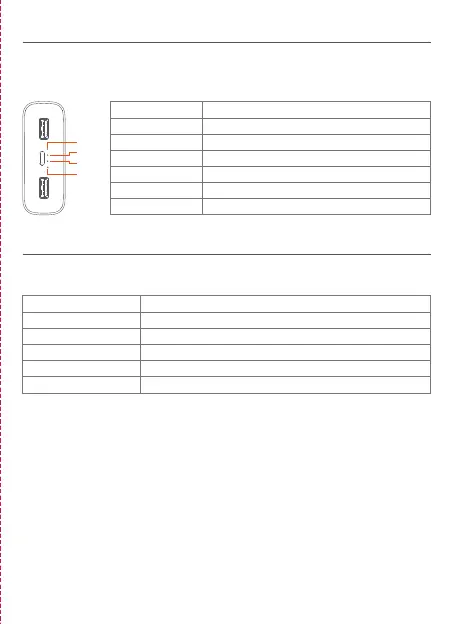
The indicator shows the following discharging conditions:
When charging a laptop with a Type-C port, use a Type-C to Type-C cable to
connect to the Type-C port of this product.
Low-current Discharge: When the power bank is not charging, double press the
battery level check button to enter low-current discharge mode. In this mode, it
can be used for charging small devices such as Bluetooth headsets and smart
bands, and the indicators will be lit on one by one. To exit the low-current
discharge mode, press the battery level check button. The device will
automatically exit this mode after two hours.
Connect the Mi power adapter and cable to the power bank's Type-C port to
charge it.
The indicator shows the following charging conditions:
Charging
LED4
Off
Off
Off
Blinking
On
Blinking
LED3
Off
Off
Blinking
On
On
Blinking
LED2
Off
Blinking
On
On
On
Blinking
LED1
Blinking
On
On
On
On
Blinking
Battery Level
0-25%
25-50%
50-75%
75-99%
Fully Charged
Charging Error
LED4
Off
Off
Off
Off
Blinking
LED3
Off
Off
Off
Blinking
Blinking
LED2
Off
Off
Blinking
Blinking
Blinking
LED1
Off
Blinking
Blinking
Blinking
Blinking
Battery Level
Undervoltage
0-25%
25-50%
50-75%
75-100%
Discharging
LED1
LED2
LED4
LED3





 To Next Page