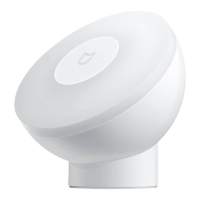
The Mi Motion-Activated Night Light (Bluetooth) is a smart lighting device designed to provide illumination in dark environments, activated by human body motion. It also incorporates sensor functions to detect ambient light status, allowing for integration into a broader smart home ecosystem.
Function Description:
The primary function of the device is to act as a night light, automatically turning on when it detects human body motion in a dark environment and turning off after a period of inactivity. This motion-activated lighting is enabled by default, with an initial setting of 15 seconds of illumination at 2.5 lumens. Users can customize these settings via the Mi Home/Xiaomi Home app, adjusting brightness between 2.5 and 25 lumens and the lighting duration between 15 and 60 seconds.
Beyond its lighting capabilities, the device serves as a motion and ambient light sensor. It can detect human body motion and distinguish between bright and dark ambient light conditions. This sensor data can be logged and accessed through the Mi Home/Xiaomi Home app when the night light is connected to devices supporting a Bluetooth gateway function, such as the Mi Bedside Lamp or Mi Smart LED Ceiling Light. This allows for the creation of smart scenes where the night light interacts with other connected devices based on detected motion or light levels.
Important Technical Specifications:
- Model: MJYD02YL-A
- Rated Voltage: 4.5 V
- Rated Power: 0.35 W
- Operating Temperature: -10°C to 40°C
- Item Dimensions: Ø 80 × 62 mm
- Net Weight: Approximately 121 g
- Luminous Flux: 2.5–25 lm
- Wireless Connectivity: Bluetooth 4.2 BLE
- Operating Frequency: 2402–2480 MHz
- Maximum Output Power: ≤8 dBm
- Compatible with: Android 4.4 & iOS 9.0 or above
- Power Source: Three AA batteries (not rechargeable)
- Detection Area: A 120° area directly at the center in front of the night light, covering 0–6 meters in front and 0–2.5 meters to the sides. The detection effect is influenced by the angle of the light, ambient temperature, body size, and moving speed.
- Mounting: Magnetic base with adhesive sticker, allowing for 360-degree rotation of the light.
Usage Features:
- Installation:
- Battery Installation: The front cover is unscrewed counterclockwise to access the battery compartment. Three AA batteries are installed, ensuring correct polarity.
- App Connection: The device connects to the Mi Home/Xiaomi Home app (referred to as Xiaomi Home app in Europe, except Russia) via Bluetooth. Users scan a QR code or search for the app, then add the device by tapping "+" in the app and following prompts. Bluetooth must be enabled on the phone during connection. If reconnection is needed, the device should be deleted from the app and factory settings restored.
- Mounting: The night light is designed for flat, dry surfaces. The protective film is peeled from the adhesive sticker on the magnetic base, which is then firmly pressed onto the desired surface. The night light then attaches to this magnetic base, allowing for angle adjustment.
- Mounting Height and Angle Recommendations:
- Over 1.9 m above the floor: Light should face downwards for accurate detection.
- Between 0.5–1.5 m above the floor: Light should face straight forward.
- Below 0.5 m above the floor: Light should face upwards.
- The angle should be adjusted based on the user's height and desired usage scenario for optimal results.
- Night Light Functionality:
- Automatic activation in dark environments upon detecting human motion.
- Automatic deactivation after a period of no motion.
- Customizable brightness (2.5–25 lumens) and lighting duration (15–60 seconds) via the app.
- To make settings changes or update firmware via the app, Bluetooth must be enabled on the phone, and the user should move within the night light's induction range or push the Bluetooth switch.
- Sensor Functionality:
- Detects human body motion and ambient light status (bright/dark).
- Can be accessed by devices supporting Bluetooth gateway function (e.g., Mi Bedside Lamp, Mi Smart LED Ceiling Light) to log motion and light status.
- Enables configuration of smart scenes with other devices based on sensor data.
- Restoring Factory Settings: Quickly press the Bluetooth switch three times in either direction within two seconds. The night light will turn on and then off, indicating successful restoration.
Maintenance Features:
- Cleaning: Wipe the surface with a soft cotton cloth. Avoid corrosive solvents.
- Battery Replacement: When brightness is reduced, replace the three AA batteries. Dispose of used batteries according to local rules and regulations to prevent environmental pollution.
- Battery Handling:
- Pay attention to positive (+) and negative (-) poles during installation.
- Non-rechargeable batteries cannot be recharged.
- Do not mix different types of batteries or old and new batteries.
- Remove leaking batteries and dispose of them properly.
- Remove batteries if the night light is not used for a long time or when disposing of the device.
Precautions:
- Do not cover the detection area.
- Avoid installing near heat sources (AC, heating vents, direct sunlight) or humidity sources (humidifiers, water heaters).
- Ensure the device is firmly installed with the magnet to prevent accidental dropping.
- Ensure the Mi logo is upright during installation and use.
- Maintain a separation distance of at least 20 cm between the antenna and the user's body during normal use.
- The light source is not user-replaceable; it should only be replaced by the manufacturer, service agent, or a qualified person.
- For indoor use only.

 Need help?
 General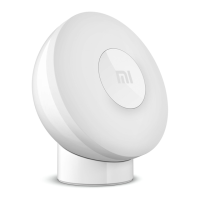

 To Next Page