Scheduled cleanup
You can schedule cleaning times in the app. The vacuum-mop will
automatically start cleaning at the scheduled times, and return to the
charging dock aer the cleaning is completed.
Note: If the DND mode is enabled, the vacuum-mop will not perform the scheduled
cleanups during the do-not-disturb periods.
Virtual walls/restricted areas
You can set up virtual walls and restricted areas in the app to prevent the
vacuum-mop from entering the areas that need not be cleaned.
Note:
• Before using this feature, a map must be saved in the app.
• Moving the vacuum-mop or significantly changing the layout of your home may
invalidate the saved maps and make the virtual walls and restricted areas lost.
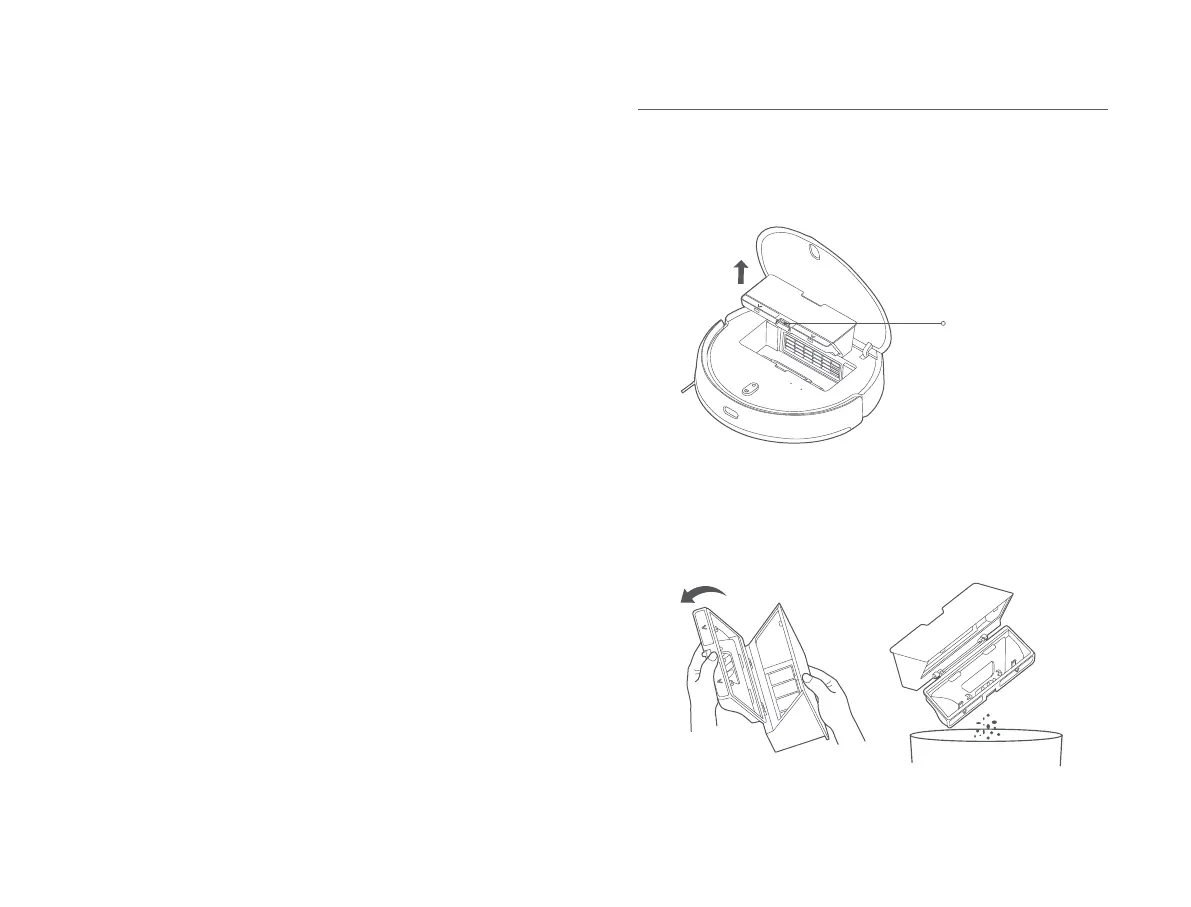
1. Open the cover of the vacuum-mop, and press the dust compartment
release buon to remove the dust compartment.
2. Open the dust compartment cover, and empty out the contents.
Care & Maintenance
Dust Compartment
Dust Compartment
Release Buon
13









 To Next Page