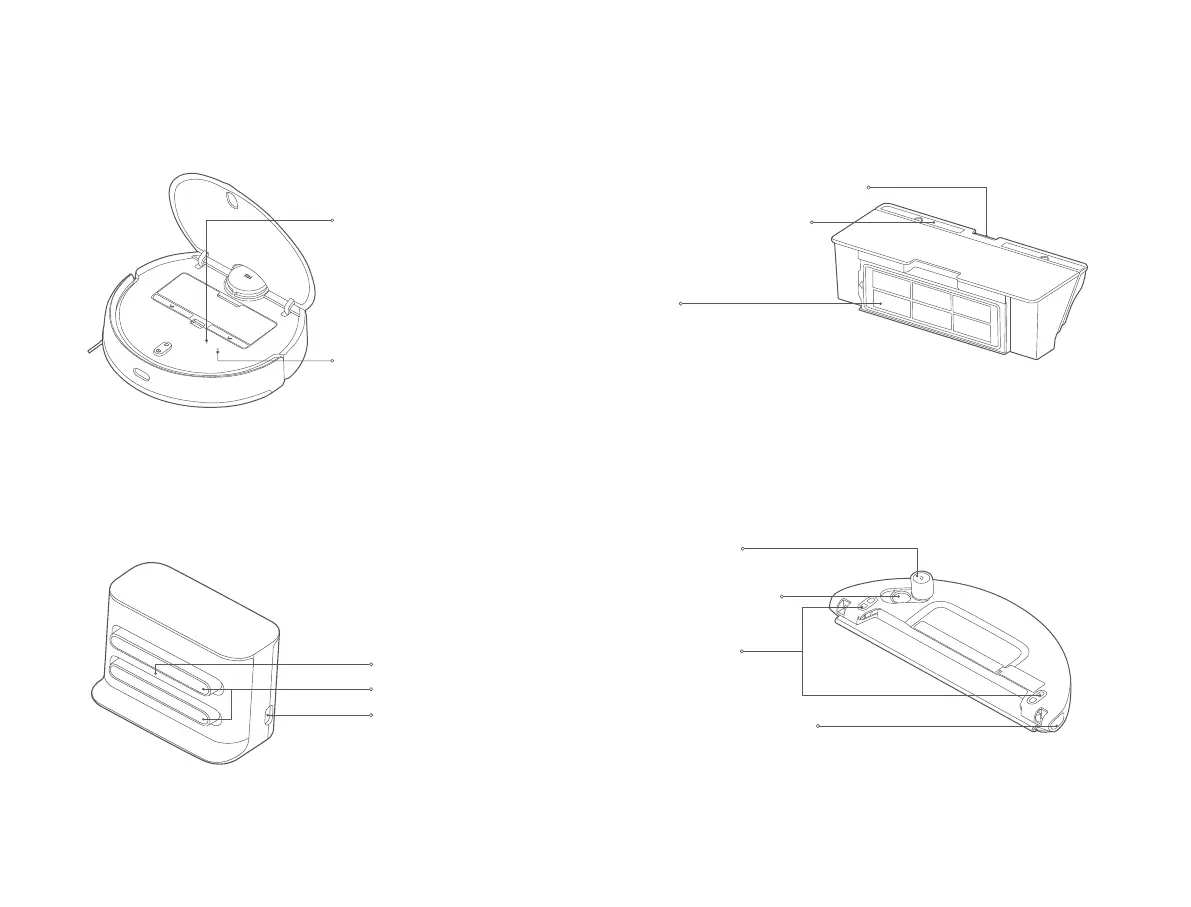
Dust Compartment Release Buon
Dust Compartment Cover
Filter
Water Tank Release Buon
Water Tank Lid
Dust CompartmentVacuum-Mop
Water Tank
(Used for Vacuuming & Mopping Mode)
Charging Dock (Place against a Wall)
Wi-Fi Indicator
Reset Buon
Staying blue for 2 seconds then
goes off: Wi-Fi connected
Blinking blue: Connecting to
Wi-Fi/Updating firmware
Blinking yellow: Awaiting Wi-Fi
connection
Press and hold for 3 seconds to
reset the system.
Press and hold for 10 seconds to
restore the system.
Signaling Area
Note: The water tank may contain a small amount of residual water due to quality
inspection. This is normal.
Note: The dust compartment must be installed for both vacuuming mode and
vacuuming & mopping mode, otherwise the vacuum-mop cannot be turned on.
Power Port
Charging Contacts
Water Filling Opening
Electrode Plate
07









 To Next Page