The Xiaomi Electric Toothbrush T700 is a smart electric toothbrush designed for comprehensive oral hygiene. It features a high-frequency vibration motor to efficiently clean teeth, gums, and tongue. The toothbrush is equipped with a Smart LED Screen for displaying various information and modes.
Function Description:
The primary function of the Xiaomi Electric Toothbrush T700 is to provide effective teeth cleaning. It offers multiple brushing modes to cater to different user needs:
- Standard Mode: Suitable for daily oral hygiene.
- Gentle Mode: Designed for sensitive teeth.
- Custom Mode: A two-minute advanced mode by default, which can be further configured via the Mi Home/Xiaomi Home app. This mode allows for customization of brushing duration, splash prevention (for ten seconds), and includes beginner, sensitive, advanced, and additional features.
The toothbrush incorporates an overpressure protection system that detects excessive pressure during brushing. When too much pressure is applied, the overpressure notification indicator on the back of the handle blinks red quickly, and the toothbrush vibrates alternately in different amplitudes to alert the user.
Important Technical Specifications:
- Model: MES604
- Rated Voltage: 3.7 V⎓
- Rated Power: 4.2 W
- Rated Input: 5 V ⎓ 1 A
- Charging Time: Approximately 6 hours for a full charge.
- IP Rating: IPX7 (indicating it is protected against immersion in water up to 1 meter for 30 minutes).
- Wireless Connectivity: Bluetooth 5.0 2.4 GHz
- Operation Frequency: 2402–2480 MHz
- Maximum Output Power: <4 dBm
- Battery: Built-in rechargeable battery that is non-replaceable.
Power Adapter Specifications (Model Identifier: A520-050100U-EU1):
- Input Voltage: 100–240 V~
- Input AC Frequency: 60/50 Hz
- Output Voltage: 5.0 V⎓
- Output Current: 1.0 A
- Output Power: 5.0 W
- Average Active Efficiency: 73.62%
- Efficiency at Low Load (10%): 64.59%
- No-load Power Consumption: 0.075 W
Usage Features:
- On/Off and Mode/Power Buttons: A dedicated On/Off button turns the toothbrush on and off. A separate Mode/Power button allows users to change brushing modes when the toothbrush is on. Pressing and holding this button enables stepless power adjustment for the current mode.
- Brushing Timer: The toothbrush pauses briefly every 30 seconds to prompt the user to change brushing positions, ensuring even cleaning. It automatically turns off once the brushing mode ends, with the duration configurable via the app.
- Smart LED Screen: Displays the current brushing mode (Standard, Gentle, Custom), power indicator, Bluetooth connection status, and brushing score.
- Bluetooth Connectivity: The toothbrush connects to the Mi Home/Xiaomi Home app, allowing users to control the device, configure custom modes, set brushing duration, and access additional features.
- Screen-on Notifications: When picked up, the screen automatically lights up to display the current brushing mode. If a nickname or anniversary date is set in the app, it will display these notifications on the specified date.
- Factory Settings Restoration: Users can restore the toothbrush to factory settings by pressing and holding both the on/off and mode/power buttons simultaneously for five seconds until the LED screen turns white.
- Charging: The toothbrush uses a dedicated charging dock (T700 specific). Battery level indicators on the screen show the charging status, from quickly blinking (<25% or depleted) to fully lighted (100% charged).
Maintenance Features:
- Toothbrush Head Installation: The toothbrush head should be installed in the same direction as the handle, leaving a slight gap (0.4-1.0mm) to prevent collision during high-frequency vibration.
- Toothbrush Head Replacement: It is recommended to replace the toothbrush head every three months for optimal hygiene and performance.
- Cleaning the Toothbrush Body: The body should be cleaned with a dampened soft cloth at least once a week. Any toothpaste residue should be immediately washed off under a gentle stream of room temperature water, then dried with a soft cloth.
- Cleaning the Toothbrush Head: After each brushing session, the toothbrush head should be rinsed under running water. A protective cover should be placed on the head after rinsing to keep it clean and hygienic.
- Charging Dock Care: Do not immerse the charging dock in water or any other liquid. Do not plug it into an outlet with liquid on the plug. Avoid using the charging dock outdoors in direct sunlight or placing metal objects on it while it's plugged in.
- Battery Disposal: At the end of its service life, the built-in battery should be removed and disposed of or recycled according to local laws and regulations. If the battery cannot be removed by the user, the toothbrush should be taken to an official designated recycling center. The toothbrush must be turned off and the battery fully depleted before removal.

 Need help?
 General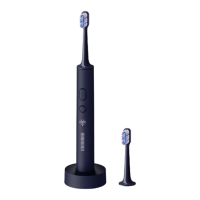

 To Next Page
