10
CAUTIONS:
Do not add hot water into the clean water tank or the dirty water tank as
this may cause their deformation.
Please set virtual walls or restricted areas to exclude carpeted areas for
mopping tasks.
If the floor is overly wet, clean the excessive water first before using the
vacuuming or mopping function.
Remove the dirty water tank and the washboard aer a mopping task
has been completed. Clean the dirty water tank, the washboard, and the
washboard base in time to prevent odor and mildew.
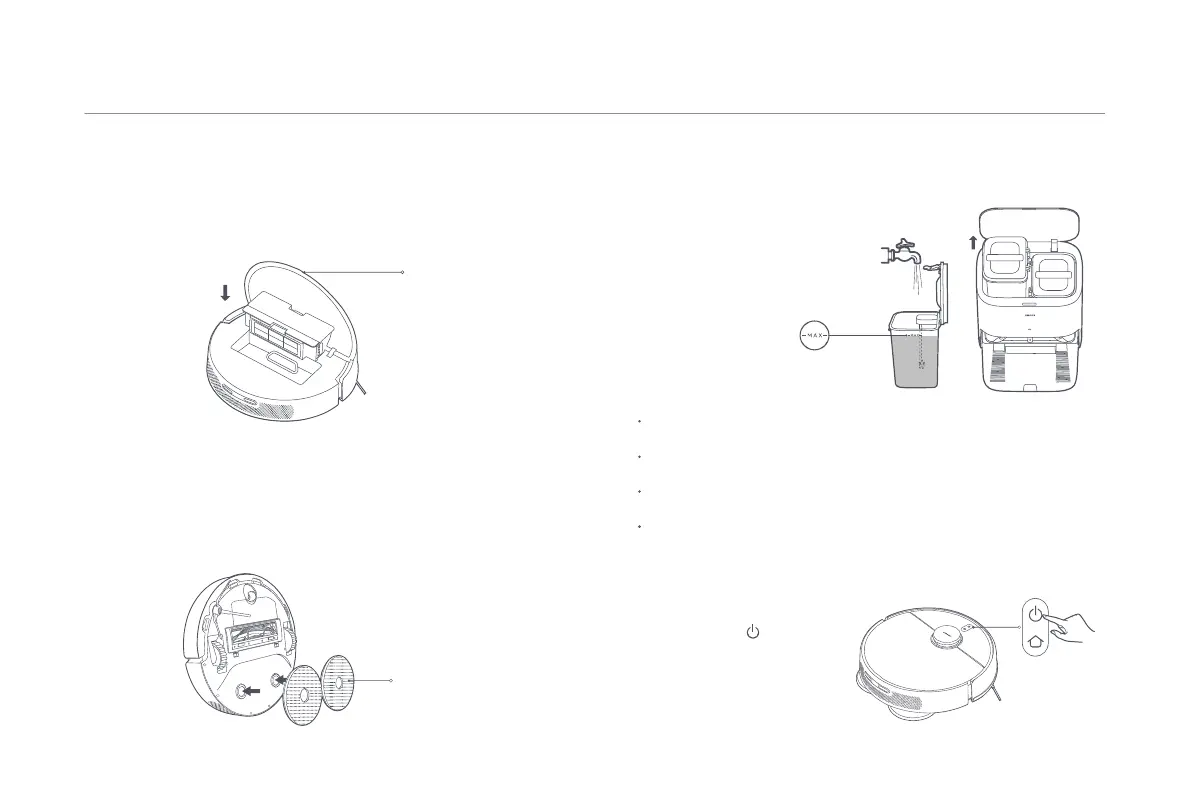
Maximum Water Level Mark
Water Tank Capacity: 4000 mL
2. Fill the clean water tank with clean water up to the maximum water level
mark. Do not add any cleaning agent or disinfectant to the water tank.
CAUTION: Adding cleaning agents or
disinfectants may affect product
functions and damage the machine.
How to Use
Note: Clean the dust compartment regularly to avoid a reduction in vacuuming
performance.
Installing Accessories for Desired Mode
Vacuuming mode (installation of dust compartment is required):
Open from Here
Vacuuming & mopping mode (installation of dust compartment, mop
assembly, clean water tank, and dirty water tank are required):
Press the buon to start
vacuuming and mopping.
Starting the Robot Vacuum
Mop Assembly
The dust compartment needs to be installed under all cleaning modes.
Otherwise, the robot vacuum cannot start. Open the cover and install the
dust compartment into the robot vacuum, and make sure the clips are
firmly aached.
1. Install the mop assembly to the buckling position as illustrated. It is
installed in place when you hear a "click".




 To Next Page