Care & Maintenance
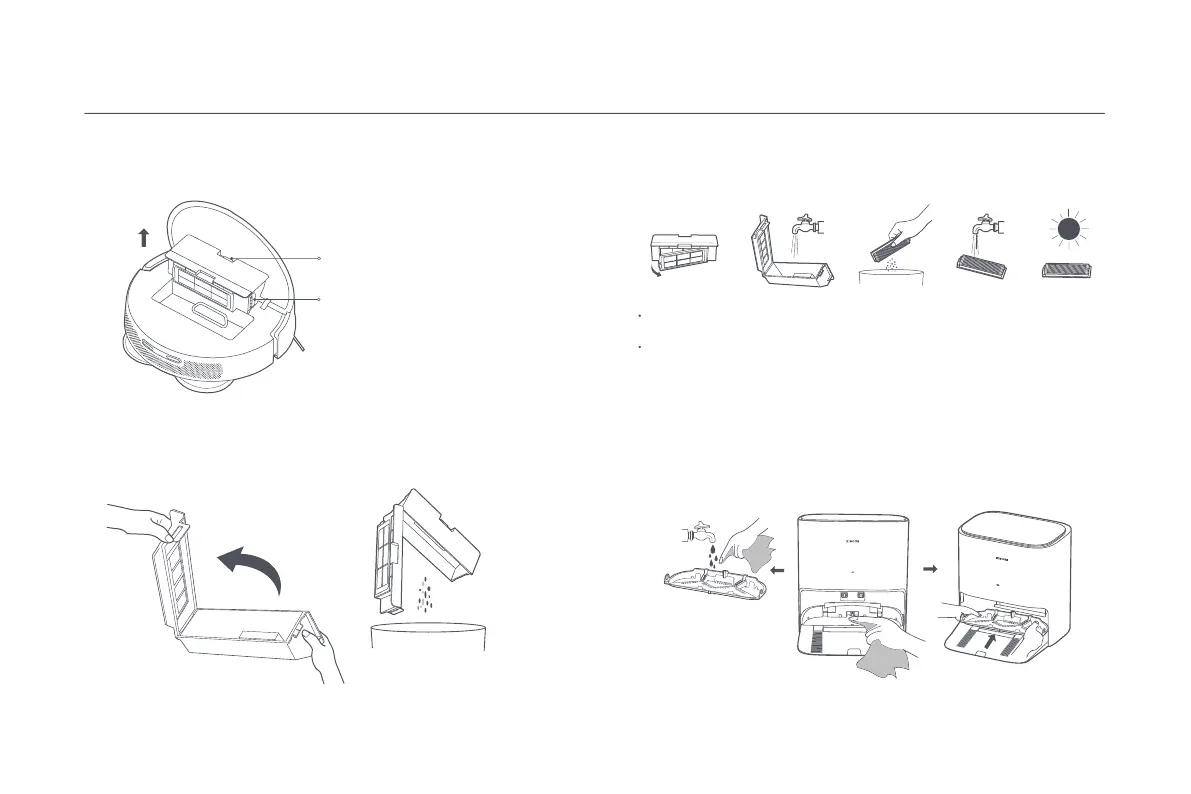
2. Open the dust compartment cover as illustrated and empty the trash.
Dust Compartment
Washboard/Washboard Base
Each time aer the mop pad cleaning is complete, li the handle to remove
the washboard. Clean the washboard and washboard base, and then
reinstall the washboard.
Dust Compartment Clip
13
3. Take out the filter, remove the dirt from the dust compartment, and
clean the filter. Then wash the dust compartment and the filter with
water, dry and put them back.
Dust Compartment Release Buon
1. Open the cover of the robot vacuum, and press the dust compartment
release buon to remove the dust compartment from the robot vacuum.
Notes:
It is recommended to clean the dust compartment thoroughly at least once a week. The
dust compartment must be fully dry before use.
The filter can be rinsed with water. The frequency of every two weeks is recommended,
however, frequent rinses are not suggested. Make sure it is completely dry before
reinstalling.
Washboard
Note: The functions of robot vacuums are tested before leaving the factory, so there
may be some water residues in the robot vacuum. This is normal.




 To Next Page