EasyManua.ls Logo

Xirgo XT6350 - Device Operation and Installation; LED Indicators and Current Consumption; Device Mounting Guidelines

Xirgo XT6350
31 pages
Print Icon
To Next Page IconTo Next Page
To Previous Page IconTo Previous Page
Loading...
8
Sales Engineering
support@xirgotech.com
21
White
60 in.
20
OWB2
22
Purple
60 in.
20
Ext. ADC
23
Black
7 in.
20
Spare GND
Panic GND
2
24
Blue/Green
7 in.
20
Spare GND
2
LED Definition
Current Consumption
OPERATING MODE
CURRENT CONSUMPTION
Deep Sleep (non-functional mode)
3 mA
Standby
10 mA
Active Receive
65 mA
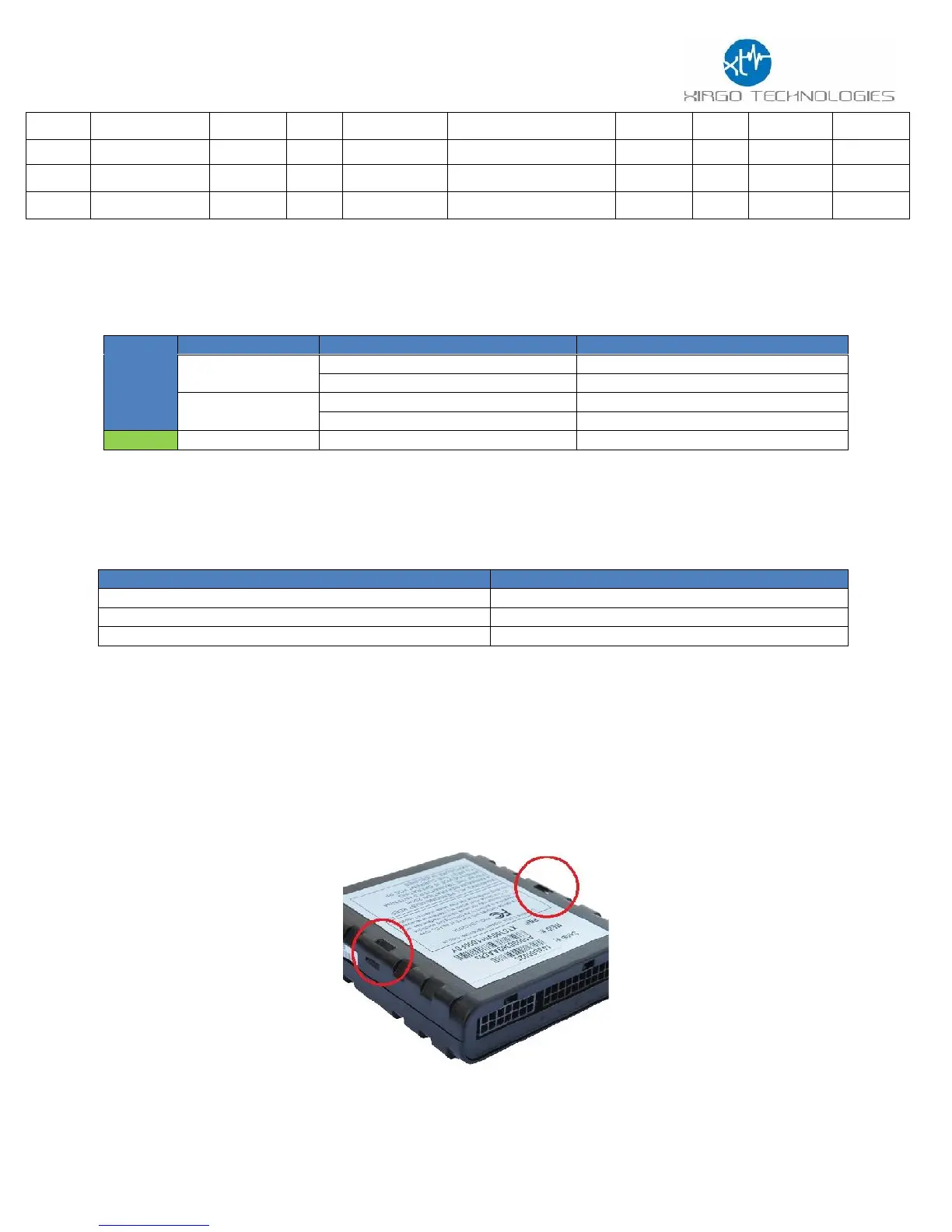
Device Mounting:
The XT6350 device must be securely installed. The accelerometer will not calibrate if unit is loose
when vehicle is in motion. When mounting the device, use a tie strap to secure the device as noted
below.
BASE
UNIT
LED
Description
Status
Cellular (Amber)
Searching for Cellular Network
LED OFF
Cellular Carrier Lock
Solid
GPS (Green)
Searching for satellite
Solid
GPS Lock
Blinking
Optional
Bluetooth (Blue)
TBD
TBD