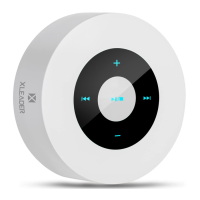
The XLEADER Touch Wireless Speaker A8 is a compact and elegantly designed audio device featuring Smart Touch Screen technology. Its design is reminiscent of an Echo Dot, offering intuitive control through gentle fingertip touches for various functions such as changing songs, adjusting volume, and managing phone calls. The ultra-compact form factor ensures portability, easily fitting into a pocket, purse, or backpack. A convenient feature is the ability for compatible phones to display the speaker's battery life. The speaker boasts quick connectivity, automatically reconnecting to a paired device within 3 seconds. To conserve power, it includes an automatic shutdown function that activates if Bluetooth is disconnected for 10 minutes.
Technical Specifications:
- Pairing Name: XLeader A8
- Battery Capacity: 1200mAh
- Charging Input: 5V / 0.5A
- Charging Time: 3-4 hours
- Operating Range: 10m / 33ft
- Supported Profiles: A2DP, AVRCP
- Output Power: 4Ω 5W Φ40MM
- Frequency Response: 40Hz-18KHz
- Signal Noise Ratio: ≥95dB
- Distortion Degree: ≤1%
- Unit Weight: 180g
- Unit Size: Φ85 x H30mm
- Certifications: CE, RoHS, FCC, Giteki
Included in the Box:
- XLEADER SoundAngel A8 speaker
- USB Charging Cable
- 3.5mm Audio Cable
- User Manual
- Carry EVA Case
- Feedback Card
- Warranty Card
Usage Features:
Controls:
The speaker features touch controls on its top surface and physical buttons/ports on its side.
- Volume Down (Touch): Decreases playback volume.
- Previous Song (Touch): Skips to the previous track.
- Play/Pause/Answer Calls/Disconnect Bluetooth (Touch): Multifunctional button for playback control and call management.
- Next Song (Touch): Skips to the next track.
- Volume Up (Touch): Increases playback volume.
- Turn On/Off: Press and hold for 3 seconds.
- Switching Modes: Press once to cycle through Bluetooth Mode, Music Mode (Micro SD Card), and Aux Mode (Audio line-in). If no Micro SD card or audio cable is connected, the speaker defaults to Bluetooth Mode.
- Short Press: Play/Pause music, Answer call, or Hang up call.
- Long Press: Disconnect Bluetooth.
- Double Tap Quickly: Redial the last call.
Indicator Light:
The LED indicator provides status information with three colors and two flashing modes:
- Colors:
- Red: Battery is charging (turns off when fully charged).
- Blue: Speaker is on and ready to play.
- Pink: Speaker is on and playing while simultaneously charging.
- Flashing Modes:
- Flashing Fast: Unit is in pairing mode (stops when paired).
- Flashing Slow: Speaker is playing music.
Blue Backlight:
The touchscreen features a blue backlight that automatically turns off after 45 seconds of inactivity to save power.
Pairing with Devices:
Upon powering on, the speaker automatically enters Bluetooth mode.
- On your device, search for "XLeader A8" in the Bluetooth settings.
- For devices with Bluetooth versions under 3.0, confirm pairing by pressing "Yes."
- If prompted, enter the password or PIN code "0000" (four zeros), then press "Yes" or "OK" to complete pairing.
Specific Device Pairing Instructions:
- Phone/Tablet: Turn on speaker -> Open Phone/Tablet Settings -> Bluetooth -> On -> Search/Scan -> Select "XLeader A8" -> Paired/Connected -> Play music.
- Computer/Laptop: Turn on speaker -> Open Laptop Settings -> Devices -> Bluetooth & other devices -> Turn on Bluetooth -> Add Bluetooth or other devices -> Bluetooth -> Search device -> Select "XLeader A8" -> Paired/Connected -> Play music. (Note: If the computer lacks Bluetooth, a Bluetooth adapter and driver are required.)
- MacBook: Turn on speaker -> Open Mac Book System Preferences -> Bluetooth -> Turn Bluetooth on -> Search device -> Select "XLeader A8" -> Paired/Connected -> Play music.
- Echo Dot: Turn on speaker -> Open Alexa APP -> Settings -> Set up a new device -> Bluetooth -> Pair a new device -> Search device -> Select "XLeader A8" -> Paired/Connected -> Play music.
- Kindle: Turn on speaker -> Open Kindle Settings -> Wireless -> Bluetooth -> Enable Bluetooth (ON) -> Search for Device -> Select "XLeader A8" -> Paired/Connected -> Play music.
Microphone / Call Features:
The speaker has a built-in microphone located under the Aux jack.
- When connected via Bluetooth, press the "Pause" button to answer a phone call.
- To redial the last call, quickly double-tap the "Pause" button.
- For higher call quality, speak near the microphone.
Micro SD Card (Memory Card) Usage:
- Inserting a Micro SD Card automatically switches the speaker to Music Mode and begins playback.
- Supports Micro SD Cards up to 32 gigabytes.
- Supported music formats: MP3, WMA, WAV.
- Notice: Ensure the Micro SD card contains only music files. Other file types may cause the speaker to crash. If this occurs, hold the power button to turn off the unit, remove extraneous files, and then power on again.
Aux/Line-in Usage:
Insert a 3.5mm audio plug into the speaker's Aux jack and connect the other end to your device.
- Notice: In Line-in Mode, the speaker cannot switch between previous/next songs or control the device's app.
Maintenance Features / Troubleshooting (FAQ):
How to charge the speaker?
Use your phone charger or a USB port on your computer/laptop.
What if the unit doesn't charge and the LED is off?
Check your USB and cable connections to ensure they are working properly.
Why won't the unit connect/pair?
- Ensure your device's Bluetooth is enabled.
- Make sure your device is within 3 feet/one meter of the speaker.
- Delete any existing pairing records on your device and reset the speaker.
Why is there a delay or corrupted audio?
In rare cases, an outdated Bluetooth version on your phone or poor app compatibility with Bluetooth can cause playback issues. An update file may be available to resolve this.
How can I reset the speaker?
A reset button is located inside the Aux jack. Carefully insert a pin or toothpick into the jack and briefly press the button.
Additional Tips:
- Leaderway Technology emphasizes R&D and consumer feedback in its product design. The touch screen technology and seamless button integration are a result of this approach.
- The speaker's design, with the speaker located underneath, balances sound through high-fidelity speakers and a compact subwoofer. Sound is engineered for clarity and volume, enhanced by reflection off the surface it rests on.
- While many small speakers prioritize treble and clarity with limited bass, this speaker aims for a balanced sound profile. For dual stereo speakers, it offers significant bass combined with stereo sound.
- Consumers frequently praise the speaker for its clear and loud sound, superior overall sound quality, long battery life, and the convenience of its touch screen technology.
- As a manufacturer, XLEADER actively incorporates consumer feedback to continuously improve its products.
FCC Compliance:
This device complies with Part 15 of the FCC Rules.
- Operation is subject to two conditions: (1) This device may not cause harmful interference, and (2) this device must accept any interference received, including interference that may cause undesired operation.
- Any changes or modifications not expressly approved by the party responsible for compliance could void the user's authority to operate the equipment.
- The equipment has been tested and found to comply with Class B digital device limits, designed to provide reasonable protection against harmful interference in a residential installation.
- If the equipment causes harmful interference to radio or television reception, users are encouraged to try to correct the interference by:
- Reorienting or relocating the receiving antenna.
- Increasing the separation between the equipment and receiver.
- Connecting the equipment to an outlet on a different circuit from the receiver.
- Consulting the dealer or an experienced radio/TV technician for help.
- The device has been evaluated to meet general RF exposure requirements and can be used in portable exposure conditions without restriction.
Warranty:
XLEADER offers a 3-Year warranty for quality-related issues and lifetime technical support. For customer service, contact them directly via email as Amazon separates order IDs and product reviews.
- General Support: support@sz-leaderway.com
- US Support: xleaderusa@sz-leaderway.com
- EU Support: xleader@sz-leaderway.com
- JP Support: xleaderjp@sz-leaderway.com
Unauthorized reselling of XLEADER products is prohibited.

 Need help?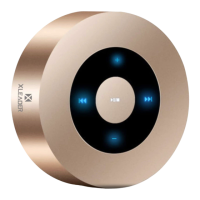

 To Next Page
 General